1
Curtain Automation – Open and Close the Curtains Based on the Ambient Light
Writing our code
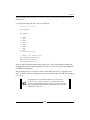
Let's take the light sensor code we wrote and expand it to start controlling the
motor shield.
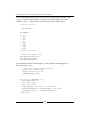
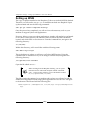
Start up Geany and create a new file called CurtainControl.cpp. Add the following
code into this file:
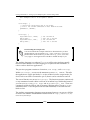
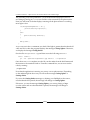
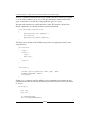
//Include ArduPi library
#include "arduPi.h"
//Needed for Serial communication
SerialPi Serial;
//Needed for accesing GPIO (pinMode, digitalWrite, digitalRead, I2C
functions)
WirePi Wire;
#define TH 690
#define DIRECTION 5
#define PWMPIN 3
Here we have our standard template headers, as well as the threshold we defined
in LightSensor.cpp. After this, we have added two new constants DIRECTION
and PWMPIN.
The constant DIRECTION stores the pin on the motor shield that is used to define
which way the motor is running, that is, clockwise or counterclockwise.
We use the PWMPIN constant to store the pin number of the pin on which we create
a square wave (PWM) on. Now add the following code:
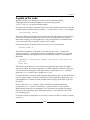
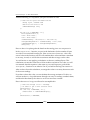
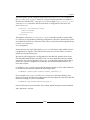
pthread_t pwmthread;
pthread_mutex_t pwmmutex = PTHREAD_MUTEX_INITIALIZER;
These declarations are used for the thread that we will generate when we create
PWM on pin 3. The thread is stored under the variable name pwmthread. Next we
add in two Boolean variables that act as flags:
boolean off_on;
boolean open_state;
[ 120 ]