1
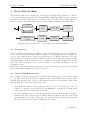
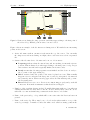
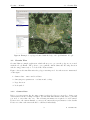
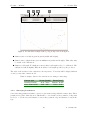
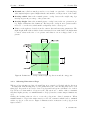
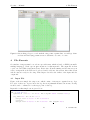
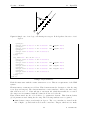
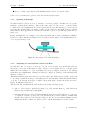
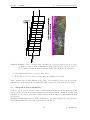
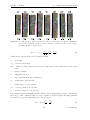
Geoniss — Manual 2.3 Flight Operations Figure 3: Nesis screen during shooting operation. Aircraft is approaching to the first point of the selected leg. Marked point is active, but not locked. Figure 3 shows an example of the Geoniss screen during action. We marked some interesting points on the screen. 1. Active file name without extension is shown in the top left corner. You can make shootings at several areas during one flight, where each area is stored in a separated file. 2. Status of the Geoniss device. Geoniss can be in one of four states. Preparing indicates that Geoniss is busy and is searching for internal reference position. This is always done when approaching to the first point of a leg. Preparation takes some time and is typically finished in 15-20 seconds. Ready means that Geoniss preparation was finished and the device is ready to shoot points on the approaching leg. Idle is activated after the points of the active leg has lost focus. This normally happens a few seconds after the last point of active leg was passed. Geoniss sets into neutral position. When a new leg approaches, Geoniss wakes up and goes into the Preparing state. Error indicates a severe error. Device is not functioning properly and you should contact us. In normal circumstances, this should never happen. 3. Number of shoots taken (picture index). Normally this starts with zero, but when an existing internal file is loaded where some shoots were already made, these shoots are taken into account and numbering continues from the last recorded value. 4. Name of the previous leg – a leg, which will become active after the Previous button is pressed. 5. Name of the active leg. There may be two colored circles with a number on top of the active leg rectangle. A number besides the white circle tells how many points in the 5 © Kanardia 2013