1
aspMENU.net User Manual
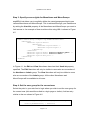
private void ASPMenu2_Click(object sender, WebActive.ASPMenu.ASPMenuEventArgs e)
{
TextBox1.Text = e.ClickedItemCaption;
}
Figure 4.3
Step 4: Run the web application
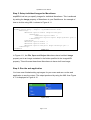
You have now finished setting up server side events for your menu and can run
the web application to see them in action. The output produced by using the XML
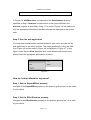
from Figure 4.1 and the code in Figure 4.3 is displayed in Figure 4.4. In this
Figure the View MenuItem has been clicked on.
Figure 4.4
How do I setup permissions?
Step 1: Set the EnableAccessControlList property
Navigate to the EnableAccessControlList property in the property grid and set it
to True.
Step 2: Set the SessionName property
Navigate to the SessionName property in the property grid and set it to a value
of your choice. This property specifies the session variable name that holds the
current user’s group.
Page 5 of 11