1
aspMENU.net User Manual
Step 3: Run the web application
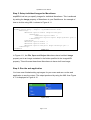
You have now finished setting up effects for your menu and can run the web
application to see them in action. An example of this is shown in Figure 4.8. In
this example the Pixelate effect has been chosen.
Figure 4.8
How do I setup scrolling on my menu?
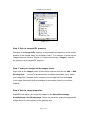
Step 1: Set the Scrollable property
Navigate to the Scrollable property in the property grid and set it to True.
Step 2: Set the VisibleHeight property
Navigate to the VisibleHeight property in the property grid and set it to a value of
your choice.
Step 3: Run the web application
You have now finished setting up scrolling for your menu and can run the web
application to see the output. An example of this is shown in Figure 4.9. In this
example VisibleHeight has been set to 50.
Page 8 of 11