1
aspMENU.net User Manual
Figure 4.9
How do I make use of images in my menu?
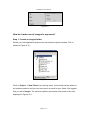
Step 1: Create an images folder
Select your web application project from the solution explorer window. This is
shown in Figure 4.10.
Figure 4.10
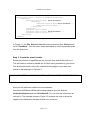
Click on Project g New Folder from the top menu. A new folder will be added to
the solution explorer and you can now type in a name for your folder. We suggest
that you call it images. The solution explorer should now look similar to the one
displayed in Figure 4.11.
Page 9 of 11