1
Setup Enclosure
1.
Place the RocketStor 6314A on a
level surface and remove each
disk tray.
2.
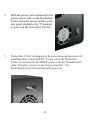
Carefully insert the 3.5” or 2.5” disk into each disk tray and secure
them with the provided mounting screws.
For 3.5” disk: Use the 3.5” screws (black color) to mount the disk to
each side of the disk tray.
6