1
2. Connectors and System Indicators
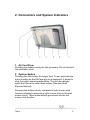
1. Air Vent Flow
Provides secondary cooling for the processor. Do not obstruct
the ventilation slots.
2. System Switch
Pressing this little button for longer then 1,5 sec executes the
same function as the ESCape key on a keyboard. It allows to
stop the switch scanning algorithms. This will also display
again the title bar in case it was hidden (See also Mind
Express Manual).
Pressing this button shortly activates the right mouse click
function allowing to generate a right mouse click on the next
screen touch. Tellus automatically goes back into the left
mouse click function.
Tellus
5