1
VS16 Module
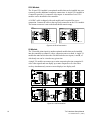
The 16-port VS16 module is an optional module that can be installed into your
system to provide additional composite connections. A single VS16 module in
a controller provides 16 composite video inputs. A maximum of two VS16
modules can be installed in one controller.
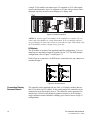
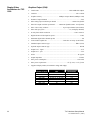
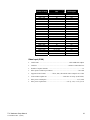
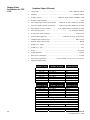
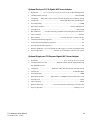
A 16 BNC cable is shipped with each module and is required for source
connection. Connect the cable to the top D-sub connector on the VS16 module.
The bottom connector is not needed and should remain empty.
VS16
Module #1
Not Used
#1
#2
#3
#4
#5
#6
#7
#8
#9
#10
#11
#12
#13
#14
#15
#16
Module #2
#1
Note: n/a for 20 heads and up.
Note: n/a for 20 adn 24 heads
Not Used
16 Composite Video Inputs
#17
#18
#19
#20
#21
#22
#23
#24
#25
#26
#27
#28
#29
#30
#31
#32
16 Composite Video Inputs
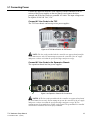
Figure 3-10 VS16 Connections
V9 Module
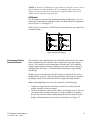
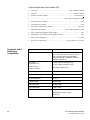
The V9 module (nine-input) is another optional module that can be installed
into the controller to connect S-video, composite sources or both. A single V9
module has nine built-in decoders. Each decoder has two inputs, A and B, of
which only one can be viewed at any given time.
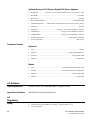
A single V9 module can connect up to nine composite plus nine composite/Svideo video signals and can display up to nine composite or S-video video
overlays simultaneously on one or more displays in a display wall.
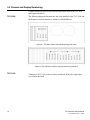
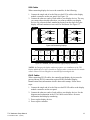
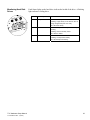
Figure 3-11 V9 Connections
16
TVC Hardware Setup Manual
013-100380-03 Rev. 1 (03/07)