1
Chapter 9: Maintenance and Troubleshooting
Introduction
Even though the ViewMarq requires virtually no maintenance, there are a few steps you can
1
take to insure the longevity of your product and to maintain the warranty, safety and
environmental ratings.
2
• To maintain the NEMA ratings the cable entry points in the back cover must be properly sealed.
The ViewMarq is provided with cable glands to seal all of these points whether a cable is used or
not. The provided covers must be properly installed as well.
3
• To provide for proper heat dissipation, keep the ViewMarq clear of all dust and debris.
• Regularly inspect ViewMarq mounting brackets and the mounting surfaces.
4
• To maintain viewing distances and clarity, clean the lens with a damp cloth as needed.
5
NOTE: To maintain UL508 rating, Flexible Conduit must be used for all conductors entering the message
display.
6
7 Updating Firmware
Occasionally new firmware will be released to enhance your ViewMarq. The firmware may
be downloaded from automationdirect.com/downloads and updated using the ViewMarq
8
software.
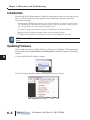
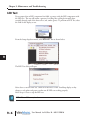
1) Select the Link for the display to update.
9
10
11
12
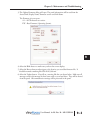
2) From the Setup dropdown menu, select Update Firmware as shown.
13
14
A
B
C
D
9–2
User Manual, 1st Ed. Rev. B – MD-USER-M