1
Chapter 9: Maintenance and Troubleshooting
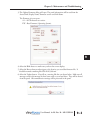
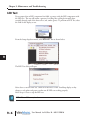
3) The Update Firmware dialog will open. The panel information will be read from the
slected Link; Display Name, Firmware version and Link Name.
The Firmware is in two parts:
A1 – ASCII character set version
FW – Base Firmware (Operating System).
4) Select the Blink button to make sure you have the correct display.
5) Select the Browse button and navigate to the location you saved the firmware file. It
should be named something like VM-A1015300.vmf .
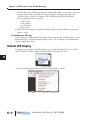
6) Select the Update button. You will see a warning like the one shown below. Make sure all
messages saved in the message list have been saved on your hard drive. They will be cleared
from the panel. All communication settings will be preserved in the panel.
User Manual, 1st Ed. Rev. B – MD-USER-M
9–3
1
2
3
4
5
6
7
8
9
10
11
12
13
14
A
B
C
D