1
Chapter 9: Maintenance and Troubleshooting
1
2
3
4
5
6
7
8
9
10
11
12
13
14
A
B
C
D
LED Test
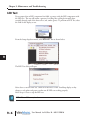
If you suspect that an LED component has failed, you may verify the LED components with
the LED test. The test will initiate a pattern of scrolling lines cycling horizontally then
vertically through each of the three colors (red, amber, green). To perform an LED Test, select
the Link for the display to test.
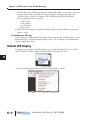
From the Setup dropdown menu, select Run LED Test as shown below.
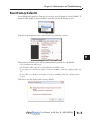
The LED Test dialog will open
Select Start to run the LED test. Check all of the LEDs on the ViewMarq display as they
change to red, amber and green to make sure all LEDs are working properly.
Select Stop or Close to stop the LED test.
NOTE: LEDs are NOT user replaceable.
9–6
User Manual, 1st Ed. Rev. B – MD-USER-M