1
Chapter 9: Maintenance and Troubleshooting
1
2
3
4
5
6
7
8
9
10
11
12
13
14
A
B
C
D
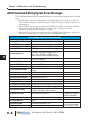
ASCII Command String Syntax Error Messages
The ViewMarq checks the ASCII command String for errors and reports these error in several
ways.
1) If ASCII Reply is enabled in the Display, then the Display will respond on the port on which the
ASCII command String was received. This may be read by PLC’s that are capable of asynchronous
communications.
2) The ASCII Reply text may also be read from the ASCII Response Buffer over Modbus or Modbus
TCP started at register 415000. The buffer is 512 bytes long. See Chapter 7 for more
information on reading the ASCII Reply over Modbus.
3) If the Syntax Error Check option is enabled in the ViewMarq Display Configuration, syntax errors
will scroll across the display. See Chapter 6 for more on enabling this feature.
ASCII Command String Syntax Error Messages
Error Message
Description
E1: Invalid SETS format
Missing string number or out of range
E2: Invalid SETV format
Missing variable number or out of range
E3: Invalid Pause Time
Pause time must between 0 and 1000 Seconds
E5: Invalid SETS Value
SETS String too long, maximum is 100 characters
E6: Display Memory Full
Use the CLR command to prevent memory from
becoming full. There can be a maximum of 31 <T>,
<DEC>, <STR>, <PORTPAR>, <IPADDR>, <VER>,
<NAME> commands total in the displayed message.
E7: Text Memory Full
Maximum text characters that can be displayed is 1500.
Use the <CLR> command
E8: Invalid STR/DEC Format
Syntax error in STR or DEC command
E9: Invalid PORTPAR Format
Syntax error in PORTPAR command
E10: Parameter Out of Range
E12: Download Error
CS parameter out of range
A DO command is calling a string with an embedded DO
command
Error Downloading strings (Future)
E13: Invalid STR String Number
String number must be 1-16
E14: Invalid DEC String Number
Variable number must be 1-32
E16: Invalid DEC Size
Maximum length is 11 characters
E17: Invalid STR Size
Maximum length is 100 characters
E11: DO command not allowed
Notes
E18: Invalid Message Number in DO Invalid Message Number, Message does not exist (Future)
E19: Invalid Message Number in DS Invalid Message Number, Message does not exist (Future)
E20: Status Buffer is Empty
Status buffer in empty probably because STATUS
command is used before any other command
E21: Syntax error at pos #
General Syntax error at position #
E22: Syntax error in DO at pos #
E24: Invalid ID Format
General Syntax error in DO at position # (Future)
Error in MSG # %d - Error is displayed on ViewMarq
(Future)
ID number must be between 0 - 247
E25: Missing <ID #>
ID command contains no ID number
E23: Error in MSG # %d:
9–8
Syntax errors could be caused
by sending ASCII strings too
fast with no handshaking.
These are not displayed
errors. They will be stored in
the Status register (411500)
User Manual, 1st Ed. Rev. B – MD-USER-M