1
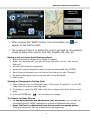
Handsfree Bluetooth Operation After pressing the “BACK” button, the conversation icon appear on the bottom right. will The purpose of this is to enable the user to go back to conversation screen to adjust the volume, end call, transfer call, dial, etc. During a call, you have the following options: Adjust the speaker volume from lowest to highest Mute / Un-mute the call (you can still hear the caller, but he / she cannot hear you) View the call duration (automatic) Access the number keypad to make choices on automated calls (DTMF) Switch the call between your cell phone from the mirror unit (Transfer) Go back to Navigation screen and still able to use Bluetooth End the call Viewing or Changing the Pairing Code 1. Press ‘Setting’ from the Bluetooth menu. Then press ‘Properties”. In the ‘PIN Code’ field is the current pairing code. 2. To change it, press the ‘PIN Code’ field then a keypad will show. Enter a new code. 3. Press the ENTER key to complete your change. To Connect to Other Phones To see which phones are paired with your mirror unit, you will see the connected phone’s ‘NAME’ appeared on the top of Bluetooth Main Menu. Press ‘DisConn’ to disconnect from the currently connected phone. Then go through the ‘Pairing’ process from the beginning. 33