1
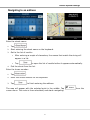
Device System Settings Navigating to an address In the Navigation menu, tap . By default, MN312R proposes the country/state and settlement where you are. If needed, tap the button with the name of the country/state, and select a different one from the list. If needed, change the settlement: To select the settlement from the list of recently used ones, tap the button. To enter a new settlement: 1. Tap the button with the name of the settlement, or if you have changed the country/state, tap . 2. Start entering the settlement name on the keyboard. 3. Get to the list of search results: 4. After entering a couple of characters, the names that match the string appear in a list. Tap automatically. to open the list of results before it appears Pick the settlement from the list. 17