1
Contents
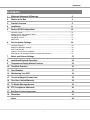
Contents
1.
Welcome Statement & Warnings
2
2.
What’s in the Box
4
3.
Product Overview
6
4.
Installation
11
5.
Rydeen GPS Configurations
15
Operating modes .......................................................................................................................15
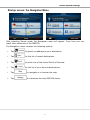
Startup screen: The Navigation Menu........................................................................................16
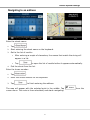
Navigating to an address .............................................................................................................17
Navigating to a POI ......................................................................................................................19
Map screen ...................................................................................................................................21
6.
Device System Settings
22
Language Settings ……………………………………………………………………………………..23
Brightness (Backlight) Settings ……………………………………………………………………….23
Date-Time Settings …………………………………………………………………………………….24
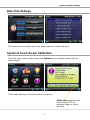
System & Touch Screen Calibration ..........................................................................................24
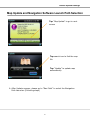
Map Update and Navigation Software Launch Path Selection ..................................................25
7.
Music and Volume Settings
27
8.
Handsfree Bluetooth Operation
30
9.
Temperature Display Button Function
35
10. Tele-Mute Function
36
11. Specifications
37
12. Maintaining Your GPS
38
13. Technical Support Contact Info
38
14. One Year Limited Warranty
38
15. To Obtain Warranty Service
39
16. FCC Compliance Statement
40
17. End User License Agreement
40
18. Disclaimer
43
Index
44
1