1
7-9) ADJUSTING HALF-TURN FILM FOR COLOR CHANGE
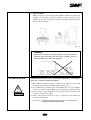
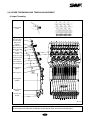
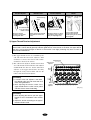
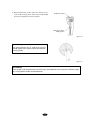
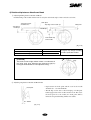
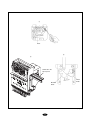
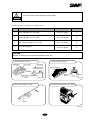
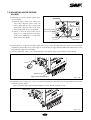
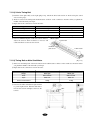
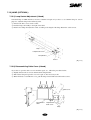
① (For automatic color change) If the needle is not at the center of the needle hole on the plate, turn the lever and
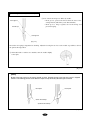
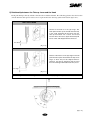
adjust so that the roller is on the center of the color change cam on the straight line. Open the cover of the halfturn sensor and align the center of the half-turn sensor with the center of the film (see [Fig.7-18(a)]).
② For SWF/E-UH1508-45, the machine will stop automatically if any of the needle setting lamp or needle position lamp
blinks. In this case, use a box spanner to adjust the position of the color change cam so the roller is at the center of the
cam on the straight line (when the needle is at the center of the needle hole on the plate). Open the cover of the halfturn film and align the center of the half-turn sensor with the center of the film (see [Fig.7-18(b)]).
Half-turn sensor
Half-turn
film
Half-turn
sensor
Roller
Half-turn Film screw
film cover
Half-turn
sensor
Color change
cam
Color change cam
Box spanner
(a)
(b)
[Fig.7-18]
[CAUTION]
Manual color change must be performed at the upper shaft angle of 100°.
Manual color change at the upper shaft angles other than 100°may cause damage on the controller
and the take-up unit.
7-9