1
1.
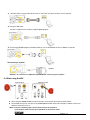
Download the [queue X.X.X +Driver] and its user manual.
<Note> Please follow the user manual of queue
TM
for installation and operation.
Chapter 5 DIP Switch Settings
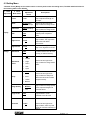
<Note> You have to turn the unit OFF and back ON for the setting to take affect.
5.1 Connecting to a projector or monitor
5.1.1 SXGA 60Hz output (default values):
5.1.2 XGA 60 Hz output
5.1.3 Special mode
5.1.4 HDTV 720P 60Hz output
English - 14