1
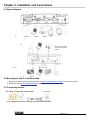
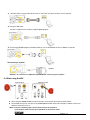
Use VGA cable to connect VGA IN connector on 445 to the VGA OUT connector on the computer Using the USB Cable Connect to USB port then install the supplied queue program. Using the EXTENDER adapter and RS232 Cable to connect EXTENDER of 445 to a RS232 of computer Connecting to speaker Speaker <Remark>: Or connect to an additional amplifier before connecting to the speaker. 4.4 Start using the 445 Control Panel Remote Control When using the remote control, aim at the receptor on the DC265, and press the power button. Once DC265 is turned on, the LED on the control panel will flash a few times and stay lit. Please contact your distributor if the LED is not on. <Note> Once the password page is shown, please key in the password. If you forget it, please contact your distributor or the service center. English - 12