1
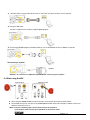
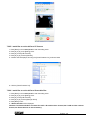
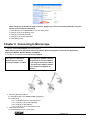
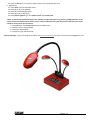
<Note> Doing this will disable the Capture function. Suggest you return it to [Camera] mode after using this function. Please follow the steps below. 1. Press [Menu] on the control panel to enter the setting menu. 2. Press [] or [] to the [Setting] menu. 3. Press [] to find [USB Transfer]. 4. Press [] or [] to select [Camera]. 5. Press [Menu] to exit. Chapter 8 Connecting to Microscope 1. Mount the microscope adaptor onto the microscope. <Note> Please choose an appropriate microscope adapter. Microscope adapter accessories are applicable to eyepieces of Ø28mm, Ø31mm, Ø33mm, and Ø34mm. 2. The lens of 445 connects with the microscope adaptor. If the eyepiece is Ø33mm or Ø34mm, only one Lumens microscope adapter is needed. If the eyepiece is Ø28mm or Ø31mm, you need two microscope adapters. (1. The original microscope adapter. 2. The microscope adapter suitable for the eyepiece size Ø28mm or Ø31mm.) 3. Select the [Microscope] Mode 3.1. Press [M Scope] on the remote control (suggestion). 3.2. Control panel 3.2.1. Press [MENU] to enter the setting menu. 3.2.2. Press [] or [] to select [Display]. 3.2.3. Press [] to select [Mode]. 3.2.4. Press [] or [] to select [Microscope]. 4. If the image is not clear. 4.1. Please adjust the focus of microscope. English - 29