1
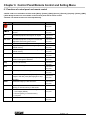
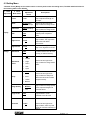
Chapter 6 Control Panel/Remote Control and Setting Menu 6.1 Functions of control panel and remote control <NOTE>: OSD is not available at C-Video mode. [Menu] / [Rotate] / [PAN] / [Source] / [Record] / [Capture] / [Delete] / [PBP] / [Slide Show] functions are not available on the machine panel and the remote control. <Remark> The below functions are listed alphabetically. Name Function Turn on and off the visual presenter. Operation Remote control / Control panel AF Move up, down, left or right to select the needed function. Automatically adjust focal length on an object. Remote control / Control panel Remote control / Camera Head Auto Tune BRT+/Capture Delete Enter Automatically adjust the image to have the best brightness and focusing performance. Manually adjust the brightness of the image. Capture the image to the SD card (priority) or internal memory. Delete the image stored in the SD card (priority) or internal memory. Enter/Activate functions. Remote control / Control panel Remote control Remote control / Control panel Remote control / Control panel Remote control / Control panel Freeze Lamp Freeze the current image to temporarily stay on the Remote control / screen. Press again to defreeze. Control panel Turn on / off the lamp. Remote control / Menu Activate the setting menu function/exit menu. Control panel Remote control / Control panel PAN Switch a part of the live image Remote control / Control panel Record Rotate Record motion images. Press [Record] to record images to SD card, press [Record] again to stop recording. Rotate the image by 0°/90°/180°/270°. Remote control / Control panel Remote control / Control panel Slide Show Source Zoom +/- Show the photos or videos stored in the SD card (priority) or internal memory in slide mode. Switch between different sources of signals: 1. Live images (default) 2. SD card (priority) or internal memory 3. Computer Increase or decrease the image size. Remote control Remote control / Control panel Remote control / Control panel English - 16