1
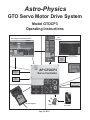
GTO Control Box – Model GTOCP3 - Your Mount’s Brain
The GTO control box contains all of the circuitry to drive the two servo motors and the logic required to navigate the sky.
It will be operational and track at the sidereal rate when connected to both motor / gearboxes of the mount and a power
source. In order to control the movement of the mount, you will need to connect at least one of these:
●●
GTO Keypad.
●●
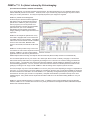
PC computer with PulseGuide™ by Sirius Imaging. The CD with this program is included with the mount. The CD
includes a complete user’s manual in PDF format. For the most updated version of the software, check out the
Web site www.pulseguide.com. Please refer to the section later in this manual for further information regarding the
capabilities of this program.
●●
Computer with a planetarium program or observatory control software. Astro-Physics now has a fully supported
ASCOM V2 Driver available. A more detailed listing of software is in the “Controlling Your GTO Mount” section later in
this manual. In addition, see the Web site’s ASCOM page for details on the ASCOM driver.
●●
Mobile Smart Device with mount command functions that employ the Astro-Physics Command Protocol.
Please remember that this box contains advanced electronics and must be treated with the same care given to other fine
equipment. You can see that the unit is machined of aluminum and is built to be rugged; however it is not indestructible.
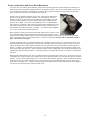
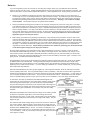
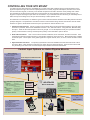
GTOCP3 Control Box - Layout and Features
Pre-loaded PEMPro™ Curve
All Astro-Physics mounts are tested at our production facility with a special version of PEMPro™ Periodic Error
Management Software. After ensuring that the mount’s uncorrected periodic error is within that mount’s specifications, we
generate a unique optimized PE curve for your specific mount, and then save the corresponding PE correction curve to the
GTOCP3 control box for you to use. By turning PE on from the keypad, PulseGuide, or through a client program with the
Astro-Physics V2 ASCOM Driver, you can take advantage of this PE curve the very first time you use your mount. This
PE curve should remain valid for several months as your gears “run in” and will probably suffice for many mount owners.
Instructions for turning the PEM on in the keypad’s “Tools” menu are found in the keypad manual. Note that OEM mounts
are the responsibility of the manufacturer, and are neither tested nor given a PE curve by Astro-Physics.
The full version of PEMPro™ v.2.x has been included with the 900GTO, 1200GTO, and 3600GTO so you can actually
produce an even more refined periodic error curve by using more worm cycles than we can do here at the factory.
Although we can make no promises, we have heard numerous reports of sub-arcsecond periodic error from experienced
users running 6 or more worm cycles in PEMPro™! Mach1GTO owners can purchase PEMPro™ from our Web site.
It is suggested that you save the existing curve to your computer before overwriting it in the control box with a new curve,
just in case you do something wrong in your first attempt at a PEMPro™ run. That way, you can re-load the old data back
to your control box, if needed.
7