1
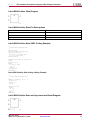
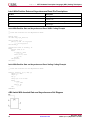
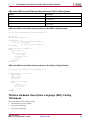
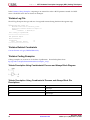
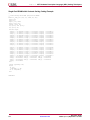
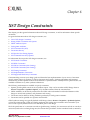
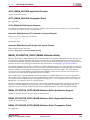
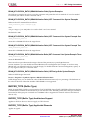
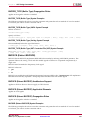
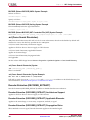
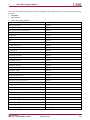
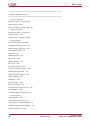
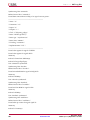
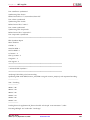
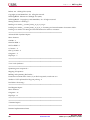
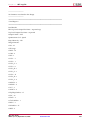
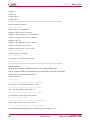
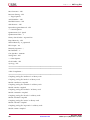
Chapter 6: XST Design Constraints
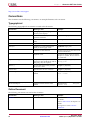
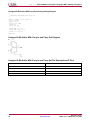
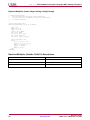
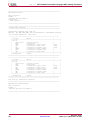
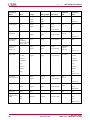
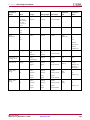
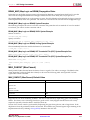
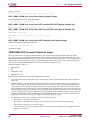
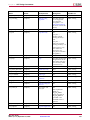
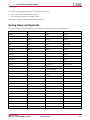
Constraint Name
Command Line
Command Value
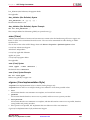
Hierarchy Separator
-hierarchy_separator
_
/
default: /
Input Format
-ifmt
mixed
vhdl
verilog
default: mixed
Input/Project File Name
-ifn
file_name
default: N/A
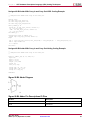
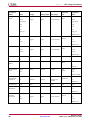
Add I/O Buffers
yes
-iobuf
no
default: yes
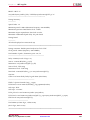
Ignore User Constraints
yes
-iuc
no
default: no
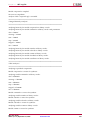
Library Search Order
-lso
file_name.lso
default: N/A
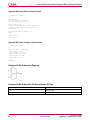
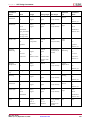
LUT Combining
auto
-lc
area
off
default: off
Netlist Hierarchy
-netlist_hierarchy
as_optimized
rebuilt
default: as_optimized
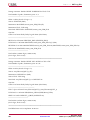
Output File Format
ngc
-ofmt
default: ngc
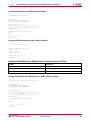
Output File Name
-ofn
file_name
default: N/A
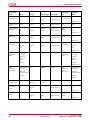
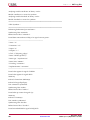
Target Device
-p
part-package-speed (For example:
xc5vfx30t-ff324-2)
default: N/A
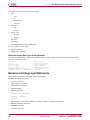
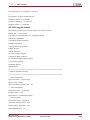
Clock Enable
yes
-pld_ce
no
default: yes
Macro Preserve
yes
-pld_mp
no
default: yes
XST User Guide
UG627 (v 11.3) September 16, 2009
www.xilinx.com
261