1
Installation
Installation
1. You must start the key operation within 10 minutes after
turning on the power for setting options.
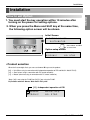
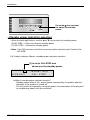
2. When you press the Menu and Shift key at the same time,
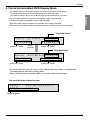
the following option screen will be shown.
Initial Screen
ELECTRIC POWER
DISTRIBUTOR
Press Menu and Shift
at same time
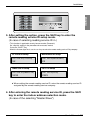
Option setup screen
00000000
00000000
Unit 1W/p
MICRONIC
NO- STBP
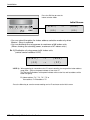
• Product selection
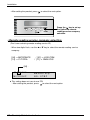
When the first two digits flash, you can use the ▲ or ▼ key to set the product.
[00] -> Unit (When using in connection with Independent operation of PDI and MultiV / MultiV PLUS)
[10] -> Slave (when using in connection with PC central controller)
[11] -> Master (when not using in connection with PC central controller)
*Note : [00] is not using the PI-485, but [10]/[11] are using the PI-485.
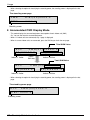
Ex) Product selection: Master, Watt meter: 1W/1 pulse
[11] : Independent operation of PDI
11000000
Master1W/p
MICRONIC
NO- STBP
User’s Manual 11
ENGLISH
How to set Option