1
How to set each Indoor Unit
How to set each Indoor Unit
■ Using wired remote controller
AUTO SWING
OPERATION
SET TEMP
Room Temp
Operation unit
03
Timer
Cancel
Program
Week
SUB FUNCTION
HI
MED
LO
AUTO Heater
Defrost
JET
Filter
ZONE
1 2
Time
Timer
On Off
Set no. Time 01
FAN SPEED
Preheat
Humidify
Out door
3 4
Program set
05
07
09
11
13
15
17
19
21
23
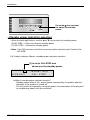
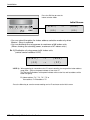
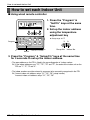
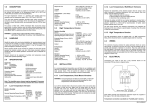
1. Press the "Program" &
"Set/Clr" keys at the same
time.
2. Set up the indoor address
using the temperature
adjustment key
☛ Setup range: 00-7F
Holiday
Program
Plasma
3
A
Set/Clr
Hour
Min
RESET
Group No. Indoor No.
Set/Clr
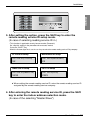
3. Press the "Program" & "Setup/Clr" keys at the same time
for 3 seconds to set up the indoor address.
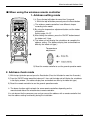
• The room address on the PDI is listed in the ascending order of indoor number.
Ex) If the indoor addresses are "7C", "7D", "7E" and "7F", the order of the indoor unit on the
PDI are "1", "2", "3" and "4".
• The indoor numbers must be entered in sequence to be accurately recognized in the PDI.
Ex) Correct indoor unit address setup: "01", "02", "03" (setup in order)
Incorrect indoor unit address setup: "01", "02", "06"
18 Electricity Distribution Indicator