1
Single Installation
1. Make up a new piece of cable, using the tvLINK® connectors
supplied (see page 8 for fitting instructions). Make sure it is
long enough to reach the second TV and that is double screened
satellite grade cable.
2. Switch off and disconnect the Sky Set-top Box from the mains
supply.
3. Install the new cable between the Sky Set-top Box and the
second TV.
4. Connect the female end of the new cable into the RFout2
connector on the back of the Sky Set-top Box.
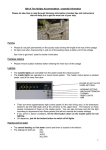
5. Connect the other end of the
new cable (male) into the
female connector of the
tvLINK® . See fig.1.
6. Connect the tvLINK® into the
back of the second TV, and
position the infrared eye in a
spot where it has a line of
sight to the Sky Remote
Control. See fig.2.
fig.1.
fig.2.
If it does not connect directly i.e. the TV housing does not allow the
tvLINK® to get close enough for a firm fitting, then use a small length
of coax between the two. See fig.3.
Extra piece of cable
fig.3.
7. Return to the Sky Set-topBox, plug it back into the mains and
switch it on.
For tvLINK® single installation diagrams see pages 4-5.
www.tvlink.co.uk
www.tvlink.co.uk
2
© globalinvacom Ltd. 2008. Not to be reproduced in full, or in part, without prior permission
© globalinvacom Ltd. 2008. Not to be reproduced in full, or in part, without prior permission
Section 1