1
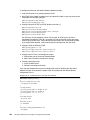
– Set the LUN on the correct path that you want to boot from, which applies to
asymmetrical storage subsystems only.
Some SANs are asymmetrical storage subsystems, such as the IBM System Storage
DS3000, DS4000, and DS5000 series. Others SANs are symmetrical storage
subsystems, such as the SAN Volume Controller and IBM System Storage DS8000.
The asymmetrical storage subsystems controllers set a preferred path. The preferred
path must be set to communicate to your CNA (normally by using an IQN).
The LUN on most SANs is to one controller at a time. This LUN can move from
controller A to controller B.
At installation time, the operating system does not have its redundant driver loaded
and, therefore, does not handle redundant paths. To work around this issue, you must
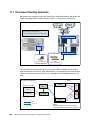
provide a single path. For example, if you are booting through CNA port 0 and this port
0 communicates to controller A1, the preferred path for your LUN must be A on the
SAN disk. Likewise, if you are booting through CNA port 0 and this port 0
communicates to controller B1, your preferred path for your LUN must be B on the SAN
disk.
The preferred path is typically easy to change in the SAN disk settings.
Configure the host port as follows:
– You must have different IP addresses in different networks for each IP per host.
– As a preferred practice, in any operating system or storage controller, ensure that each
NIC has its own network, unless it is teamed with software or a configuration.
– Configure the host ports of the disk storage subsystem the same way, which is the
preferred configuration:
•
•
•
•
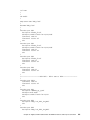
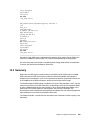
Storage controller A Host port 0: 192.168.1.100 Subnet 255.255.255.0
Storage controller A Host port 1: 192.168.2.100 Subnet 255.255.255.0
Storage controller B Host port 0: 192.168.3.100 Subnet 255.255.255.0
Storage controller B Host port 1: 192.168.4.100 Subnet 255.255.255.0
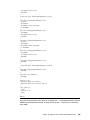
– If you have single port hosts (servers) and require redundancy at the controller level, in
some storage controllers, you can configure the host ports as follows:
•
•
•
•
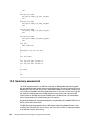
Storage controller A Host port 1: 192.168.1.100 Subnet 255.255.255.0
Storage controller A Host port 2: 192.168.2.100 Subnet 255.255.255.0
Storage controller B Host port 1: 192.168.1.101 Subnet 255.255.255.0
Storage controller B Host port 2: 192.168.2.101 Subnet 255.255.255.0
For information about best practices, not a preferred configuration, contact your
storage subsystem vendor.
– Use supported SFP and cables.
You must know your environment, cabling, and setup, which can all be validated by checking
cable connections, SAN disk configuration, or logs.
292
Storage and Network Convergence Using FCoE and iSCSI