1
*Preferred
DVI KVM over IP
EXT-DVIKVM-LANTX
EXT-DVIKVM-LANRX
User Manual
NOTRelease
FOR RELEASE
A8
Important Safety Instructions
1.
Read these instructions.
2.
Keep these instructions.
3.
Heed all warnings.
4.
Follow all instructions.
5.
Do not use this product near water.
6.
Clean only with a dry cloth.
7.
Do not block any ventilation openings. Install in accordance with the manufacturer’s
instructions.
8.
Do not install or place this product near any heat sources such as radiators, heat
registers, stoves, or other apparatus (including amplifiers) that produce heat.
9.
Do not defeat the safety purpose of the polarized or grounding-type plug. A polarized
plug has two blades with one wider than the other. A grounding type plug has two
blades and a third grounding prong. The wide blade or the third prong are provided for
your safety. If the provided plug does not fit into your outlet, consult an electrician for
replacement of the obsolete outlet.
10. Protect the power cord from being walked on or pinched particularly at plugs,
convenience receptacles, and the point where they exit from the apparatus.
11. Only use attachments/accessories specified by the manufacturer.
12. To reduce the risk of electric shock and/or damage to this product, never handle or
touch this unit or power cord if your hands are wet or damp. Do not expose this
product to rain or moisture.
13. Unplug this apparatus during lightning storms or when unused for long periods of time.
14. Refer all servicing to qualified service personnel. Servicing is required when the
apparatus has been damaged in any way, such as power-supply cord or plug is
damaged, liquid has been spilled or objects have fallen into the apparatus,
the apparatus has been exposed to rain or moisture, does not operate normally,
or has been dropped.
15. Batteries that may be included with this product and/or accessories should never be
exposed to open flame or excessive heat. Always dispose of used batteries
according to the instructions.
ii
Warranty Information
Gefen warrants the equipment it manufactures to be free from defects in material and
workmanship.
If equipment fails because of such defects and Gefen is notified within two (2) years from
the date of shipment, Gefen will, at its option, repair or replace the equipment, provided
that the equipment has not been subjected to mechanical, electrical, or other abuse or
modifications. Equipment that fails under conditions other than those covered will be
repaired at the current price of parts and labor in effect at the time of repair. Such repairs
are warranted for ninety (90) days from the day of reshipment to the Buyer.
This warranty is in lieu of all other warranties expressed or implied, including without
limitation, any implied warranty or merchantability or fitness for any particular purpose, all of
which are expressly disclaimed.
1.
Proof of sale may be required in order to claim warranty.
2.
Customers outside the US are responsible for shipping charges to and from Gefen.
3.
Copper cables are limited to a 30 day warranty and cables must be in their original
condition.
The information in this manual has been carefully checked and is believed to be accurate.
However, Gefen assumes no responsibility for any inaccuracies that may be contained
in this manual. In no event will Gefen be liable for direct, indirect, special, incidental, or
consequential damages resulting from any defect or omission in this manual, even if
advised of the possibility of such damages. The technical information contained herein
regarding the features and specifications is subject to change without notice.
For the latest warranty coverage information, refer to the Warranty and Return Policy under
the Support section of the Gefen Web site at www.gefen.com.
iii
Licensing
This product uses software that is subject to open source licenses, including one or more
of the General Public License Version 2 and Version 2.1, Lesser General Public License
Version 2.1 and Version 3, BSD, and BSD-style licenses. Distribution and use of this
product is subject to the license terms and limitations of liability provided in those licenses.
Specific license terms and Copyright Notifications are provided in the source code.
For three years from date of activation of this product, any party may request, and we
will supply, for software covered by an applicable license (e.g. GPL or LGPL), a complete
machine-readable copy of the corresponding open source code on a medium customarily
used for software interchange. The following software and libraries are included with this
product and subject to their respective open source licenses:
•
•
jQuery
Linux
iv
Contacting Gefen Technical Support
Technical Support
(818) 772-9100
(800) 545-6900
8:00 AM to 5:00 PM Monday - Friday, Pacific Time
Fax
(818) 772-9120
Email
[email protected]
Web
http://www.gefen.com
Mailing Address
Gefen, LLC
c/o Customer Service
20600 Nordhoff St.
Chatsworth, CA 91311
Product Registration
Register your product here: http://www.gefen.com/kvm/Registry/Registration.jsp
v
Operating Notes
•
The Gefen Syner-G Software Suite is a free downloadable application from Gefen
that provides network configuration assistance and automatic download and
installation firmware upgrades for this product. Always make sure that the DVI KVM
over IP is running the latest firmware.
•
The DVI KVM over IP is compatible with the HD KVM over IP, DVI KVM over IP w/
Local DVI Output, VGA KVM over IP, and the HD over IP w/ RS-232 and 2-way IR
which allows these products to be connected within a single system.
•
Gefen highly recommends the use of the Syner-G software and Matrix Controller
(Gefen part no. EXT-CU-LAN) for setting up and controlling the operation of a
Video-over-IP network using these products.
•
Shielded CAT-5e (or better) cables should not exceed 330 feet (100 meters) between
the Sender / Receiver unit and the network.
•
By default, all Sender and Receiver units are set to channel 0.
•
This product does not support dual link resolutions.
•
By default, the source device will use the EDID from the display (or other sink device)
which is connected the Receiver unit. See EDID Management (page 47) for more
information.
•
If terminating network cables in the field, please adhere to the TIA/EIA568B
specification. See the Network Cable Diagram (page 148) for details.
Important
The use of a Gigabit switch with higher than 8K “jumbo frame” capability is
required when connecting the DVI KVM over IP to a network.
DVI KVM over IP is a trademark of Gefen, LLC.
© 2015 Gefen, LLC. All Rights Reserved. All trademarks are the property of their respective owners.
Gefen, LLC reserves the right to make changes in the hardware, packaging, and any accompanying documentation
without prior written notice.
Pb
This product uses UL listed or CE-compliant power supplies.
vi
Features and Packing List
Features
•
Extends DVI, USB, RS-232, bi-directional stereo analog audio, and IR over IP,
using a Gigabit Local Area Network
•
Any combination of HDMI, DVI, and VGA Senders and Receivers can be used
together to create a “Virtual Matrix”
•
Supports resolutions up to 1080p Full HD and 1920 x 1200 (WUXGA)
•
Supports 2 USB devices at Receiver side, with 500mA current capability per port, USB
2.0 data rates up to 480 Mbps, and backward-compatibility with USB 1.1
•
Any of the Senders within a network can be accessed by any Receiver unit via a web
browser on a mobile device or computer, or by using the Gefen Keyboard Switching
Controller software (available for download at www.gefen.com)
•
Supports a total of just over 65,000 Sender and Receiver units, depending on the
network bandwidth and number of ports on your network switch
•
Three-port Ethernet switch built into the Receiver unit
•
Switch/USB button facilitates scrolling between multiple Senders and accessing
a USB host computer from multiple Receivers
•
Mode button on Sender for sharpness or motion optimization of image
•
Easy-to-use web server interface for quick system set-up, operation, and firmware
upgrade
•
Locking power supply connectors
•
1U tall, half-rack width enclosures are rack-mountable using EXT-RACK-1U
•
Surface mounting brackets included
1080P
Packing List
The DVI KVM over IP ships with the items listed below. The packing contents of the Sender
and Receiver unit are listed below. If any of these items are not present in the box when
you first open it, immediately contact your dealer or Gefen.
EXT-DVIKVM-LANTX
EXT-DVIKVM-LANRX
•
•
•
•
•
•
•
•
•
•
•
1 x DVI KVM over IP (Sender unit)
1 x 6 ft. DVI cable (M-M)
1 x 6 ft. USB cable (A-B)
1 x 6 ft. DB-9 cable (M-F)
2 x Mounting brackets with screws
1 x 5V DC power supply
1 x Quick-Start Guide
vii
1 x DVI KVM over IP (Receiver unit)
2 x Mounting brackets with screws
1 x 5V DC power supply
1 x Quick-Start Guide
Table of Contents
1
Getting Started
Introduction............................................................................................................ 2
Sender Unit.................................................................................................... 2
Receiver Unit.................................................................................................. 4
Installation & Configuration.................................................................................... 6
Local Area Network (LAN) Connection.......................................................... 6
Using a Direct Connection........................................................................... 12
Supplementary Connections........................................................................ 14
Sample Wiring Diagram............................................................................... 15
2
Basic Operation
Setting the Video Channel.................................................................................... 18
Setting the Channel using the Web Interface............................................... 18
Setting the Channel using the Front Panel.................................................. 19
Masking Video...................................................................................................... 22
Enabling or Disabling Video over IP............................................................. 22
Unicast & Multicast Modes................................................................................... 23
Configuring Unicast Mode............................................................................ 23
Switching between Sender units in Unicast mode....................................... 25
Configuring Multicast Mode.......................................................................... 28
Discovery Mode................................................................................................... 30
Gefen Syner-G Discovery............................................................................ 30
Finding Your Device..................................................................................... 31
MTU Size.............................................................................................................. 33
Using RS-232....................................................................................................... 35
RS-232 under Unicast Mode........................................................................ 38
RS-232 under Multicast Mode...................................................................... 38
USB Control......................................................................................................... 39
USB under Unicast Mode............................................................................. 39
USB under Multicast Mode.......................................................................... 41
Active per request mode.............................................................................. 44
Active on link mode...................................................................................... 45
EDID Management............................................................................................... 47
Using the Internal EDID............................................................................... 47
Using the Downstream EDID....................................................................... 48
Audio Connections............................................................................................... 49
Using HDMI Sources.................................................................................... 51
Setting the Video Mode........................................................................................ 52
Using the Web interface............................................................................... 52
Using the Front Panel.................................................................................. 53
Changing the Password....................................................................................... 54
Performing a Factory Reset................................................................................. 55
Reset using the Web Interface..................................................................... 55
Reset using the Front Panel......................................................................... 57
viii
Table of Contents
Rebooting a Unit.................................................................................................. 58
Reboot using the Web Interface................................................................... 58
Reboot using the Front Panel...................................................................... 59
3
Advanced Operation
Telnet Access....................................................................................................... 62
Commands........................................................................................................... 63
4Appendix
Default Settings.................................................................................................. 144
Upgrading the Firmware..................................................................................... 146
Network Cable Diagram..................................................................................... 148
Rack Tray Installation......................................................................................... 149
Specifications..................................................................................................... 150
Index.................................................................................................................. 151
ix
DVI KVM over IP
1
Getting Started
Introduction
Page Title
Getting Started
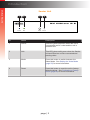
Sender Unit
1
2
3
4
DVI KVM over IP S
Power
ID
1
2
Link
Mode
Reset
Name
Description
EXT-DVIKVM-LANS
Gefen
Power
DVI In
Link
This LED glows solid blue when the unit is
connected to an AC outlet and the unit is
powered ON.
RS-232
Line
In
Line
Out
USB
Link
IR Out
5V DC
This LED glows solid green when the Sender
unit and Receiver unit are connected and
passing video.
3
Mode
Press this button to switch between the
Video Mode. See Setting the Video Mode
(page 52) for more information.
4
Reset
Press this button to reset the unit to factorydefault settings. See Performing a Factory
Reset (page 55) for more information.
page | 2
DVI KVM over IP S
Introduction
Page Title
Getting Started
Power
Link
1
Mode
Reset
2
3
RS-232
Line
In
4
5
6
7
8
Link
IR Out
5V DC
EXT-DVIKVM-LANS
Gefen
DVI In
Line
Out
USB
ID
Name
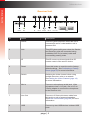
Description
1
DVI In
Connect the included DVI cable from this
connector to the DVI source.
2
RS-232
Connect the included RS-232 cable from this
port to an RS-232 device.
See Using RS-232 (page 35) for more
information.
3
Line In
Connect a 3.5mm mini-stereo cable from the
Line Out jack on the multimedia PC to this
jack.
4
Line Out
Connect a 3.5mm mini-stereo cable from this
jack to the Line In jack of a multimedia PC.
5
USB
Connect the included USB cable from the
computer to this USB port.
6
Link
Connects the Sender unit to the network (or
directly to the Receiver unit) using shielded
CAT-5e (or better) cable.
7
IR Out
Connect an IR Emitter (Gefen part no. EXTIREMIT) from this jack to the DVI source to
control the source from the viewing location.
8
5V DC
Connect the included 5V DC locking power
supply to this power receptacle.
page | 3
Introduction
Getting Started
Receiver Unit
1
2
3
4
5
6
7
8
DVI KVM over IP R
USB
Power
ID
1
Link
IR
Name
Link
DVI Out
Switch
Mic In
Line Out
USB
USB
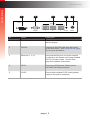
Description
Power
EXT-DVIKVM-LANR
This LED glows solid blue when the unit is
connected
to an AC outlet and the unit is
Ethernet
powered ON.
Gefen
2
Reset
RS-232
This LED2glows solid
green
when
the Sender
3
IR Ext
5V DC
and Receiver units are connected using
a shielded CAT-5e (or better) cable and
successfully passing video.
1
3
IR
This IR sensor receives signals from IR
remote control of the source device.
4
Reset
Press this button to reset the unit to factorydefault settings. See Performing a Factory
Reset (page 55) for more information.
5
Switch
Switches the video channel when using
multiple Receiver units on a network.
See Setting the Video Channel (page 18)
for more information.
6
Mic In
Connect a microphone to this jack. If the
microphone has a 1/4” jack, use a 1/4”-to3.5mm adapter to connect the microphone
to the Receiver unit.
7
Line Out
Connect a 3.5mm mini-stereo cable from
this jack to a pair of powered speakers.
See Audio Connections (page 49) for more
information.
8
USB
Connect up two USB devices to these USB
ports.
page | 4
DVI KVM over IP R
Introduction
USB
Getting Started
Power
Link
IR
1
Reset
Switch
Mic In
2
Line Out
USB
USB
3
4
5
IR Ext
5V DC
EXT-DVIKVM-LANR
Gefen
Ethernet
DVI Out
RS-232
1
2
3
ID
Name
Description
1
DVI Out
Connect a DVI cable from this connector to
the DVI display.
2
RS-232
Connect an RS-232 cable from this port to
an RS-232 device. See Using RS-232 (page
35) for more information.
3
Ethernet (1, 2, 3)
Connects the Receiver unit to the network
(or directly to the Sender unit) using shielded
CAT-5e (or better) cable. See the next
page for installation instructions.
4
IR Ext
Connect an IR Extender (Gefen part no.
EXT-RMT-EXTIRN) to this port.
5
5V DC
Connect the included 5V DC locking power
supply to this power receptacle.
page | 5
Getting Started
Installation & Configuration
The DVI KVM over IP Sender and Receiver units can be connected over a Local Area
Network (LAN) or they can be directly connected to one another. We will cover both
installations.
Local Area Network (LAN) Connection
In order to connect the DVI KVM over IP to a Local Area Network (LAN), both the Sender
and Receiver unit must first be set to DHCP mode or Static IP mode. DHCP mode will use
the DHCP server to automatically assign an IP address for each Sender and Receiver unit
that is connected to the network. Static IP mode will allow the IP address for each Sender
and Receiver unit to be configured manually. Contact your network administrator if
necessary.
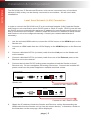
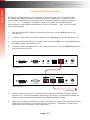
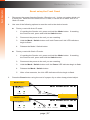
1.
Use the included HDMI cable to connect the Hi-Def source to the HDMI In port on the
Sender unit.
2.
Connect an HDMI cable from the Hi-Def display to the HDMI Out port on the Receiver
unit.
3.
Connect a shielded CAT-5e (or better) cable from the Link port on the Sender unit
to the network.
4.
Connect a shielded CAT-5e (or better) cable from one of the Ethernet ports on the
Receiver unit to the network.
5.
Connect the included 5V DC locking power supplies to both the Sender unit and
Receiver unit. Do not overtighten the locking connectors. Connect the included AC
power cords from the power supplies to available electrical outlets.
DVI KVM over IP S
Power
Link
Mode
Reset
DVI KVM over IP R
EXT-DVIKVM-LANS
Gefen
USB
Power
Link
DVI In
IR
Reset
RS-232
Switch
Line
In
Mic In
Line
Out
Line Out
USB
Link
USB
USB
IR Out
5V DC
Sender unit
Connect to LAN / DHCP server
EXT-DVIKVM-LANR
Gefen
Ethernet
DVI Out
RS-232
1
2
3
IR Ext
5V DC
Receiver unit
Connect to LAN / DHCP server
6.
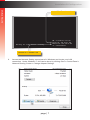
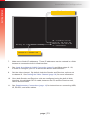
Obtain the IP address of both the Sender and Receiver unit by disconnecting the
HDMI cable from the Sender unit (or from the source device). Information, similar to
the illustration on the next page, will be displayed.
page | 6
Getting Started
Installation & Configuration
Local IP = Receiver unit
Waiting for video source - standby
FW: V1.53H-Oct-24 779c
Local IP: 169.254.7.231
Remote IP: 169.254.6.250
ID: 001C9103C003
Remote IP = Sender unit
6.
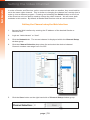
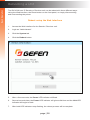
Access the Network Setting control panel in Windows and locate your LAN
connection. Under Windows 7, this can be done by clicking Start > Control Panel >
Network Sharing Center > Change Adapter Settings.
page | 7
Getting Started
Installation & Configuration
7.
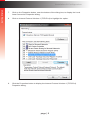
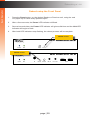
Click on the Properties button, near the bottom of the dialog box, to display the Local
Area Connection Properties dialog.
8.
Click on Internet Protocol Version 4 (TCP/IPv4) to highlight the option.
9.
Click the Properties button to display the Internet Protocol Version 4 (TCP/IPv4)
Properties dialog.
page | 8
Getting Started
Installation & Configuration
Stop
Write down the current IP settings before making changes, since you will
need to restore the old settings later. If the Properties are set to “Obtain an IP
address automatically” and “Obtain DNS server address automatically”,
you do not need the actual address settings.
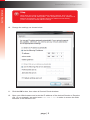
10. Change the settings, as shown below.
11. Click the OK button, then close all Control Panel windows.
12. Open your Web browser and enter the IP address of the desired Sender or Receiver
unit. In our example, we would enter 169.254.7.231 in order to access the Web
interface of the Receiver unit.
page | 9
Getting Started
Installation & Configuration
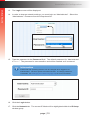
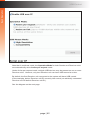
13. The Login screen will be displayed.
14. In order to change network settings, you must login as “Administrator”. Select the
“Administrator” username from the drop-down list.
15. Type the password in the Password field. The default password for “Administrator”
is admin. The password is case-sensitive and will be masked as it is entered.
Information
Passwords and operating features can be changed when logged in as
Administrator. The User option has limited access. To change password
credentials, see Changing the Password (page 54) for more information.
16. Click the Login button.
17. Click the Network tab. The current IP Mode will be highlighted within the IP Setup
window group.
page | 10
Getting Started
Installation & Configuration
18. Click the desired IP Mode button.
•
If you will be using Static mode, then enter the IP Address, Subnet Mask, and Default
Gateway. Contact your system administrator if necessary.
•
If DHCP mode is selected, then the IP address, subnet mask, and default gateway will
be specified by the DHCP server.
For this example, we will click the DHCP button.
19. Set the video channel. By default, both the Sender and Receiver unit are set
to channel 0. See Setting the Video Channel (page 18) for more information.
20. Click the Save button in the bottom-right corner of the IP Setup window group.
21. Click the Reboot button near the bottom of the page.
22. Repeat steps 12 - 21 for each Sender and Receiver to be configured.
Important
The use of a Gigabit switch with “jumbo frame” capability is required when
connecting the DVI KVM over IP to a network. The switch should be set to
greater than 8K.
page | 11
Getting Started
Installation & Configuration
Using a Direct Connection
By default, the DVI KVM over IP is shipped in Auto IP mode. Auto IP mode is used
for directly connecting Sender and Receiver units to one another. In Auto IP mode
each Sender and Receiver unit assigns itself a unique IP address within the range of
169.254.x.x. To configure the units to work over a LAN, we must access the
Web interface of the Sender and Receiver unit on a computer. Then, we can change
the network settings.
1.
Use the included DVI cable to connect the DVI source to the DVI In port on the
Sender unit.
2.
Connect a DVI cable from the DVI display to the DVI Out port on the Receiver unit.
3.
Connect a shielded CAT-5e (or better) cable from the LAN port on the Sender unit to
the LAN 1 port on the Receiver unit.
DVI KVM over IP S
Power
4.
Link
Mode
Reset
Connect another shielded CAT-5e (or better) cable from one of the Ethernet ports on
the Receiver unit to a PC.
DVI KVM over IP R
EXT-DVIKVM-LANS
Gefen
USB
Power
Link
DVI In
IR
Reset
RS-232
Switch
Line
In
Mic In
Line
Out
Line Out
USB
USB
Link
USB
IR Out
5V DC
3
IR Ext
5V DC
Sender unit
EXT-DVIKVM-LANR
Gefen
Ethernet
DVI Out
RS-232
1
2
Receiver unit
Connect to PC
5.
Connect the included 5V DC locking power supplies to both the Sender unit and
Receiver unit. Do not overtighten the locking connectors. Connect the included AC
power cords from the power supplies to available electrical outlets.
6.
Obtain the IP address of both the Sender and Receiver unit by disconnecting the DVI
cable from the Sender unit (or from the source device). Information, similar to the
illustration on the next page, will be displayed.
page | 12
Getting Started
Installation & Configuration
Local IP = Receiver unit
Waiting for video source - standby
FW: V1.53H-Oct-24 779c
Local IP: 169.254.7.231
Remote IP: 169.254.6.250
ID: 001C9103C003
Remote IP = Sender unit
7.
Make note of both IP addresses. These IP addresses can be entered in a Web
browser to access the built-in Web interface.
8.
See Local Area Network (LAN) Connection (page 6) and follow steps 6 - 20,
in order to configure your PC to access the built-in Web interface.
9.
Set the video channel. By default, both the Sender and Receiver unit are set
to channel 0. See Setting the Video Channel (page 18) for more information.
10. Once both Sender and Receiver units are configured using the built-in Web
interface, the shielded CAT-5e cable, between the PC and the Receiver unit,
can be disconnected.
11. See Supplementary Connections (page 14) for instructions on connecting USB,
IR, RS-232, and audio cables.
page | 13
Getting Started
Installation & Configuration
Supplementary Connections
►► USB (see USB Control (page 39) for more information on using USB devices)
1.
Connect the included USB cable from the computer to the USB port on the Sender
unit.
2.
Connect a maximum of two USB devices to the Receiver unit.
►► IR
3.
Connect an IR Emitter (Gefen part no. EXT-IREMIT) to the Sender unit and attach
it to the IR sensor on the device to be controlled.
4.
Connect an IR Extender (Gefen part no. EXT-RMT-EXTIRN) to the Receiver unit if the
IR sensor will not be within line-of-site for proper IR control.
►► Audio (see Audio Connections (page 49) for more information on using audio
devices)
5.
Connect a 3.5mm mini-stereo cable from the Line In jack on the Sender unit to an
audio source.
6.
Connect a pair of powered speakers (or another audio output device) to the Line Out
jack on the Receiver unit.
7.
Connect a microphone to the Mic In jack on the Receiver unit.
8.
Connect a pair of powered speakers (or another audio output device) to the Line Out
jack on the Sender unit.
►► RS-232
9.
Connect the included RS-232 cable from the PC or automation system to the
RS-232 port on the Sender unit.
10. Connect an RS-232 cable from the Receiver unit to the RS-232 device to be
controlled.
page | 14
Installation & Configuration
Getting Started
Sample Wiring Diagram
CAT-5e (or better) CABLE
DVI CABLE
USB CABLE
AUDIO CABLE
(Up to 330 ft)
MIC CABLE
RS-232 CABLE
IR EMITTER
IR EXTENDER
Gigabit Switch
Receiver
Multimedia PC
IR Emitter
Microphone
RS-232 Controlled
Device
USB Mouse
USB Keyboard
IR Extender
Sender
Powered Speakers
or headphones
HD Display
EXT-DVIKVM-LAN
page | 15
DVI KVM over IP
2
Basic Operation
Basic Operation
Setting the Video Channel
In order a Sender and Receiver unit to communicate with one another, they must both be
set to the same video channel. This is similar to changing the channel on a set-top box in
order to view a different program. Pressing and releasing the Switch button on the front
of the Receiver unit can also be used to change the video channel. We will cover both
methods in this section. By default, all Sender and Receiver units are set to channel 0.
Setting the Channel using the Web Interface
1.
Access the Web interface by entering the IP address of the desired Sender or
Receiver unit.
2.
Login as “Administrator” or “User”.
3.
Click the Network tab. The current channel is displayed within the Channel Setup
window group.
4.
Click the Channel Selection drop-down list and select the desired channel.
Channel numbers can range from 0 to 255.
5.
Click the Save button on the right-hand side of Channel Setup window group.
page | 18
Basic Operation
Setting the Video Channel
6.
The following message will be displayed, at the top of the page, indicating that the
selected channel has been applied.
7.
Access the Web interface of the next unit (Sender or Receiver) by entering its
IP address.
8.
Repeat steps 2 - 5 for each Sender and Receiver to be changed.
Setting the Channel using the Front Panel
1.
Press and release the Switch button on the front panel of the Receiver unit.
DVI KVM over IP R
USB
Power
2.
Link
IR
Reset
Switch
Mic In
Line Out
USB
USB
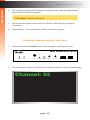
The current video channel of the Receiver unit will be shown on the connected display.
EXT-DVIKVM-LANR
Gefen
Channel: 02
DVI Out
RS-232
1
page | 19
Ethernet
2
3
IR Ext
5V DC
Basic Operation
Setting the Video Channel
3.
While the current video channel is being displayed, press and release the Switch
button on the Receiver unit. The Receiver unit will change to the next available video
channel that is being used by a Sender unit.
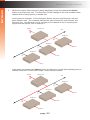
Let’s look at an example: In the illustration below, we have one Receiver unit and
three Sender units. The numbers indicate the video channel for each Sender and
Receiver unit. Our Receiver unit is currently set to channel 2 and is receiving the
signal from the Sender unit on channel 2.
DVI Out
Receiver unit
LAN
2
Sender unit
2
Sender unit
DVI In
1
Sender unit
5
DVI In
DVI In
If we press and release the Switch button, the Receiver unit will automatically jump to
channel 5 because it is the next “larger” video channel number.
DVI Out
Receiver unit
LAN
5
Sender unit
2
Sender unit
DVI In
1
Sender unit
5
DVI In
DVI In
page | 20
Basic Operation
Setting the Video Channel
4.
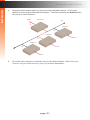
Press the Switch button again to jump to the next available channel. In this case,
channel 5 is the largest video channel number. Therefore, pressing the Switch button
will return to video channel 1.
DVI Out
Receiver unit
LAN
1
Sender unit
2
Sender unit
DVI In
1
Sender unit
5
DVI In
DVI In
5.
To set the video channel on a Sender unit, use the Web interface. See Setting the
Channel using the Web Interface (page 18) for more information.
page | 21
Basic Operation
Masking Video
Enabling or Disabling Video over IP
This feature is useful for masking video. Disabling the video on the Sender unit will mask
the video on all connected Receiver units (multicast mode only). To mask the video on
selected Receiver units, disable the video on the desired Receiver units.
1.
Access the Web interface by entering the IP address of the a Receiver unit.
2.
Login as “Administrator”.
3.
Click the Functions tab.
4.
Under the EDID Management window group, check the Enable Video over IP box
to enable video. Uncheck this box to disable video.
5.
Click the Save button within the EDID Management group.
6.
Click the Reboot button at the bottom of the page.
7.
Repeat steps 1 through 5 for each Sender and/or Receiver unit in the system.
page | 22
Configuring Unicast Mode
The term unicast is used to describe a configuration where information is sent from one
point to another point. It is possible to have multiple Sender and Receiver units connected
in a system. However, in unicast mode a Sender unit can communicate with only one
Receiver unit at a time. In unicast mode, the DVI KVM over IP functions similiar to a DVI
KVM switcher.
Information
The DVI KVM over IP Sender and Receiver units shipped from the factory in
unicast mode.
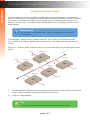
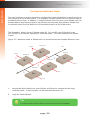
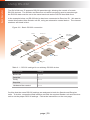
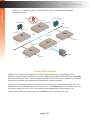
The illustration, below, shows 3 Sender units (S1, S2, and S3) and 2 Receiver units
(R1 and R2) on a network, operating in unicast mode. The video channels are notated
in blue.
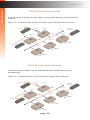
Figure 2.1 - Unicast mode: A Sender unit can communicate with only one Receiver unit at
a time.
Receiver unit
DVI Out
2
LAN
R
2
Sender unit
Receiver unit
1
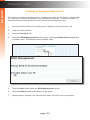
S
2
R
3
DVI Out
Sender unit
1
DVI In
S
2
1
Sender unit
5
DVI In
S
1
Basic Operation
Unicast & Multicast Modes
DVI In
1.
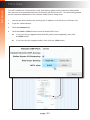
Access the Web interface for each Sender and Receiver unit that will be using unicast
mode. In this example, we will start with Receiver unit R1.
2.
Login as “Administrator”.
Tip
In unicast mode, the DVI KVM over IP behaves as a DVI KVM Switcher.
page | 23
Basic Operation
Unicast & Multicast Modes
3.
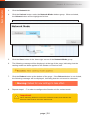
Click the Network tab.
4.
Click the Unicast button under the Network Mode window group. When selected,
the Unicast button will be highlighted in blue.
5.
Click the Save button in the lower-right corner of the Network Mode group.
6.
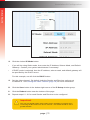
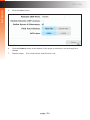
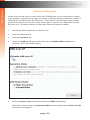
The following message will be displayed, at the top of the page, indicating that the
casting mode has been applied to the Sender or Receiver unit.
7.
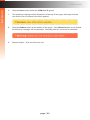
Click the Reboot button at the bottom of the page. If the Reboot button is not clicked,
the following message will be displayed, indicating that the unit must be rebooted.
8.
Repeat steps 1 - 7 in order to configure the Sender unit for unicast mode.
Important
When switching between unicast and multicast modes, both Sender and
Receiver units must be set to the same mode.
page | 24
Switching between Sender units in Unicast mode
When multiple Sender and Receiver unit are used in unicast mode, the DVI KVM over IP
behaves as a switcher. In unicast mode, a Sender unit can communicate with only one
Receiver unit at a time.
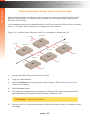
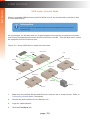
In the example below, we will switch Receiver unit R1 to receive the DVI source on Sender
unit S1. To do this, all we need to do is change the video channel.
Figure 2.2 - Unicast mode: Receiver unit R1 is connected to Sender unit S2.
Receiver unit
DVI Out
2
LAN
R
2
Sender unit
Receiver unit
1
S
2
R
3
DVI Out
Sender unit
1
DVI In
S
2
1
Sender unit
5
DVI In
S
1
Basic Operation
Unicast & Multicast Modes
DVI In
1.
Access the Web interface for Receiver unit R1.
2.
Login as “Administrator”.
3.
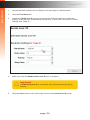
Click the Network tab and change the video channel. Refer to Setting the Video
Channel if necessary.
4.
Click the Save button.
5.
The following message will be displayed, at the top of the page, indicating that the
new channel has been applied to the Sender or Receiver unit.
6.
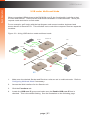
Receiver unit R1 is now receiving the DVI source on Sender unit S1, as shown on the
next page.
page | 25
Figure 2.3 - Unicast mode: Receiver unit R1 is now connected to Sender unit S1.
Receiver unit
DVI Out
2
LAN
R
2
DVI Out
Sender unit
Receiver unit
3
Sender unit
1
5
S
2
R
DVI In
S
2
1
Sender unit
DVI In
S
1
5
DVI In
Now, let’s set both Sender S1 and S2 to channel 5 and observe what happens:
Figure 2.4 - Unicast mode violation: Two Sender units (S1 and S2) using the same
video channel.
Receiver unit
DVI Out
2
LAN
R
2
Sender unit
Receiver unit
S
2
R
5
3
DVI Out
Sender unit
1
DVI In
S
2
5
Sender unit
5
DVI In
S
1
Basic Operation
Unicast & Multicast Modes
DVI In
In this example, Receiver R1 will continue to receive audio/video data from Sender
S1, even though Sender S2 is set to the same channel. The reason for this is
because Receiver R1 and Sender S1 were already set to the same channel and
communicating (as depicted in Figure 2.3). However, this scenario violates the
unicast mode rule: A Sender unit can communicate with only one Receiver unit
at a time.
page | 26
Basic Operation
Unicast & Multicast Modes
When using unicast mode, each of the Sender units must be assigned a unique
channel and should never be changed. Use the Receiver unit to switch (channels)
between Sender units.
Multiple Receiver units can simultaneously connect to any Sender unit within the
network including the Gefen KVM over LAN products with HDMI, DVI, or VGA video,
to create a virtual matrix of just over 65,000 Sender and Receiver units, depending
on the network bandwidth and number of ports on the network switch. Although any
combination of HDMI, DVI, and VGA Senders and Receivers can be used, HDCP
content is only supported by HDMI Sender and Receiver units.
Information
In unicast mode, if an additional Sender unit is introduced into a system with
the same channel as another Sender unit, then the Receiver unit will continue
to receive audio/video data from the Sender unit which was connected first.
page | 27
Configuring Multicast Mode
The term multicast is used to describe a configuration where information is sent from one or
more points to a set of other points. For example, a single Sender unit can transmit data to
multiple Receiver units. In addition, if multiple Sender units are used, each Sender unit can
transmit data to any Receiver that is not already receiving data from another Sender unit.
In multicast mode, the DVI KVM over IP functions similar to a DVI KVM matrix.
The illustration, below, shows 3 Sender units (S1, S2, and S3) and 2 Receiver units
(R1 and R2) on a network, operating in multicast mode. The video channels are shown
in blue.
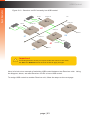
Figure 2.5 - Multicast mode: A Sender unit can communicate with multiple Receiver units.
Receiver unit
DVI Out
1
LAN
R
2
Sender unit
Receiver unit
1
S
2
R
3
DVI Out
Sender unit
1
DVI In
S
2
1
Sender unit
5
DVI In
S
1
Basic Operation
Unicast & Multicast Modes
DVI In
1.
Access the Web interface for each Sender and Receiver unit that will be using
multicast mode. In this example, we will start with Receiver S2.
2.
Login as “Administrator”.
Tip
In multicast mode, the DVI KVM over IP behaves as a DVI KVM Matrix.
page | 28
Basic Operation
Unicast & Multicast Modes
3.
Click the Network tab.
4.
Click the Multicast button under the Network Mode window group. When selected,
the Multicast button will be highlighted in blue.
5.
Click the Save button in the lower-right corner of the Network Mode group.
The following message will be displayed, at the top of the page, indicating that the
casting mode has been applied to the Sender or Receiver unit.
If a display is connected to the Receiver unit, then the message “Starting USB”
will be displayed. For more information on using USB under multicast mode,
refer to USB under Multicast Mode.
6.
Click the Reboot button at the bottom of the page. If the Reboot button is not clicked,
the following message will be displayed, indicating that the unit must be rebooted.
7.
Repeat the steps above in order to configure the Sender unit to multicast mode.
Important
When switching between unicast and multicast modes, both Sender and
Receiver units must be set to the same mode.
page | 29
Basic Operation
Discovery Mode
Gefen Syner-G Discovery
Enabling the Gefen Syner-G Discovery feature allows the Gefen Syner-G Software Suite
or Gefen Discovery Tool App to locate a Sender and/or Receiver on a network. Once the
software is able to locate the unit, IP settings can be changed as desired.
1.
Access the Web interface by entering the IP address of a Receiver or Sender unit.
2.
Login as “Administrator”.
3.
Click the Network tab.
4.
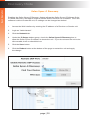
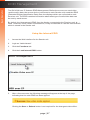
Under the IP Setup window group, check the Gefen Syner-G Discovery box to
allow the Gefen Syner-G software to locate the unit. If you do not want the unit to be
discoverable, then un-check this box.
5.
Click the Save button.
6.
Click the Reboot button at the bottom of the page to restart the unit and apply
the change.
page | 30
Basic Operation
Discovery Mode
Finding Your Device
If several Sender and Receiver unit pairs are connected on a network, you may need to
physically identify a particular Sender and/or Receiver unit. In such a case, use the Find
Your Device feature.
1.
Access the Web interface by entering the IP address of a Receiver or Sender unit.
2.
Login as “Administrator”.
3.
Click the Network tab.
4.
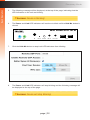
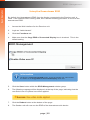
Under the IP Setup window group, click the Show Me button. By default, the Hide
Me button will be selected.
Although shown, below, it is not necessary to have the Gefen Syner-G Discovery
option enabled in order to use the Find Your Device feature.
page | 31
Basic Operation
Discovery Mode
5.
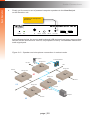
The following message will be displayed, at the top of the page, indicating that the
LED indicators on the unit are blinking.
6.
The Power and Link LED indicators will continue to blink until the Hide Me button is
clicked.
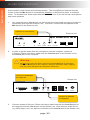
DVI KVM over IP R
USB
Power
7.
Link
IR
Reset
Switch
Mic In
Line Out
USB
USB
Click the Hide Me button to stop both LED indicators from blinking.
EXT-DVIKVM-LANR
Gefen
Ethernet
DVI Out
8.
RS-232
1
2
3
IR Ext
5V DC
The Power and Link LED indicators will stop blinking and the following message will
be displayed at the top of the page.
page | 32
Basic Operation
MTU Size
The MTU (Maximum Transmission Unit) size setting relates to the maximum data packet
size that can be transmitted between the Sender and Receiver unit. Use this setting based
on the maximum bandwidth of the network switch that is being used.
1.
Access the Web interface by entering the IP address of a Receiver or Sender unit.
2.
Login as “Administrator”.
3.
Click the Network tab.
4.
Click the 8000 or 1500 button to set the desired MTU size.
►► If you are using a gigabit switch with 8K jumbo frame capability, then click
the 8000 button.
►► If you are using a megabit switch, then click the 1500 button.
page | 33
Basic Operation
MTU Size
5.
Click the Save button.
6.
Click the Reboot button at the bottom of the page to restart the unit and apply the
change.
7.
Repeat steps 1 - 6 for each Sender and Receiver unit.
page | 34
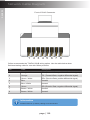
The DVI KVM over IP supports RS-232 pass-through, allowing the control of remote
RS-232 devices. The Sender and Receiver unit which are being used to pass-through
the RS-232 data must be set to the same baud rate as the RS-232 host and client.
In the example below, an RS-232 device has been connected to Receiver R1. We want to
control this product from Sender unit S3, using an automation control device. The channel
numbers are listed in blue.
Figure 2.6 - Basic RS-232 connection
Receiver unit
DVI Out
R
Receiver unit
02
12
Sender unit
S
3
R
Automation
Control Device
LAN
2
DVI Out
Sender unit
12
S
DVI In
2
1
Sender unit
RS-232 device
09
S
DVI In
1
Basic Operation
Using RS-232
05
DVI In
Table 2.1 - RS-232 settings for an arbitrary RS-232 device.
Description
Setting
Baud rate
19200
Data bits
8
Parity
None
Stop bits
1
Hardware flow control
None
Confirm that the same RS-232 settings are assigned to both the Sender and Receiver
units. To do this, access the Web interface on both the required Sender unit and Receiver
unit to set the proper RS-232 settings. Follow the instructions on the next page.
page | 35
Basic Operation
Using RS-232
1.
Access the Web interface for the Sender unit and login as “Administrator”.
2.
Click the Functions tab.
3.
Locate the Serial over IP group and change the RS-232 settings to match the
settings of the RS-232 device that is being used. In this case, we need to use the
settings from Table 2.1
4.
Make sure that the Enable Serial over IP box is checked.
Important
If Enable Serial over IP is not checked, then RS-232 pass-through will be
disabled.
5.
Click the Save button in the lower-right corner of the Serial over IP group.
page | 36
Basic Operation
Using RS-232
6.
The following message will be displayed, at the top of the page, indicating that the
new Serial over IP options have been applied.
7.
Click the Reboot button at the bottom of the page. If the Reboot button is not clicked,
the following message will be displayed, indicating that the unit must be rebooted.
8.
Repeat steps 1 - 7 for the Receiver unit.
page | 37
RS-232 under Unicast Mode
In unicast mode, a Sender unit will be able to communicate with only one Receiver unit
at a time.
Figure 2.7 - In unicast mode, the host can talk to only one RS-232 device at a time.
RS-232 device
Receiver unit
DVI Out
Automation
Control Device
LAN
R
02
2
DVI Out
Sender unit
Receiver unit
S
3
R
1
12
Sender unit
12
S
2
RS-232 device
DVI In
Sender unit
09
1
S
05
DVI In
DVI In
RS-232 under Multicast Mode
In multicast mode, a Sender unit can communicate with multiple Receiver units
simultaneously.
Figure 2.8 - In multicast mode, the host can talk to multiple RS-232 devices.
RS-232 device
Receiver unit
DVI Out
Automation
Control Device
LAN
R
12
2
Sender unit
Receiver unit
S
3
R
12
Sender unit
12
S
2
DVI Out
1
RS-232 device
Sender unit
09
S
1
Basic Operation
Using RS-232
05
DVI In
page | 38
DVI In
DVI In
USB under Unicast Mode
When connecting USB devices to the DVI KVM over IP, the functionality is similar to that
of video and RS-232.
Information
The DVI KVM over IP Sender and Receiver units shipped from the factory in
unicast mode.
As an example, we will start with our original diagram and connect a computer to Sender
unit S2 and a keyboard and mouse device to Receiver unit R2. This will allow us to control
the computer from the Receiver unit.
Figure 2.9 - Using USB devices under unicast mode.
Receiver unit
DVI Out
LAN
2
R
DVI Out
Sender unit
Receiver unit
3
S
07
R
1
Sender unit
2
S
02
DVI In
09
Sender unit
S
1
Basic Operation
USB Control
05
DVI In
07
DVI In
USB cable
Computer
1.
Make sure the desired Sender and Receiver units are set to unicast mode. Refer to
Configuring Unicast Mode if necessary.
2.
Access the Web interface for the Sender unit.
3.
Login as “Administrator”.
4.
Click the Functions tab.
page | 39
Basic Operation
USB Control
4.
Locate the USB over IP group and make sure the Enable USB over IP box is
checked. This is the default setting. Note that in unicast mode, the Operation Mode
is automatically set to Active on link and cannot be changed.
5.
Make sure that the USB Mouse Mode is set to High Resolution. This is the default
setting. Use Compatibility mode only if using additional KVM switchers or other
devices within the system that causes the mouse to behave erratically.
6.
Click the Save button within the USB over IP group, then click the Reboot button at
the bottom of the page.
7.
Connect the USB host (e.g. computer) to the USB port on the Sender unit.
8.
Connect a USB device (keyboard and/or mouse) to a USB port on the Receiver unit.
Up to 4 USB devices can be connected per network in unicast mode.
9.
The keyboard and mouse (or other USB device) can now be used from the Receiver
unit.
Important
When enabling or disabling USB over IP, the Save and Reboot buttons must
be clicked to apply changes.
page | 40
USB under Multicast Mode
When connecting USB devices to the DVI KVM over IP, the functionality is similar to that
of video and RS-232. There are two USB modes available in multicast mode: Active per
request mode and Active on link mode.
For an example, we’ll begin with the last diagram and connect another keyboard and
mouse device to Receiver R1. This will allow us to control the computer from two separate
locations.
Figure 2.9 - Using USB devices under multicast mode.
Receiver unit
R
DVI Out
LAN
2
Sender unit
Receiver unit
07
1
S
DVI Out
R
3
Sender unit
S
DVI In
07
2
Sender unit
09
DVI In
S
Basic Operation
USB Control
05
1
07
USB cable
DVI In
1.
Make sure the desired Sender and Receiver units are set to multicast mode. Refer to
Configuring Multicast Mode if necessary.
2.
Access the Web interface for the Sender unit.
3.
Click the Functions tab.
4.
Locate the USB over IP group and make sure the Enable USB over IP box is
checked. This is the default setting. See the illustration on the following page.
page | 41
Basic Operation
USB Control
Note that in multicast mode, the Operation Mode for both Sender and Receiver units
are automatically set to Active per request mode.
Under Active per request mode, multiple USB devices may be present on one or more
Receiver units. However, only one Receiver unit can have USB control at a time.
By default, the first Receiver unit connected to the system will have USB control.
In the example, below, Receiver unit R2 currently has control (we arbitrarily connected
Receiver unit R2 before Receiver unit R1).
See the diagram on the next page.
page | 42
Figure 2.10 - Receiver unit R2 currently has USB control.
Receiver unit
R
DVI Out
LAN
2
Sender unit
Receiver unit
07
1
S
DVI Out
R
3
Sender unit
S
DVI In
07
2
Sender unit
09
DVI In
S
Basic Operation
USB Control
05
1
07
USB cable
DVI In
Important
If switching between Active per request mode and Active on link mode,
the Save and Reboot buttons must be clicked to apply changes.
Now, let’s look at an example of switching USB control between two Receiver units. Using
the diagram, above, we want Receiver unit R1 to have USB control.
To assign USB control to another Receiver unit, follow the steps on the next page.
page | 43
Active per request mode
1.
Press and hold the Switch button on the desired Receiver unit, for at least two
seconds. In this example, we will depress the Switch button on Receiver unit R1.
2.
The message “Starting USB” will appear on the connected display.
Figure 2.11 - Receiver unit R1 has USB control.
Receiver unit
R
DVI Out
LAN
2
Sender unit
Receiver unit
07
1
S
DVI Out
R
3
Sender unit
S
DVI In
07
2
Sender unit
09
DVI In
S
Basic Operation
USB Control
05
3.
1
07
USB cable
DVI In
In order to assign USB control to a different Receiver unit, repeat steps 1 - 2.
Important
If switching between Active per request mode and Active on link mode, the
Save and Reboot buttons must be clicked to apply changes.
page | 44
Basic Operation
USB Control
Active on link mode
Under Active on link mode, a maximum of four USB devices can be used within a system.
In the diagram, on the previous page, the system is already using the maximum number of
USB devices (2 USB devices per Receiver). If we had two more Receiver units (making
a total of four Receiver units), we would only be able to connect one USB device to each
Receiver unit. To switch to Active on link mode, follow the instruction below.
1.
Access the Web interface for the Sender unit.
2.
Login as “Administrator”.
3.
Click the Functions tab.
4.
Locate the USB over IP group and make sure the Enable USB over IP box is
checked. This is the default setting.
5.
Click the Active on link radio button within the USB over IP group.
Note that in unicast mode, the Operation Mode is automatically set to Active on link
and cannot be changed.
page | 45
Basic Operation
USB Control
6.
Click the Save button within the USB over IP group.
7.
The following message will be displayed, at the top of the page, indicating that the
new Serial over IP options have been applied.
8.
Click the Reboot button at the bottom of the page. If the Reboot button is not clicked,
the following message will be displayed, indicating that the unit must be rebooted.
9.
Repeat steps 2 - 8 for the Receiver unit.
page | 46
Basic Operation
EDID Management
The DVI KVM over IP features EDID Management. Before the source can send video
(and/or audio) data, the source device (connected to each Sender unit) reads the EDID
(Extended Display Identification Data) from the displays which are connected to each
Receiver unit. The EDID contains information about what type of audio/video data can
be sent by each source.
By default, the (downstream) EDID from the display, connected to the Receiver unit, is
used. However, under certain circumstances, it may be desirable to use the internal EDID
which is stored in the Sender unit.
Using the Internal EDID
1.
Access the Web interface for the Sender unit.
2.
Login as “Administrator”.
3.
Click the Functions tab.
4.
Click the Load Internal EDID button.
5.
After a few moments, the following message will appear at the top of the page,
indicating that the new EDID has been applied.
Clicking the Save or Reboot button is not required for the changes to take effect.
page | 47
Basic Operation
EDID Management
Using the Downstream EDID
By default, the (downstream) EDID from the display, connected to the Receiver unit, is
used. If the internal EDID is being used, then use the following procedure to revert to the
downstream EDID.
1.
Access the Web interface for the Receiver unit.
2.
Login as “Administrator”.
3.
Click the Functions tab.
4.
Make sure that the Copy EDID of Connected Display box is checked. This is the
default setting.
Information
Clicking the Load Internal EDID button, under the Sender unit, will override
the status of the Copy EDID of Connected Display check box.
5.
Click the Save button within the EDID Management window group.
6.
The following message will be displayed, at the top of the page, indicating that the
new Serial over IP options have been applied.
7.
Click the Reboot button at the bottom of the page.
8.
The Sender unit will now use the EDID of the downstream sink device.
page | 48
Basic Operation
Audio Connections
Audio works in both unicast and multicast modes. The only difference between the two
modes is that the Mic In jack is automatically disabled, on all Receiver units, in multicast
mode. To illustrate how audio works with the DVI KVM over IP, we will set up a microphone
and some speakers.
1.
Our computer has a Line In jack, as part of the sound card and we want to be able to
access this jack from the Receiver unit. Therefore, connect the microphone to the
Mic In jack on the Receiver unit.
Connect to microphone
Receiver unit
DVI KVM over IP R
USB
Power
2.
Link
IR
Reset
Switch
Mic In
Line Out
USB
USB
In order to get the audio from the microphone into the computer, connect a
3.5mm-to-3.5mm mini-stereo cable from the Line Out jack on the Sender unit to
the Line In jack on the computer.
EXT-DVIKVM-LANR
Gefen
Ethernet
Warning
IP S
Do not connect the mini-stereo cable fromDVI
the LineKVM
Out jack over
on the Sender
unit to the Mic In jack
on the computer.
Doing2so will result
in audio
“clipping”
RS-232
1
3
IR Ext
5V DC
and may cause damage to the computer’s sound card.
DVI Out
Power
Link
Mode
Reset
Connect to Line Out
on computer
Sender unit
EXT-DVIKVM-LANS
Gefen
DVI In
RS-232
Line
In
Line
Out
USB
Link
IR Out
5V DC
Connect to Line In
on computer
3.
Connect another 3.5mm-to-3.5mm mini-stereo cable between the Line Out jack on
the computer and the Line In jack on the Sender unit. Note that any audio device
(e.g. MP3 player, etc.) can also be connected to the Line In jack on the Sender unit.
page | 49
Finally, we’ll connect a set of powered computer speakers to the Line Out jack
on the Receiver unit.
Connect to computer
speakers
DVI KVM over IP R
USB
Power
Link
IR
Reset
Switch
Mic In
USB
Line Out
USB
In the diagram below, the mouse and keyboard USB devices have been removed from
Sender unit S2 and Receiver unit R2, for purposes of clarity. Arrowheads indicate the
audio signal path.
EXT-DVIKVM-LANR
Gefen
Ethernet
Figure 2.12 - Speaker and microphone connections in unicast mode.
DVI Out
RS-232
1
2
Microphone
3
IR Ext
5V DC
Powered speakers
Receiver unit
DVI Out
Mic In
R
Line Out
LAN
2
Sender unit
DVI Out
Receiver unit
1
S
07
3
Sender unit
S
DVI In
02
09
2
Sender unit
Line Out
S
4.
R
Basic Operation
Audio Connections
1
07
Line In
Computer
05
DVI In
page | 50
Figure 2.13 - The Mic In jack, on all Receiver units, is automatically disabled
in multicast mode.
Microphone
Powered speakers
Receiver unit
Powered speakers
Mic In
R
Line Out
LAN
2
Sender unit
Receiver unit
Line Out
S
07
1
07
3
Sender unit
S
R
DVI In
09
2
Sender unit
Line Out
S
Basic Operation
Audio Connections
1
07
Line In
Computer
05
DVI In
Using HDMI Sources
HDMI sources can be connected to the DVI KVM over IP when using HDMI-to-DVI
adapters on the Sender and Receiver units. HDMI audio is passed through to the DVI Out
port on the Receiver unit. However, the DVI KVM over IP will not pass content from HDCP
sources such as Blu-ray players and Playstation® console systems.
If a 3.5mm mini-stereo cable is connected to the Line In jack on the Sender unit, then the
HDMI audio will be disabled on the Receiver unit. The Line Out jack, on the Receiver unit,
will output audio from the source connected to the Line In jack on the Sender unit.
HDMI audio cannot be output using the Line Out jack on the Receiver unit.
page | 51
Basic Operation
Setting the Video Mode
The video mode can be changed using the Mode button or through the Web interface of
the Sender unit. Consecutively pressing the Mode button on the Sender unit will switch
between Graphic, Low, Med, High, and Video mode. The Web interface will allow you to
select either Graphic or Video modes.
Using the Web interface
1.
Access the Web interface for the Sender unit.
2.
Login as “Administrator” or “User”.
3.
Click the Network tab.
4.
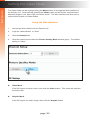
Click the desired mode within the Picture Quality Mode window group. The default
setting is “Video”.
►► Video Mode
If the DVI signal is motion video, then click the Video button. This mode will optimize
the frame rate.
►► Graphic Mode
If the DVI signal is a static image, then click the Graphic button.
page | 52
Basic Operation
Setting the Video Mode
5.
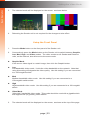
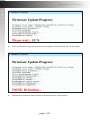
The selected mode will be displayed on the screen, as shown below.
Video Mode
6.
Graphic Mode
Rebooting the Sender unit is not required for the changes to take effect.
Using the Front Panel
1.
Press the Mode button on the front panel of the Sender unit.
2.
Consecutively press the Mode button on the Sender unit to switch between Graphic,
Low, Med, High, and Video modes. The video modes on all Sender and Receiver
units, on the network, should be set to the same mode.
►► Graphic Mode
If the source video signal is a static image, then click the Graphic button.
►► Low
Low-bandwidth video mode. Limits the video bandwidth on the network. Note that
using this setting will degrade the video quality. Use this setting if you are connected
to a 100-megabit switch.
►► Med
Medium-bandwidth video mode. Use this setting if you are connected to a
100-megabit switch.switch.
►► High
High-bandwidth video mode. Use this setting if you are connected to a 100-megabit
switch.
►► Video Mode
“Ultra-high” bandwidth video mode. This mode should be used with a gigabit switch
that supports 8K (or greater) jumbo frames.
3.
The selected mode will be displayed on the screen, as shown at the top of the page.
page | 53
Basic Operation
Changing the Password
1.
Access the Web interface for the Sender / Receiver unit.
2.
Login as “Administrator”.
3.
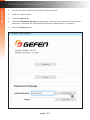
Click the System tab.
4.
Under the Password Change window group, enter the new password for the desired
username. Note that the new password will not be masked when it is entered.
5.
Click the Change button.
page | 54
Basic Operation
Performing a Factory Reset
The DVI KVM over IP can be reset using the Web interface or using the buttons on the front
panel. When using the Web interface, the Sender / Receiver units will automatically be
reset to Auto IP mode. When using the front-panel buttons, the Sender / Receiver can be
reset to either Auto IP or Static IP mode.
Reset using the Web Interface
Information
Once a unit has been reset to Auto IP mode, the connection to the Web
interface will be terminated. To reestablish a connection to the Web interface,
from your computer, see Installation & Configuration (page 6).
1.
Access the Web interface for the desired Sender / Receiver unit. It does not matter
which unit is reset first.
2.
Login as “Administrator”.
3.
Click the System tab.
4.
Click the Reset button.
page | 55
Basic Operation
Performing a Factory Reset
5.
Both the Power and Link LED indicators will begin to flash.
DVI KVM over IP R
USB
Power
Link
IR
Reset
Switch
Mic In
Line Out
USB
USB
6.
After both LED indicators stop flashing, the unit will be reset.
7.
Repeat the process for each unit.
EXT-DVIKVM-LANR
Gefen
Ethernet
DVI Out
RS-232
1
page | 56
2
3
IR Ext
5V DC
Basic Operation
Performing a Factory Reset
Reset using the Front Panel
1.
Disconnect the power from the Sender / Receiver unit. It does not matter which unit
is reset first. When the DVI KVM over IP is reset, it can be set to either Auto IP or
Static IP mode.
2.
Use one of the following options to reset the unit to the desired mode.
►► Factory reset with Auto IP mode:
1.
If resetting the Sender unit, press and hold the Mode button. If resetting
the Receiver unit, press and hold the Switch button.
2.
Reconnect the power to the unit you are resetting.
3.
Hold the Mode / Switch button until both Power and Link LED indicators
begin to flash.
4.
Release the Mode / Switch button.
►► Factory reset with Static IP mode:
3.
1.
If resetting the Sender unit, press and hold the Mode button. If resetting
the Receiver unit, press and hold the Switch button.
2.
Reconnect the power to the unit you are resetting.
3.
Hold the Mode / Switch button until the Power LED indicator begin to flash.
4.
Release the Mode / Switch button.
5.
After a few moments, the Link LED indicator will also begin to flash.
Press the Reset button using the end of a paper clip or other sharp pointed object.
Mode button
DVI KVM over IP S
Power
Link
Mode
Reset
Reset button
Switch button
DVI KVM over IP R
USB
EXT-DVIKVM-LANS
Gefen
Power
Link
DVI In
IR
RS-232
Reset
Switch
Mic In
page | 57
Line
In
Line
Out
Line Out
USB
USB
USB
Link
IR Out
5V DC
Basic Operation
Rebooting a Unit
The DVI KVM over IP Sender or Receiver unit can be rebooted in three different ways:
Using the Web interface, the Reset button on the front panel, or simply disconnecting
and reconnecting the power.
Reboot using the Web Interface
1.
Access the Web interface for the Sender / Receiver unit.
2.
Login as “Administrator”.
3.
Click the System tab.
4.
Click the Reboot button.
5.
After a few moments, the Power LED indicator will flash.
6.
Several seconds later, the Power LED indicator will glow solid blue and the Link LED
indicator will begin to flash.
7.
After both LED indicators stop flashing, the reboot process will be complete.
page | 58
Basic Operation
Rebooting a Unit
Reboot using the Front Panel
1.
Press the Reset button, on the desired Sender or Receiver unit, using the end
of a paper clip or other sharp pointed object.
2.
After a few moments, the Power LED indicator will flash.
3.
Several seconds later, the Power LED indicator will glow solid blue and the Link LED
indicator will begin to flash.
4.
After both LED indicators stop flashing, the reboot process will be complete.
Reset button
DVI KVM over IP S
Power
Link
Mode
Reset
Reset button
DVI KVM over IP R
USB
EXT-DVIKVM-LANS
Gefen
Power
Link
DVI In
IR
RS-232
Reset
Switch
Line
In
Mic In
Line
Out
Line Out
USB
USB
USB
Link
IR Out
5V DC
3
IR Ext
5V DC
EXT-DVIKVM-LANR
Gefen
Ethernet
DVI Out
RS-232
1
page | 59
2
DVI KVM over IP
3
Advanced Operation
Advanced Operation
Telnet Access
Information
By default, the Telnet login credentials are disabled. This setting is required
when using the Matrix controller (Gefen part no. EXT-CU-LAN) but can be
enabled for security purposes. Use the #use_telnet_login command to
enable or disable this feature.
1.
Launch the desired terminal application (e.g. Windows Hyperterminal, etc).
2.
Within the terminal program, enter the IP address of the Sender or Receiver unit that
you wish to control.
3.
Enter the TCP listening port. The default listening port is 23.
4.
After the correct settings have been used in the terminal program, information similar
to the following will be displayed.
In the example, below, we are connected to the client (Receiver unit) and Telnet login
has been enabled:
------------- Welcome to the Gefen Telnet Server ----------ast2-client001C9103C8B3 login:
5.
Login as “Administrator”. The default password is “admin”. To change the Telnet
password, see the #set_telnet_pass command.
6.
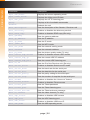
Type #help for a list of commands or refer to the tables on the following pages.
page | 62
Advanced Operation
Commands
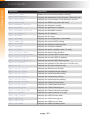
Command
Description
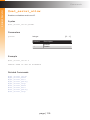
#factory_reset
Resets the unit to factory-default settings
#get_description
Displays the description of the Sender / Receiver unit
#get_discovery
Displays the current state of the discovery service
#get_edid_copy
Displays the EDID copy state (Rx only)
#get_firmware_version
Displays the firmware version
#get_gateway
Displays the gateway IP address
#get_hardware_version
Displays the hardware version
#get_ip_address
Displays the IP address
#get_ip_mode
Displays the IP mode
#get_ipconfig
Displays the IP configuration information
#get_jumbo_mtu
Displays the current MTU setting
#get_net_mode
Displays the network casting mode
#get_netmask
Displays the netmask address
#get_pq_mode
Displays the picture quality mode (Tx only)
#get_product_name
Displays the name of the product
#get_remote_udp_access
Displays the remote UDP access state
#get_remote_udp_ip
Displays the remote UDP IP address
#get_remote_udp_port
Displays the remote UDP listening port
#get_rx_channel
Displays the channel of the Receiver unit (Rx only)
#get_rx_id
Displays the ID of the Receiver unit
#get_serial_allow
Displays the Serial-over-IP state
#get_serial_baud
Displays the serial baud rate setting
#get_serial_bits
Displays the serial data bits setting
#get_serial_parity
Displays the serial parity setting
#get_serial_stop
Displays the serial stop bits setting
#get_telnet_access
Displays the Telnet access state
#get_telnet_pass
Displays the Telnet password state
#get_telnet_port
Displays the Telnet listening port
#get_telnet_welcome
Displays the Telnet welcome message
#get_tx_channel
Displays the video channel (Tx only)
#get_udp_access
Displays the UDP access state
#get_udp_port
Displays the UDP listening port
#get_usb_allow
Displays the USB-over-IP state
#get_usb_mode
Displays the USB operating mode
page | 63
Advanced Operation
Commands
Command
Description
#get_usb_mouse
Displays the mouse operating mode
#get_video_allow
Displays the Video-over-IP state
#get_web_port
Displays the HTTP listening port
#help
Displays a list of available commands
#reboot
Reboots the unit
#set_description
Sets the description of the Sender / Receiver unit
#set_discovery
Enables or disables the discovery service
#set_edid_copy
Enables or disables EDID copy (Rx only)
#set_gateway
Sets the gateway address
#set_ip_address
Sets the IP address
#set_ip_mode
Sets the IP mode
#set_jumbo_mtu
Sets the MTU mode
#set_net_mode
Sets the network casting mode
#set_netmask
Sets the netmask address
#set_pq_mode
Sets the picture quality mode (Tx only)
#set_remote_udp_access
Enables or disables remote UDP access
#set_remote_udp_ip
Sets the remote UDP IP address
#set_remote_udp_port
Sets the remote UDP listening port
#set_rx_id
Sets the ID of the Receiver unit (Rx only)
#set_serial_allow
Enables or disables Serial-over-IP mode
#set_serial_baud
Sets the baud rate for the serial port
#set_serial_bits
Sets the data bits for the serial port
#set_serial_parity
Sets the parity setting for the serial port
#set_serial_stop
Sets the number of stop bits for the serial port
#set_showme
Enables or disables the “show me” feature
#set_telnet_access
Enables or disables Telnet access
#set_telnet_pass
Sets the Telnet password
#set_telnet_port
Sets the Telnet listening port
#set_telnet_welcome
Sets the Telnet welcome message
#set_tx_channel
Sets the video channel (Tx only)
#set_udp_access
Enables or disables UDP access
#set_udp_port
Sets the UDP listening port
#set_usb_allow
Enables or disables USB-over-IP
#set_usb_mode
Sets the USB operating mode
page | 64
Advanced Operation
Commands
Command
Description
#set_usb_mouse
Sets the mouse operating mode
#set_video_allow
Enables or disables Video-over-IP
#set_web_port
Sets the HTTP listening port
#set_webui_ad_pass
Sets the Administrator password for the Web UI
#set_webui_user_pass
Sets the User password for the Web UI
#use_telnet_login
Enable or disables Telnet login credentials
#use_telnet_welcome
Enables or disables the Telnet welcome message
r
Routes an input to a Receiver unit (Rx only)
Important
Commands that are limited to a Sender or Receiver unit are marked as
“Tx only” and “Rx only”, respectively. Unless otherwise noted, all commands
can be used when connected to either a Sender or Receiver unit.
page | 65
Advanced Operation
Commands
#factory_reset
Resets the unit to factory-default settings. param1 must be included and set to 1.
Syntax
#factory_reset param1
Parameters
param1
Integer1
Example
#factory_reset 1
RESET TO FACTORY DEFAULTS
Related Commands
#reboot
page | 66
Advanced Operation
Commands
#get_description
Displays the description of the Sender / Receiver unit.
Syntax
#get_description
Parameters
None
Example
#get_description
EXT-DVIKVM-LAN-S
Related Commands
#get_product_name
#set_description
page | 67
Advanced Operation
Commands
#get_discovery
Displays the current discovery mode setting.
Syntax
#get_discovery
Parameters
None
Example
#get_discovery
DISCOVERY SERVICE IS ENABLED
Related Commands
#set_discovery
#set_showme
page | 68
Advanced Operation
Commands
#get_edid_copy
Displays the EDID copy state. This command is only available when connected
to a Receiver unit.
Syntax
#get_edid_copy
Parameters
None
Example
#get_edid_copy
COPY EDID OF CONNECTED DISPLAY IS ENABLED
Related Commands
#set_edid_copy
page | 69
Advanced Operation
Commands
#get_firmware_version
Displays the firmware version.
Syntax
#get_firmware_version
Parameters
None
Example
#get_firmware_version
FIRMWARE VERSION IS V1.53V
Related Commands
#get_hardware_version
page | 70
Advanced Operation
Commands
#get_gateway
Displays the gateway address of the Sender/Receiver unit.
Syntax
#get_gateway
Parameters
None
Example
#get_gateway
GATEWAY: 192.168.0.1
Related Commands
#get_ip_address
#get_ip_mode
#get_ipconfig
#get_netmask
#set_gateway
#set_ip_address
#set_ip_mode
#set_netmask
page | 71
Advanced Operation
Commands
#get_hardware_version
Displays the hardware version of the Sender / Receiver unit.
Syntax
#get_hardware_version
Parameters
None
Example
#get_hardware_version
HARDWARE VERSION IS ast1510hv1
Related Commands
#get_firmware_version
page | 72
Advanced Operation
Commands
#get_ip_address
Displays the current IP address of the Sender or Receiver unit.
Syntax
#get_ip_address
Parameters
None
Example
#get_ip_address
IP: 10.5.64.60
Related Commands
#get_gateway
#get_ip_mode
#get_ipconfig
#get_netmask
#get_web_port
#set_gateway
#set_ip_address
#set_ip_mode
#set_netmask
#set_web_port
page | 73
Advanced Operation
Commands
#get_ip_mode
Displays the current IP mode.
Syntax
#get_ip_mode
Parameters
None
Example
#get_ip_mode
IP MODE IS SET TO DHCP
Related Commands
#get_gateway
#get_ip_address
#get_ipconfig
#get_netmask
#get_web_port
#set_gateway
#set_ip_address
#set_ip_mode
#set_netmask
#set_web_port
page | 74
Advanced Operation
Commands
#get_ipconfig
Displays the current IP configuration. In addition to providing the MAC address and the
broadcast IP address, this command also provides the same information as executing the
#get_ip_mode, #get_ip_address, #get_netmask, and #get_gateway commands.
Syntax
#get_ipconfig
Parameters
None
Example
#get_ipconfig
IP CONFIGURATION IS :
IP MODE: DHCP
IP: 10.5.64.60
NETMASK: 255.255.255.0
GATEWAY: 10.5.64.1
BROADCAST: 10.5.64.255
MAC ADDRESS: 00-1C-91-03-C8-B3
Related Commands
#get_gateway
#get_ip_address
#get_netmask
#get_web_port
#set_gateway
#set_ip_address
#set_ip_mode
#set_netmask
#set_web_port
page | 75
Advanced Operation
Commands
#get_jumbo_mtu
Displays the current MTU (Maximum Transmission Unit) setting. The default setting
is enabled.
Syntax
#get_jumbo_mtu
Parameters
None
Example
#get_jumbo_mtu
JUMBO MTU is ENABLE
Related Commands
#set_jumbo_mtu
page | 76
Advanced Operation
Commands
#get_net_mode
Displays the current network mode setting.
Syntax
#get_net_mode
Parameters
None
Example
#get_net_mode
NETWORK CASTING MODE IS UNICAST
Related Commands
#set_net_mode
page | 77
Advanced Operation
Commands
#get_netmask
Displays the current net mask setting.
Syntax
#get_netmask
Parameters
None
Example
#get_netmask
NETMASK: 255.255.255.0
Related Commands
#get_gateway
#get_ip_address
#get_ipconfig
#get_web_port
#set_gateway
#set_ip_address
#set_ip_mode
#set_netmask
#set_web_port
page | 78
Advanced Operation
Commands
#get_pq_mode
Displays the picture quality mode. This command is only available when connected to a
Sender unit.
Syntax
#get_pq_mode
Parameters
None
Example
#get_pq_mode
TRANSMITTER PICTURE QUALITY IS VIDEO
Related Commands
#set_pq_mode
page | 79
Advanced Operation
Commands
#get_product_name
Displays the product name of the Sender / Receiver unit.
Syntax
#get_product_name
Parameters
None
Example
#get_product_name
PRODUCT NAME IS EXT-DVIKVM-LAN-S
Related Commands
#get_description
page | 80
Advanced Operation
Commands
#get_remote_udp_access
Displays the remote UDP access state.
Syntax
#get_remote_udp_access
Parameters
None
Example
#get_remote_udp_access
REMOTE UDP ACCESS IS ENABLED
Related Commands
#get_remote_udp_ip
#get_remote_udp_port
#get_udp_access
#get_udp_port
#set_remote_udp_access
#set_remote_udp_ip
#set_remote_udp_port
#set_udp_access
#set_udp_port
page | 81
Advanced Operation
Commands
#get_remote_udp_ip
Displays the remote UDP IP address.
Syntax
#get_remote_udp_ip
Parameters
None
Example
#get_remote_udp_access
REMOTE UDP IP: 192.168.1.29
Related Commands
#get_remote_udp_access
#get_remote_udp_port
#get_udp_access
#get_udp_port
#set_remote_udp_access
#set_remote_udp_ip
#set_remote_udp_port
#set_udp_access
#set_udp_port
page | 82
Advanced Operation
Commands
#get_remote_udp_port
Displays the remote UDP listening port.
Syntax
#get_remote_udp_port
Parameters
None
Example
#get_remote_udp_port
REMOTE UDP COMMUNICATIONS PORT: 50008
Related Commands
#get_remote_udp_access
#get_remote_udp_ip
#get_udp_access
#get_udp_port
#set_remote_udp_access
#set_remote_udp_ip
#set_remote_udp_port
#set_udp_access
#set_udp_port
page | 83
Advanced Operation
Commands
#get_rx_channel
Displays the current channel of the Receiver unit. To set the video channel of a Receiver
unit, use the r command.
Syntax
#get_rx_channel
Parameters
None
Example
#get_rx_channel
RECEIVER CHANNEL: 1
Related Commands
#get_tx_channel
#set_tx_channel
r
page | 84
Advanced Operation
Commands
#get_rx_id
Displays the ID of the Receiver unit. This command is only available when connected
to a Receiver unit.
Syntax
#get_rx_id
Parameters
None
Example
#get_rx_id
RX ID: 8
Related Commands
#set_rx_id
page | 85
Advanced Operation
Commands
#get_serial_allow
Displays the Serial-over-IP state. Use the #set_serial_allow command to enable
or disable the Serial-over-IP feature.
Syntax
#get_serial_allow
Parameters
None
Example
#get_serial_allow
SERIAL OVER IP is ENABLE
Related Commands
#get_serial_baud
#get_serial_parity
#get_serial_stop
#set_serial_allow
#set_serial_baud
#set_serial_bits
#set_serial_parity
#set_serial_stop
page | 86
Advanced Operation
Commands
#get_serial_baud
Displays the serial baud rate setting. Use the #set_serial_baud command to set
the baud rate.
Syntax
#get_serial_baud
Parameters
None
Example
#get_serial_baud
SERIAL BAUD RATE IS 19200
Related Commands
#get_serial_allow
#get_serial_bits
#get_serial_parity
#get_serial_stop
#set_serial_allow
#set_serial_baud
#set_serial_bits
#set_serial_parity
#set_serial_stop
page | 87
Advanced Operation
Commands
#get_serial_bits
Displays the serial data bits setting. Use the #set_serial_bits command to set
the number of data bits.
Syntax
#get_serial_bits
Parameters
None
Example
#get_serial_bits
SERIAL DATA BITS IS 8
Related Commands
#get_serial_allow
#get_serial_baud
#get_serial_parity
#get_serial_stop
#set_serial_allow
#set_serial_baud
#set_serial_bits
#set_serial_parity
#set_serial_stop
page | 88
Advanced Operation
Commands
#get_serial_parity
Displays the serial parity bit setting. Use the #set_serial_parity command to set
the parity bit.
Syntax
#get_serial_parity
Parameters
None
Example
#get_serial_parity
SERIAL PARITY MODE SET TO NONE
Related Commands
#get_serial_allow
#get_serial_baud
#get_serial_bits
#get_serial_stop
#set_serial_allow
#set_serial_baud
#set_serial_bits
#set_serial_parity
#set_serial_stop
page | 89
Advanced Operation
Commands
#get_serial_stop
Displays the serial stop bits setting. Use the #set_serial_stop command to set
the number of stop bits.
Syntax
#get_serial_stop
Parameters
None
Example
#get_serial_stop
SERIAL STOP BITS IS 1
Related Commands
#get_serial_allow
#get_serial_baud
#get_serial_bits
#get_serial_parity
#set_serial_allow
#set_serial_baud
#set_serial_bits
#set_serial_parity
#set_serial_stop
page | 90
Advanced Operation
Commands
#get_telnet_access
Displays the Telnet access state. Use the #set_telnet_access command to enable
or disable Telnet access.
Syntax
#get_telnet_access
Parameters
None
Example
#get_telnet_access
TELNET ACCESS IS ENABLED
Related Commands
#get_telnet_pass
#get_telnet_port
#get_telnet_welcome
#set_telnet_access
#set_telnet_pass
#set_telnet_port
#set_telnet_welcome
#use_telnet_login
#use_telnet_welcome
page | 91
Advanced Operation
Commands
#get_telnet_pass
Displays the Telnet password state. Use the #set_telnet_pass command to enable
or disable password credentials during a Telnet session.
Syntax
#get_telnet_pass
Parameters
None
Example
#get_telnet_pass
TELNET INTERFACE PASSWORD IS DISABLED
Related Commands
#get_telnet_access
#get_telnet_port
#get_telnet_welcome
#set_telnet_access
#set_telnet_pass
#set_telnet_port
#set_telnet_welcome
#use_telnet_login
#use_telnet_welcome
page | 92
Advanced Operation
Commands
#get_telnet_port
Displays the Telnet listening port.
Syntax
#get_telnet_port
Parameters
None
Example
#get_telnet_port
TELNET COMMUNICATION PORT: 23
Related Commands
#get_telnet_access
#get_telnet_pass
#get_telnet_welcome
#set_telnet_access
#set_telnet_pass
#set_telnet_port
#set_telnet_welcome
#use_telnet_login
#use_telnet_welcome
page | 93
Advanced Operation
Commands
#get_telnet_welcome
Displays the Telnet welcome message. Use the #set_telnet_welcome to create
a custom welcome message.
Syntax
#get_telnet_welcome
Parameters
None
Example
#get_telnet_welcome
TELNET WELCOME IS ---- Welcome to the Gefen Telnet Server -----
Related Commands
#get_telnet_access
#get_telnet_pass
#get_telnet_port
#set_telnet_access
#set_telnet_pass
#set_telnet_port
#set_telnet_welcome
#use_telnet_login
#use_telnet_welcome
page | 94
Advanced Operation
Commands
#get_tx_channel
Displays the video channel of the Sender unit. This command is only available when
connected to a Sender unit.
Syntax
#get_tx_channel
Parameters
None
Example
#get_tx_channel
Related Commands
#get_rx_channel
#set_tx_channel
r
page | 95
Advanced Operation
Commands
#get_udp_access
Displays the UDP access state. Use the #set_udp_access command to enable
or disable UDP access.
Syntax
#get_udp_access
Parameters
None
Example
#get_udp_access
UDP ACCESS IS ENABLED
Related Commands
#get_remote_udp_access
#get_remote_udp_ip
#get_remote_udp_port
#get_udp_port
#set_remote_udp_access
#set_remote_udp_ip
#set_remote_udp_port
#set_udp_access
#set_udp_port
page | 96
Advanced Operation
Commands
#get_udp_port
Displays the local UDP listening port.
Syntax
#get_udp_port
Parameters
None
Example
#get_udp_port
UDP COMMUNICATION PORT: 50007
Related Commands
#get_remote_udp_access
#get_remote_udp_ip
#get_remote_udp_port
#get_udp_access
#set_remote_udp_access
#set_remote_udp_ip
#set_remote_udp_port
#set_udp_access
#set_udp_port
page | 97
Advanced Operation
Commands
#get_usb_allow
Displays the USB-over-IP state.
Syntax
#get_usb_allow
Parameters
None
Example
#get_usb_allow
USB OVER IP is ENABLE
Related Commands
#get_usb_mode
#get_usb_mouse
#set_usb_allow
#set_usb_mode
#set_usb_mouse
page | 98
Advanced Operation
Commands
#get_usb_mode
Displays the USB operating mode.
Syntax
#get_usb_mode
Parameters
None
Example
#get_usb_mode
USB OPERATION MODE IS ACTIVE ON LINK
Related Commands
#get_usb_allow
#get_usb_mouse
#set_usb_allow
#set_usb_mode
#set_usb_mouse
page | 99
Advanced Operation
Commands
#get_usb_mouse
Displays the mouse operating mode.
Syntax
#get_usb_mouse
Parameters
None
Example
#get_usb_mouse
USB MOUSE MODE IS HIGH
Related Commands
#get_usb_allow
#get_usb_mode
#set_usb_allow
#set_usb_mode
#set_usb_mouse
page | 100
Advanced Operation
Commands
#get_video_allow
Displays the Video-over-IP status. Use the #set_video_allow command to enable
or disable video over IP.
Syntax
#get_video_allow
Parameters
None
Example
#get_video_allow
VIDEO OVER IP is ENABLE
Related Commands
#set_video_allow
page | 101
Advanced Operation
Commands
#get_web_port
Displays the HTTP listening port. Use the #set_web_port command to set the HTTP
listening port.
Syntax
#get_web_port
Parameters
None
Example
#get_web_port
WEB INTERFACE PORT: 80
Related Commands
#get_gateway
#get_ip_address
#get_ipconfig
#set_gateway
#set_ip_address
#set_ip_mode
#set_netmask
#set_web_port
page | 102
Advanced Operation
Commands
#help
Displays a list of available commands. The commands listed are specific to either the
Sender or Receiver unit.
Syntax
#help
Parameters
None
Example
#help
#FACTORY_RESET
#GET_DISCOVERY
#GET_FIRMWARE_VERSION
#GET_GATEWAY
#GET_HDCP
#GET_IPCONFIG
#GET_IP_ADDRESS
#GET_IP_MODE
...
...
#SET_TELNET_ACCESS
#SET_TELNET_PASS
#SET_TELNET_PORT
#SET_TELNET_WELCOME
#SET_TX_CHANNEL
#SET_UDP_ACCESS
#SET_UDP_PORT
#SET_USB_ALLOW
#SET_USB_MODE
#SET_USB_MOUSE
#SET_VIDEO_ALLOW
#SET_WEBUI_AD_PASS
#SET_WEBUI_USER_PASS
#SET_WEB_PORT
#USE_TELNET_LOGIN
#USE_TELNET_WELCOME
page | 103
Advanced Operation
Commands
#reboot
Reboots the Sender / Receiver unit.
Syntax
#reboot
Parameters
None
Example
#reboot
UNIT WILL REBOOT SHORTLY
Related Commands
#factory_reset
page | 104
Advanced Operation
Commands
#set_description
Sets the description for the Sender / Receiver unit. The description string cannot exceed
30 characters in length. Spaces and underscore characters are acceptable. Avoid using
symbols and special characters.
Syntax
#set_description param1
Parameters
param1
String
Example
#set_description Blu-ray_Panasonic
PRODUCT DESCRIPTION SET
Related Commands
#get_description
#get_product_name
page | 105
Advanced Operation
Commands
#set_discovery
Enables or disables the discovery feature. The default value is On.
Syntax
#set_discovery param1
Parameters
param1
Integer[0 ... 1]
param1
Description
0
Off
1
On
Example
#set_discovery 0
DISCOVERY SERVICE SET TO DISABLED
Related Commands
#get_discovery
#set_showme
page | 106
Advanced Operation
Commands
#set_edid_copy
Enables or disables the EDID copy state. When param1 = 1, the downstream EDID
(connected to the Receiver unit) is copied to the Sender unit. If param1 = 0, then the
internal (default) EDID is used. This command is only available when connected
to a Receiver unit.
Syntax
#set_edid_copy param1
Parameters
param1
Integer[0 ... 1]
param1
Description
0
Off
1
On
Example
#set_edid_copy 1
COPY EDID OF CONNECTED DISPLAY SET TO ENABLED
PLEASE REBOOT THE UNIT TO APPLY CHANGES
Related Commands
#get_edid_copy
page | 107
Advanced Operation
Commands
#set_gateway
Sets the gateway address. This command is only applicable when using Static IP mode.
param1 must be specified using dot-decimal notation.
Syntax
#set_gateway param1
Parameters
param1
IP Address
Example
#set_gateway 192.168.1.1
GATEWAY ADDRESS SET TO 192.168.1.1
PLEASE REBOOT THE UNIT TO APPLY CHANGES
Related Commands
#get_gateway
#get_ip_address
#get_ip_mode
#get_ipconfig
#get_netmask
#get_web_port
#set_ip_address
#set_ip_mode
#set_netmask
#set_web_port
page | 108
Advanced Operation
Commands
#set_ip_address
Sets the IP address. param1 must be specified using dot-decimal notation.
Syntax
#set_ip_address param1
Parameters
param1
IP Address
Example
#set_gateway 192.168.1.1
GATEWAY ADDRESS SET TO 192.168.1.1
PLEASE REBOOT THE UNIT TO APPLY CHANGES
Related Commands
#get_gateway
#get_ip_address
#get_ip_mode
#get_ipconfig
#get_netmask
#get_web_port
#set_gateway
#set_ip_mode
#set_netmask
#set_web_port
page | 109
Advanced Operation
Commands
#set_ip_mode
Sets the IP mode.
Syntax
#set_ip_mode param1
Parameters
param1
Integer[0 ... 2]
param1
Description
0
Static
1
DHCP
2
Auto IP
Example
#set_ip_mode 1
IP MODE SET TO DHCP
PLEASE REBOOT THE UNIT TO APPLY CHANGES
Related Commands
#get_gateway
#get_ip_address
#get_ip_mode
#get_ipconfig
#get_netmask
#get_web_port
#set_ip_address
#set_gateway
#set_netmask
#set_web_port
page | 110
Advanced Operation
Commands
#set_jumbo_mtu
Enables or disables jumbo MTU (Maximum Transmission Unit) mode. When enabled, the
MTU size is set to 8000 (8K jumbo frames).
Syntax
#set_jumbo_mtu param1
Parameters
param1
Integer[0 ... 1]
param1
Description
0
Disabled (MTU = 1500)
1
Enabled (MTU = 8000)
Example
#set_jumbo_mtu 1
JUMBO MTU SET TO ENABLED
PLEASE REBOOT THE UNIT TO APPLY CHANGES
Related Commands
#get_jumbo_mtu
page | 111
Advanced Operation
Commands
#set_net_mode
Sets the network casting mode.
Syntax
#set_net_mode param1
Parameters
param1
Integer[0 ... 1]
param1
Description
0
Unicast
1
Multicast
Example
#set_net_mode 0
NETWORK CASTING MODE SET TO UNICAST
Related Commands
#get_net_mode
page | 112
Advanced Operation
Commands
#set_netmask
Sets the network mask address. param1 must be specified using dot-decimal notation.
Syntax
#set_netmask param1
Parameters
param1
IP Address
Example
#set_netmask 255.255.255.0
NETMASK ADDRESS SET TO 255.255.255.0
PLEASE REBOOT THE UNIT TO APPLY CHANGES
Related Commands
#get_gateway
#get_ip_address
#get_ip_mode
#get_ipconfig
#get_netmask
#get_web_port
#set_ip_address
#set_ip_mode
#set_gateway
#set_web_port
page | 113
Advanced Operation
Commands
#set_pq_mode
Sets the picture quality mode. This command is only available when connected
to a Sender unit.
Syntax
#set_pq_mode param1
Parameters
param1
Integer[0 ... 1]
param1
Description
0
Graphic
1
Video
Example
#set_pq_mode 1
TRANSMITTER PICTURE QUALITY SET TO VIDEO
Related Commands
#get_pq_mode
page | 114
Advanced Operation
Commands
#set_remote_udp_access
Enables or disables remote UDP access.
Syntax
#set_remote_udp_access param1
Parameters
param1
Integer[0 ... 1]
param1
Description
0
Disabled
1
Enabled
Example
#set_remote_udp_access 1
REMOTE UDP ACCESS SET TO ENABLED
Related Commands
#get_remote_udp_access
#get_remote_udp_ip
#get_remote_udp_port
#get_udp_access
#get_udp_port
#set_remote_udp_access
#set_remote_udp_ip
#set_remote_udp_port
#set_udp_access
#set_udp_port
page | 115
Advanced Operation
Commands
#set_remote_udp_ip
Set the remote UDP IP address. param1 must be specified using dot-decimal notation.
Syntax
#set_remote_udp_ip param1
Parameters
param1
IP address
Example
#set_remote_udp_ip 192.168.1.29
REMOTE UDP IP ADDRESS SET TO 192.168.1.29
PLEASE REBOOT THE UNIT TO APPLY CHANGES
Related Commands
#get_remote_udp_access
#get_remote_udp_ip
#get_remote_udp_port
#get_udp_access
#get_udp_port
#set_remote_udp_access
#set_remote_udp_port
#set_udp_access
#set_udp_port
page | 116
Advanced Operation
Commands
#set_remote_udp_port
Set the remote UDP listening port.
Syntax
#set_remote_udp_port param1
Parameters
param1
Integer[0 ... 65535]
Example
#set_remote_udp_port 50008
REMOTE UDP COMMUNICATIONS PORT IS SET TO PORT 50008
PLEASE REBOOT THE UNIT TO APPLY CHANGES
Related Commands
#get_remote_udp_access
#get_remote_udp_ip
#get_remote_udp_port
#get_udp_access
#get_udp_port
#set_remote_udp_access
#set_remote_udp_ip
#set_udp_access
#set_udp_port
page | 117
Advanced Operation
Commands
#set_rx_id
Sets the ID of the Receiver unit. This command is only available when connected
to a Receiver unit.
Syntax
#set_rx_id param1
Parameters
param1
Integer[0 ... 65535]
Example
#set_rx_id 10
RX ID SET TO 10
Related Commands
#get_rx_id
page | 118
Advanced Operation
Commands
#set_serial_allow
Enables or disables serial over IP.
Syntax
#set_serial_allow param1
Parameters
param1
Integer[0 ... 1]
param1
Description
0
Disable
1
Enable
Example
#set_serial_allow 0
SERIAL OVER IP SET TO DISABLED
Related Commands
#get_serial_allow
#get_serial_baud
#get_serial_bits
#get_serial_parity
#get_serial_stop
#set_serial_baud
#set_serial_bits
#set_serial_parity
#set_serial_stop
page | 119
Advanced Operation
Commands
#set_serial_baud
Sets the baud rate for the serial port.
Syntax
#set_serial_baud param1
Parameters
param1
Integer[0 ... 11]
param1
Description (baud rate)
0
300
1
600
2
1200
3
2400
4
4800
5
9600
6
14400
7
19200
8
38400
9
57600
10
115200
11
230400
Example
#set_serial_baud 7
SERIAL BAUD RATE SET TO 19200
Related Commands
#get_serial_allow
#get_serial_baud
#get_serial_bits
#get_serial_parity
#get_serial_stop
#set_serial_allow
#set_serial_bits
#set_serial_parity
#set_serial_stop
page | 120
Advanced Operation
Commands
#set_serial_bits
Sets the data bits for the serial port.
Syntax
#set_serial_bits param1
Parameters
param1
Integer[0 ... 3]
param1
Description (data bits)
0
5
1
6
2
7
3
8
Example
#set_serial_bits 3
SERIAL DATA BITS SET TO 8
Related Commands
#get_serial_allow
#get_serial_baud
#get_serial_bits
#get_serial_parity
#get_serial_stop
#set_serial_allow
#set_serial_baud
#set_serial_bits
#set_serial_parity
#set_serial_stop
page | 121
Advanced Operation
Commands
#set_serial_parity
Sets the parity bit setting for the serial port.
Syntax
#set_serial_parity param1
Parameters
param1
Integer[0 ... 2]
param1
Description
0
None
1
Odd
2
Even
Example
#set_serial_parity 0
SERIAL PARITY MODE SET TO NONE
Related Commands
#get_serial_allow
#get_serial_baud
#get_serial_bits
#get_serial_parity
#get_serial_stop
#set_serial_allow
#set_serial_baud
#set_serial_bits
#set_serial_stop
page | 122
Advanced Operation
Commands
#set_serial_stop
Sets the number of stop bits for the serial port.
Syntax
#set_serial_stop param1
Parameters
param1
Integer[0 ... 1]
param1
Description (stop bits)
0
1
1
2
Example
#set_serial_stop 0
SERIAL STOP BITS SET TO 1
Related Commands
#get_serial_allow
#get_serial_baud
#get_serial_bits
#get_serial_parity
#get_serial_stop
#set_serial_allow
#set_serial_baud
#set_serial_bits
#set_serial_parity
page | 123
Advanced Operation
Commands
#set_showme
Enables or disables the “Show Me” feature. When the “Show Me” feature is enabled,
then both the Power and Link LED indicators, on the front panel, will flash. This quickly
identifies a unit and is useful when multiple units are being used. The default setting is
disabled.
Syntax
#set_showme param1
Parameters
param1
Integer[0 ... 1]
param1
Description
0
Disabled
1
Enabled
Example
#set_showme 1
SHOW ME ENABLED
Related Commands
#get_discovery
#set_discovery
page | 124
Advanced Operation
Commands
#set_telnet_access
Enables or disables Telnet access.
Syntax
#set_telnet_access param1
Parameters
param1
Integer[0 ... 1]
param1
Description
0
Disabled
1
Enabled
Example
#set_telnet_access 1
TELNET ACCESS SET TO ENABLED
Related Commands
#get_telnet_access
#get_telnet_pass
#get_telnet_port
#get_telnet_welcome
#set_telnet_pass
#set_telnet_port
#set_telnet_welcome
#use_telnet_login
#use_telnet_welcome
page | 125
Advanced Operation
Commands
#set_telnet_pass
Sets the Telnet password. The password cannot exceed 8 characters in length and is
case-sensitive. No special characters are allowed. The default password is admin.
Syntax
#set_telnet_pass param1
Parameters
param1
String
Example
#set_telnet_pass b055man
TELNET INTERFACE PASSWORD IS SET
Related Commands
#get_telnet_access
#get_telnet_pass
#get_telnet_port
#get_telnet_welcome
#set_telnet_access
#set_telnet_port
#set_telnet_welcome
#use_telnet_login
#use_telnet_welcome
page | 126
Advanced Operation
Commands
#set_telnet_port
Sets the Telnet listening port.
Syntax
#set_telnet_port param1
Parameters
param1
Integer[0 ... 65535]
Example
#set_telnet_port 23
TELNET COMMUNICATIONS PORT SET TO PORT 23
PLEASE REBOOT THE UNIT TO APPLY CHANGES
Related Commands
#get_telnet_access
#get_telnet_pass
#get_telnet_port
#get_telnet_welcome
#set_telnet_access
#set_telnet_pass
#set_telnet_welcome
#use_telnet_login
#use_telnet_welcome
page | 127
Advanced Operation
Commands
#set_telnet_welcome
Sets the Telnet welcome message. The welcome message cannot exceed eight characters
in length.
Syntax
#set_telnet_welcome param1
Parameters
param1
String
Example
#set_telnet_welcome Welcome!
TELNET WELCOME MESSAGE SET TO Welcome!
PLEASE REBOOT THE UNIT TO APPLY CHANGES
Related Commands
#get_telnet_access
#get_telnet_pass
#get_telnet_port
#get_telnet_welcome
#set_telnet_access
#set_telnet_pass
#set_telnet_port
#use_telnet_login
#use_telnet_welcome
page | 128
Advanced Operation
Commands
#set_tx_channel
Sets the video channel for the Sender unit. This command is only available when
connected to the Sender unit.
Syntax
#set_tx_channel param1
Parameters
param1
Integer[0 ... 255]
Example
#set_tx_channel 1
TRANSMITTER CHANNEL SET TO 1
PLEASE REBOOT THE UNIT TO APPLY CHANGES
Related Commands
#get_tx_channel
#get_rx_channel
r
page | 129
Advanced Operation
Commands
#set_udp_access
Enables or disables UDP access.
Syntax
#set_udp_access param1
Parameters
param1
Integer[0 ... 1]
param1
Description
0
Disabled
1
Enabled
Example
#set_udp_access 0
UDP ACCESS SET TO DISABLED
Related Commands
#get_remote_udp_access
#get_remote_udp_ip
#get_remote_udp_port
#get_udp_access
#get_udp_port
#set_remote_udp_access
#set_remote_udp_ip
#set_remote_udp_port
#set_udp_port
page | 130
Advanced Operation
Commands
#set_udp_port
Sets the local UDP listening port.
Syntax
#set_udp_port param1
Parameters
param1
Integer[0 ... 65535]
Example
#set_udp_port 50007
UDP COMMUNCATION IS SET TO PORT 50007
PLEASE REBOOT THE UNIT TO APPLY CHANGES.
Related Commands
#get_remote_udp_access
#get_remote_udp_ip
#get_remote_udp_port
#get_udp_access
#get_udp_port
#set_remote_udp_access
#set_remote_udp_ip
#set_remote_udp_port
#set_udp_access
page | 131
Advanced Operation
Commands
#set_usb_allow
Enables or disables the USB-over-IP feature.
Syntax
#set_usb_allow param1
Parameters
param1
Integer[0 ... 1]
param1
Description
0
Disabled
1
Enabled
Example
#set_usb_allow 1
USB OVER IP SET TO ENABLED
Related Commands
#get_usb_allow
#get_usb_mode
#get_usb_mouse
#set_usb_mode
#set_usb_mouse
page | 132
Advanced Operation
Commands
#set_usb_mode
Sets the USB operating mode.
Syntax
#set_udp_port param1
Parameters
param1
Integer[0 ... 1]
param1
Description
0
Active per request
1
Active on link
Example
#set_usb_mode 0
USB OPERATION MODE SET TO ACTIVE PER REQUEST
Related Commands
#get_usb_allow
#get_usb_mode
#get_usb_mouse
#set_usb_allow
#set_usb_mouse
page | 133
Advanced Operation
Commands
#set_usb_mouse
Sets the USB mouse mode.
Syntax
#set_udp_port param1
Parameters
param1
Integer[0 ... 1]
param1
Description
0
High resolution
1
Compatibility
Example
#set_usb_mouse 0
USB MOUSE MODE SET TO HIGH RESOLUTION
Related Commands
#get_usb_allow
#get_usb_mode
#get_usb_mouse
#set_usb_allow
#set_usb_mode
page | 134
Advanced Operation
Commands
#set_video_allow
Enables or disables the Video-over-IP feature.
Syntax
#set_video_allow param1
Parameters
param1
Integer[0 ... 1]
param1
Description
0
Disabled
1
Enabled
Example
#set_video_allow 1
VIDEO OVER IP IS SET TO ENABLED
Related Commands
#get_video_allow
page | 135
Advanced Operation
Commands
#set_web_port
Sets the HTTP listening port.
Syntax
#set_web_port param1
Parameters
param1
Integer[0 ... 65535]
Example
#set_web_port 82
WEB INTERFACE PORT SET TO 80
PLEASE REBOOT THE UNIT TO APPLY CHANGES
Related Commands
#get_gateway
#get_ip_address
#get_ip_mode
#get_ipconfig
#get_netmask
#get_web_port
#set_gateway
#set_ip_address
#set_ip_mode
#set_netmask
page | 136
Advanced Operation
Commands
#set_webui_ad_pass
Sets the Administrator password for the Web interface login. The password cannot exceed
eight characters in length. The default password is admin.
Syntax
#set_webui_ad_pass param1
Parameters
param1
Password
Example
#set_webui_ad_pass b05Sman
WEB UI ADMINISTRATOR PASSWORD IS SET
Related Commands
#set_webui_user_pass
page | 137
Advanced Operation
Commands
#set_webui_user_pass
Sets the User password for the Web interface login. The password cannot exceed eight
characters in length. The default password is user.
Syntax
#set_webui_user_pass param1
Parameters
param1
Password
Example
#set_webui_user_pass m1ni0n
WEB UI USER PASSWORD IS SET
Related Commands
#set_webui_ad_pass
page | 138
Advanced Operation
Commands
#use_telnet_login
Enables or disables Telnet login credentials.
Syntax
#use_telnet_login param1
Parameters
param1
Integer[0 ... 1]
param1
Description
0
Disabled
1
Enabled
Example
#use_telnet_login 1
Password for ‘root’ changed
Password for ‘Administrator’ changed
Password for ‘User’ changed
TELNET INTERFACE LOGIN SET TO ENABLED
PLEASE REBOOT THE UNIT TO APPLY CHANGES
Related Commands
#get_telnet_access
#get_telnet_pass
#get_telnet_port
#get_telnet_welcome
#set_telnet_access
#set_telnet_pass
#set_telnet_port
#set_telnet_welcome
#use_telnet_welcome
page | 139
Advanced Operation
Commands
#use_telnet_welcome
Enables or disables the Telnet welcome message.
Syntax
#use_telnet_welcome param1
Parameters
param1
Integer[0 ... 1]
param1
Description
0
Disabled
1
Enabled
Example
#use_telnet_welcome 1
TELNET WELCOME SCREEN IS ENABLED
PLEASE REBOOT THE UNIT TO APPLY CHANGES
Related Commands
#get_telnet_access
#get_telnet_pass
#get_telnet_port
#get_telnet_welcome
#set_telnet_access
#set_telnet_pass
#set_telnet_port
#set_telnet_welcome
#use_telnet_login
page | 140
Advanced Operation
Commands
r
Changes a Receiver unit to the specified video channel. Changing the video channel
allows a Receiver unit to accept the signal from a Sender unit that uses the same video
channel. This command is only available when connected to a Receiver unit. Do not
precede this command with the # symbol.
Syntax
r param1
Parameters
param1
Integer[0 ... 255]
Example
r 1
TRANSMITTER 1 ROUTED TO RECEIVER
Related Commands
#get_rx_channel
#set_tx_channel
DVI KVM over IP
4
Appendix
page | 143
Appendix
Default Settings
Channel Setup
Channel Selection
0
Picture
Picture Quality Mode
Video
IP Setup
MAC Address
Device-dependent (cannot be modified)
IP Address
Auto IP mode:
Sender = 169.254.x.x
Receiver = 169.254.x.x
Static IP mode:
Sender = 192.168.1.72
Receiver = 192.168.1.73
DHCP mode:
Determined by DHCP server
Subnet Mask
255.255.255.0
Default Gateway
Auto IP mode: 169.254.x.x
Static IP mode: 192.168.1.1
DHCP mode:
Determined by DHCP server
HTTP Port
80
TCP / Telnet Port
23
Enable Telnet / TCP Access
Enabled
UDP Port
50007
Enable UDP Access
Disabled
Remote UDP IP Address
192.168.1.255
Remote UDP Port
50008
Enable Remote UDP Access
Disabled
Gefen Syner-G Discovery
Enabled
Find Your Device
Hide Me
MTU Size
8000
(continued on next page)
page | 144
Appendix
Default Settings
Network
Network Mode
Unicast
EDID Management
Enable Video over IP
Enabled
Copy EDID of Connected Display
(Receiver unit only)
Enabled
USB over IP
Enable USB over IP
Enabled
Operation Mode
Active per request
USB Mouse Mode
High Resolution
Serial over IP
Enable Serial over IP
Enabled
Baud rate
19200
Data bits
8
Parity
None
Stop bits
1
page | 145
Appendix
Upgrading the Firmware
The following items are required to upgrade the firmware:
•
Gefen DVI KVM over IP
•
Computer (Mac or PC)
•
Firmware files
1.
Download the firmware for the DVI KVM over IP from the Gefen Web site.
2.
Extract both firmware files from the .ZIP file. The .ZIP file contains two files:
►► DVIKVM-LAN-S_[version].bin
(Sender unit)
►► DVIKVM-LAN-R_[version].bin
(Receiver unit)
3.
Access the Web interface by entering the IP address of the Sender or Receiver unit.
The order in which the Sender and Receiver units are upgraded does not matter.
4.
Under the System tab, click the Update Firmware tab.
5.
Click the Browse... button and select the firmware for the unit that is being upgraded:
If upgrading the Sender unit, the filename will contain the letter “S”. If upgrading the
Receiver unit, the filename will contain the letter “R”.
In the example below, we will be updating the Sender unit. Therefore, we need the
filename that contains the letter “S”.
6.
Click the Update button.
7.
After a few moments, the Web interface will indicate that the upgrade process has
been started.
page | 146
Appendix
Upgrading the Firmware
8.
Once the firmware upgrade process has completed, the DVI KVM over IP will reboot.
9.
Repeat the process for each Sender and Receiver unit in the system.
page | 147
Appendix
Network Cable Diagram
Front of RJ-45 Connector
1 2 3 4 5 6 7 8
Gefen recommends the TIA/EIA-568-B wiring option. Use the table below when
field-terminating cable for use with Gefen products.
Pin
Color
Description
1
Orange / White
TD+ (Transmit Data, positive differential signal)
2
Orange
TD- (Transmit Data, negative differential signal)
3
Green / White
RD+ (Receive Data, positive differential signal)
4
Blue
Unused
5
Blue / White
Unused
6
Green
RD- (Receive Data, negative differential signal)
7
Brown / White
Unused
8
Brown / White
Unused
Information
Shielded CAT-5e (or better) cabling is recommended.
page | 148
Appendix
Rack Tray Installation
The following illustrations provide instructions for installing the Sender and/or Receiver
unit(s) in the Gefen 1U Rack Tray (Gefen part no. EXT-RACK-1U).
Step 1
Turn unit upside down.
Step 2
Remove rubber feet.
Step 3
Line up holes on unit and rack tray.
Step 4
Install countersink screws .
Step 5
Ensure the unit is installed securely.
Step 6
Unit has been installed into rack tray.
page | 149
Appendix
Specifications
Supported Formats
Resolutions (max.)
•
•
1080p Full HD
1920 x 1200 (WUXGA)
Video Input (Sender)
•
1 x DVI 29-pin, female, locking
Video Output (Receiver)
•
1 x DVI 29-pin, female, locking
Audio (Sender)
•
•
1 x 3.5mm mini-stereo (Line In)
1 x 3.5mm mini-stereo (Line Out)
Audio (Receiver)
•
•
1 x 3.5mm mini-stereo (Line Out)
1 x 3.5mm mini-stereo (Mic In)
USB (Sender)
•
1 x Type B, female
USB (Receiver)
•
2 x Type A, female
Ethernet (Sender)
•
1 x RJ-45
Ethernet (Receiver)
•
3 x RJ-45, shielded
IR Emitter (Sender)
•
1 x 3.5mm mini-mono jack
IR Ext. (Receiver)
•
1 x 3.5mm mini-stereo jack
RS-232 (Sender)
•
1 x DB-9, female
RS-232 (Receiver)
•
1 x DB-9, male
Reset button (Sender)
•
1 x Push button, tact-type
Mode button (Sender)
•
1 x Push button, tact-type
Switch button (Receiver)
•
1 x Push button, tact-type
Link indicator (Sender / Receiver)
•
1 x LED, green
Power indicator (Sender / Receiver)
•
1 x LED, blue
Connectors, Controls, and Indicators
Operational
Maximum Pixel Clock
•
165 MHz
Power
•
5V DC
Power consumption
•
10W ea. (max.)
Dimensions (W x H x D)
•
8.4” x 1.7” x 4.5”
(213mm x 43mm x 113mm)
Unit Weight
•
2.0 lbs. (0.91 kg)
Physical
page | 150
Appendix
Index
r 141
#reboot 104
#set_description 105
#set_discovery 106
#set_edid_copy 107
#set_gateway 108
#set_ip_address 109
#set_ip_mode 110
#set_jumbo_mtu 111
#set_netmask 113
#set_net_mode 112
#set_pq_mode 114
#set_remote_udp_access 115
#set_remote_udp_ip 116
#set_remote_udp_port 117
#set_rx_id 118
#set_serial_allow 119
#set_serial_baud 120
#set_serial_bits 121
#set_serial_parity 122
#set_serial_stop 123
#set_showme 124
#set_telnet_access 125
#set_telnet_pass 126
#set_telnet_port 127
#set_telnet_welcome 128
#set_tx_channel 129
#set_udp_access 130
#set_udp_port 131
#set_usb_allow 132
#set_usb_mode 133
#set_usb_mouse 134
#set_video_allow 135
#set_web_port 136
#set_webui_ad_pass 137
#set_webui_user_pass 138
#use_telnet_login 139
#use_telnet_welcome 140
A
Audio
connecting 49
multicast mode 51
unicast mode 50
using HDMI sources 51
C
Commands
#factory_reset 66
#get_description 67
#get_discovery 68
#get_edid_copy 69
#get_firmware_version 70
#get_gateway 71
#get_hardware_version 72
#get_ip_address 73
#get_ipconfig 75
#get_ip_mode 74
#get_jumbo_mtu 76
#get_netmask 78
#get_net_mode 77
#get_pq_mode 79
#get_product_name 80
#get_remote_udp_access 81
#get_remote_udp_ip 82
#get_remote_udp_port 83
#get_rx_channel 84
#get_rx_id 85
#get_serial_allow 86
#get_serial_baud 87
#get_serial_bits 88
#get_serial_parity 89
#get_serial_stop 90
#get_telnet_access 91
#get_telnet_pass 92
#get_telnet_port 93
#get_telnet_welcome 94
#get_tx_channel 95
#get_udp_access 96
#get_udp_port 97
#get_usb_allow 98
#get_usb_mode 99
#get_usb_mouse 100
#get_video_allow 101
#get_web_port 102
#help 103
Configuration. See Installation
D
Data packet size. See MTU Size
Discovery Mode 30
DVI In
port 3
DVI Out
port 5
page | 151
Appendix
Index
E
M
EDID Management
downstream (external) EDID 48
internal EDID 47
Ethernet
ports 5
Mic In
port 4
Mode
button 2
MTU Size 33
Multicast Mode
configuring 28
USB control 41
F
Features vii
O
G
Operating Notes vi
Gefen Syner-G. See Discovery Mode
P
H
HDMI sources
using 51
I
Installation
Local Area Network (LAN) 6
supplementary connections 14
using a direct connection 12
wiring diagram (LAN) 15
IR
sensor 4
IR Ext
port 5
IR Out
port 3
L
Licensing iv
Line In
port 3
Line Out
port 3, 4
Link
indicator 2, 4
port 3
Packing list vii
Password
changing 54
Picture Quality (PQ) Mode. See Video:
setting the video mode
Power
indicator 2, 4
receptacle 3, 5
R
Rebooting
using the Front Panel 59
using the Web Interface 58
Receiver Unit 4
Reset
button 2, 4
Resetting
using the Front Panel 57
using the Web Interface 55
RS-232
multicast mode 38
port 3, 5
unicast mode 38
using 35
S
Safety Instructions ii
Sender Unit 2
page | 152
Appendix
Index
Specifications 150
Switch
button 4
T
Table of Contents viii
Technical Support v
Telnet
using 62
U
Unicast Mode
configuring 23
switching 25
USB control 39
USB
port 3, 4
USB Control
Active on link mode 45
Active per request mode 44
multicast mode 41
unicast mode 39
V
Video
channel 18
disabling 22
enabling 22
setting the video mode 52
W
Warranty Information iii
page | 153
*Preferred
Stretch it. Switch it. Split it. Gefen’s got it. ®
20600 Nordhoff St., Chatsworth CA 91311
1-800-545-6900 818-772-9100 fax: 818-772-9120
www.gefen.com [email protected]