1
N30-America
3/21/03
3:19 PM
Page 10
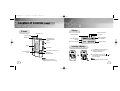
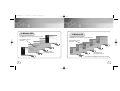
Location of Controls (yepp)
Display
Front
Repeat A-B indicator
Neck strap Hook
Equalizer Display
Earphone Jack
Microphone
Play/Stop/Pause/
Forward/Backward
Button
Title (track & artist)
indicator
Lock Display
Rock
Nor.
Get Original, Black Eyed Pea
Remaining Battery
Power indicator
Playtime indicator
Track Number indicator
Volume
Display
Hold Switch
USB Cable Connection Port
Voice Recording
Button
MENU/Loop
Repeating Button
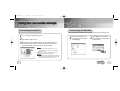
Inserting a Battery
1
After sliding the cover in the direction
of the arrow, open the cover by
pressing "PUSH OPEN".
a battery to the right poles ,
and
2 Insert
push-close the cover in the direction the
arrow as indicated.
Note :
●Please be sure to peel off the
protective tape from the LCD panel.
10
Note :
● Do not place heavy objects on the cover.
11