1
SHIELDeye SmartCam USER MANUAL
Package Contents
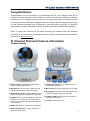
What’s in the Box
1 pc IP Shield
Security Camera
1 pc Software CD
1 pc Ethernet
Network Cable
1 pc 5V Power Cable
1 pc User Manual
1 pc Mounting
Bracket
1 pc Antenna
If any of the items are missing, please contact your vendor.
Before You Start
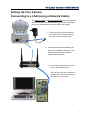
1. For Quick Installation via your smartphone,
You can follow the instruction on the colorbox to finish the Quick Installation with your
smartphone.
2. In order to install your Camera successfully on your desktop, please make sure you have the
following:
• An Internet connection
• A wireless router connected to your broadband modem
• A computer operating Windows® XP/Vista/7/8 with Internet Explorer® 6 or higher and ActiveX®
controls enabled
6