1
SHIELDeye SmartCam USER MANUAL
Setting Up Your Camera
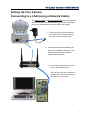
Connecting to a LAN (using a Network Cable)
The network cable and DC 5V power cable that are needed for
these instructions are included with your Camera. Please get
them from the package contents and have them ready.
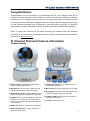
1. Connect the DC 5V power cable to
the Camera’s DC 5V port and plug
the cable to the electrical outlet.
2. Connect the Camera’s Network LAN
port to any available LAN port on your
wireless router. Use the supplied
network Ethernet cable.
3. Connect the computer to any LAN
port on the wireless router.
You can either use this computer to
configure the Camera or to access
the Camera, or to do both
7