1
Application Note:QCI-AN036
567 89:7 ; <=>?@AB > @; CDE A8F
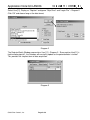
Select User[11], Display as “Register” and ignore “Strip Chart” and “Log to File” – Diagram 2.
Click ‘OK’ and choose long as the data format.
Diagram 2
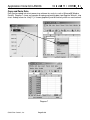
The Register Watch Window now contains User[11] – Diagram 3. Since register User[11] is
tied to analog input #1, the Data box will constantly update as the potentiometer is turned.
This provides the simplest form of data acquisition.
Diagram 3
QuickSilver Controls, Inc.
Page 2 of 8