1
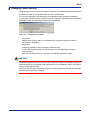
A4-4 Changing Folder Security Windows allow a user to set access rights on folders. The WideField2 software should be installed in a folder for which restricted users have access rights. You can also change the access right for an installation folder during the installation. If you specify a folder for which restricted users do not have access right as the installation destination folder, the following message will be displayed. A04_05.VSD Figure A4.1 Changing Access Rights - - - [Yes] button Adds access rights to folder for restricted users, and allows restricted users to continue with installation. [No] button Continues installation without changing folder security. In this case, restricted users will not be able to run the WideField2 software. [Cancel] button Returns to an earlier screen to specify the installation destination folder. CAUTION WideField2 frequently accesses system files in the folder where it is installed. Therefore, if restricted users are not granted update permission for the installation folder, they cannot use the WideField2 software. We do not warrant that the operating system or other applications will operate correctly if and after folder security is changed. IM 34M6Q15-11E 2nd Edition: Jun. 15, 2007-00