1
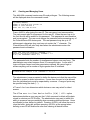
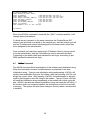
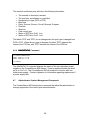
LOGGED OUT HELP SCREEN
LCI800>HELP
F1 - Display Help Screen
(VT100 mode)
F2 - Display Pull Down Menu (VT100 mode)
TTY COMMANDS:(LOGGED OUT MODE)
LOGIN
- Login with ID and Password
INFO
- Display System Info
REBOOT
- Perform a warm boot, requires root password
LCI800>
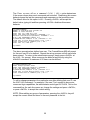
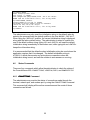
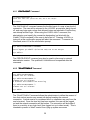
LOGGED IN HELP SCREEN
sys admin>HELP
ConsoleServer800 Sys Admin Command List
[] - optional <> - parameter must be specified
| - OR
ABBREVIATIONS
- Show list of command abbreviations
ADDUSER [new user id]
- Add a new user
BACKUP
- Backup internal database
(db will be output using ASCII)
CHANGEPSWD
- Change the sys admin password
CONNECTIONS [/MONITOR]
- Show list of current connections
(/monitor will auto-refresh)
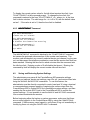
DELETEUSER [existing user id] - Delete a user
DEVICES
- Display device settings
DEVICES [/ALL|n|device name] (n can be 1 to 32) - change settings
EDITUSER [existing user id]
- Edit a user's settings
FORCELOGOUT <terminal channel>- Force a user off the system
FORCELOGOUT sysadmin
- Force logout a sys admin
session on network.
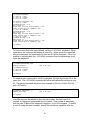
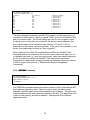
INFO
- Report miscellaneous information
LCIUPDATE [/tftp]
- Start system update process
(requires update file(s))
/tftp - used only at console port, when system updates are
transfered using the network.
LINESPERPAGE [n]
- Display/set number of lines before pause
(n can be 0 to 99, 0 disables)
LISTDEVICES
- Show list of device names
LISTUSERS [user id|/ALL]
- Display list of users
LOGOUT,LOGOFF
- Logout
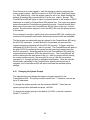
MODEM [/DEFAULT]
- Display/set modem init string
/DEFAULT - set init string to default
MODEMTIMEOUT [t]
- Display/set timeout for modem calls
(t can be 0 to 30 minutes, 0 disables)
NETWORK [/EDIT]
- Display/set network parameters
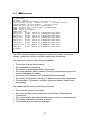
POWERSTATUS
- Show status of power supplies
REBOOT
- Perform a warm boot, requires root password
RESTORE
- Restore internal database
(upload ASCII file)
TELNETTIMEOUT [t]
- Display/set timeout for telnet sessions
(t can be 0 to 30 minutes, 0 disables)
tftp [get] host:file
- Modified tftp command, used to
transfer new updates to this box
TIMEOUT [t]
- Display/set timeout on sys admin login
(t can be 0 to 9 minutes, 0 disables)
VERSION
- Report software version information
sys admin>
A listing of abbreviations for the administrator commands is also available when
connected to the administrator port. The ABBREVIATIONS command is only
available when logged in.
17