1
Warning!
Lights operate on grounded 110Vac, 50/60Hz or 240Vac, 50/60Hz
AC Input. AC Supply Source must be sized properly and have
approved protection circuitry for safe operation. Take care to
observe all proper precautions when connecting power.
Warning!
Lights are intended for indoor operation and use only. Use in safe
and dry location only
•
•
Plug the male end of the AC power cord into an appropriate AC power source.
•
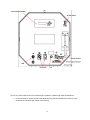
Turn on light by pressing the green power switch located in the upper right hand portion of the rear
bulkhead, as shown above.
•
Upon power up, the light will turn on immediately to its full brightness unless a specific “Power On”
Setting which has been previously programmed into the light. This “Power On” Setting will be
covered later in these instructions.
•
The Internal UIM (User Interface Module) is mounted on the bulkhead. The External UIM port is
located on the bottom of the bulkhead.
•
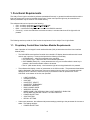
The display on the UIM will display the following Splash Screen message upon power up.
Aadyn Technology Remote Interface •
Using the Left/Right Arrow button, a desired brightness level can be selected. Other functions are
also available and can be viewed using the UIM by pressing the Up/Down arrow to the desired menu
function as detailed below in section 1.0, then pressing the (√) once a function has been selected.
All of these functions are covered later in these instructions.
•
The (X) button on the UIM is a non-latching douse switch which, when pressed, will momentarily
extinguish the light. Releasing the switch will allow the light to return to operation at its previous
setting.
AC Power Punch series lights operate on standard single phase AC power.
• Input voltage range: 100 – 277Vac
• Input frequency range: 50/60 Hz
7