1
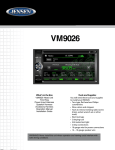
VM9026
CONTROLS AND INDICATORS
3
2
VM9026
1
11
10
VOL
9
8
7
6
5
4
1. MENU
Press to access the MAIN Menu.
2. Disc Slot
Insert CD or DVD for playback of music/video files.
3. EJECT
Press to eject a disc.
4. TFT SCREEN
5. AV INPUT COVER
Protect the USB Port and SD Interface Slot when not in use.
6. USB PORT
Connect a USB device for playback of music/video files.
7. SD INTERFACE SLOT
Insert an SD card for playback of music/video files.
8. A/V MEDIA ADAPTER CABLE PORT
Insert A/V Cable connector for playback of music/video files from an compatible external device.
9. SYSTEM RESET
Press to reset system settings back to factory default settings.
10. POWER ON/OFF and VOLUME UP/DOWN/MUTE BUTTON ( )
Press and hold to turn the unit ON and OFF. Rotate to adjust the output volume UP or DOWN. Press to activate the MUTE function and silence the audio output. Press again to restore sound.
11. MODE
Press to select system mode (Radio/Disc/Aux-F/Aux-R/SD/USB/Camera)
For Sales Information Please Contact RoadTrucker Inc (www.RoadTrucker.com)
8312 Sidbury Rd.; Wilmington, NC 28411 - (800) 507-0482 / (910) 686-4281
4