1
User Manual
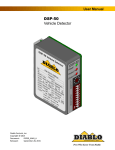
DSP-10
Vehicle Detector
Diablo Controls, Inc.
Copyright © 2014
Document:
DSP10_MAN_A
Released:
July 22, 2014
Pros Who Know Trust Diablo
1. Contents
Figures ....................................................................................................................................................................3
2.
Introduction ...........................................................................................................................................4
3.
Technical Data........................................................................................................................................5
Functional Data.......................................................................................................................................................5
Electrical Data.........................................................................................................................................................5
Environmental Data................................................................................................................................................6
Mechanical Data.....................................................................................................................................................6
4.
Features and Functions...........................................................................................................................7
Detector Reset........................................................................................................................................................7
Presence Detection.................................................................................................................................................7
Pulse Detection.......................................................................................................................................................7
Fail-Safe vs Fail-Secure ...........................................................................................................................................8
Sensitivity................................................................................................................................................................8
Frequency (DIP Switches 9 and 10) ........................................................................................................................8
Fail Memory (DIP Switch 8) ....................................................................................................................................9
Extended Presence (DIP Switch 7)..........................................................................................................................9
Output B Selection (DIP Switches 5 and 6).............................................................................................................9
Sensitivity Boost (DIP Switch 4) ............................................................................................................................11
Extension (DIP Switches 2 and 3) .........................................................................................................................12
Delay (DIP Switch 1)..............................................................................................................................................12
Indicators..............................................................................................................................................................12
5.
Installation ...........................................................................................................................................15
Detector Installation.............................................................................................................................................15
Loop Installation ...................................................................................................................................................16
6.
Configuration .......................................................................................................................................19
Wiring ...................................................................................................................................................................19
Internal Settings ...................................................................................................................................................19
7.
Troubleshooting ...................................................................................................................................20
No Power LED .......................................................................................................................................................20
Power LED Flashes On Once Every 2 Seconds ......................................................................................................20
Power LED Flashes Slowly (1 Hz) ..........................................................................................................................20
Power LED Flashes Quickly (5 Hz).........................................................................................................................21
Power LED Shows Two Quick Flashes Once Every Two Seconds..........................................................................21
Detect LED Intermittently Comes On / Stays On Without a Vehicle Present.......................................................22
Detect LED Will Not Come On With a Vehicle Present.........................................................................................23
DSP-10 User Manual
Page 2 of 23
DSP10_MAN_A
Figures
Figure 1: Physical Dimensions ....................................................................................................................................6
Figure 2: Outputs with No Delay or Extension ........................................................................................................ 10
Figure 3: Outputs with Delay................................................................................................................................... 10
Figure 4: Outputs with Extension ............................................................................................................................ 11
Figure 5: Outputs with Delay and Extension ........................................................................................................... 11
Figure 6: Power LED States...................................................................................................................................... 14
Figure 7: Detect LED States ..................................................................................................................................... 15
Figure 8: Loop Installation ....................................................................................................................................... 17
Figure 9: Saw Cut for Home Run Exit and Chiseled Corner for Home Run Exit....................................................... 18
Figure 10: Fail-Safe and Fail-Secure Internal Jumpers ............................................................................................ 19
DSP-10 User Manual
Page 3 of 23
DSP10_MAN_A
2. Introduction
The DSP-10 Detector is intended to be a top of the line single channel detector. Many features have been
included which are normally found only on more expensive models. The small package is powered by a highperformance 16-bit microcontroller that does not skimp on performance. The DSP-10 Detector was designed to
retrofit into existing locations that may require a detector upgrade. This allows maintenance personnel to carry
only one detector to meet most, if not all, of their vehicle detection needs.
The detector uses an 11-pin relay socket for connections.
DSP-10 User Manual
Page 4 of 23
DSP10_MAN_A
3. Technical Data
Functional Data
Sensitivity:
Ten sensitivities are user selectable.
Setting
0
1
2
3
4
Frequency Settings:
Sensitivity
.48% ΔL/L
.32% ΔL/L
.24% ΔL/L
.16% ΔL/L
.12% ΔL/L
Setting
5
6
7
8
9
Sensitivity
.08% ΔL/L
.06% ΔL/L
.04% ΔL/L
.03% ΔL/L
.02% ΔL/L
There are four frequency settings available. The actual loop frequency is
dependent on loop circuit inductance.
DIP Switch
9
10
OFF
OFF
OFF
ON
ON
OFF
ON
ON
Frequency
High
Medium High
Medium Low
Low
B Pulse Output:
250ms ±15ms.
Response Time:
Response time is dependent on the sensitivity selected.
Setting
0
1
2
3
4
Vehicle Hold Time:
Response Time
70ms ±10ms
70ms ±10ms
70ms ±10ms
70ms ±10ms
70ms ±10ms
Setting
5
6
7
8
9
Response Time
70ms ±10ms
140ms ±20ms
140ms ±20ms
140ms ±20ms
140ms ±20ms
In Normal Presence Mode: Approximately 1 hour for a detection of 1% ΔL/L.
In Extended Presence Mode: Approximately 19 hours for a detection of 1% ΔL/L.
Electrical Data
Loop Inductance:
20 microhenries to 1500 microhenries (including lead-in inductance). Not all
frequency settings are available at inductances below 30 microhenries.
Operating Voltages:
Three power versions:
10.5 volts to 30 volts AC or DC with over voltage protection
100 volts to 135 volts AC
200 volts to 270 volts AC
Output Relay Rating:
3 amps @ 125 volts
DSP-10 User Manual
Page 5 of 23
DSP10_MAN_A
Current Draw:
10.5 volts to 30 volts AC or DC
100 volts to 135 volts AC
200 volts to 270 volts AC
75 milliamps maximum.
7.5 milliamps maximum.
3.75 milliamps maximum.
Environmental Data
Operating Temperature:
-35°F to 165°F (-37°C to 74°C)
Storage Temperature:
-40°F to 176°F (-40°C to 80°C)
Humidity:
Up to 95% relative humidity non-condensing
Mechanical Data
Mounting Position:
Any
Housing Material:
Lexan
Housing Size:
2.36 inches (High) x 1.75 inches (Wide) x 4.06 inches (Deep)
59.94 mm (High) x 44.45 mm (Wide) x 103.12 mm (Deep)
Figure 1: Physical Dimensions
DSP-10 User Manual
Page 6 of 23
DSP10_MAN_A
4. Features and Functions
Detector Reset
When any of the 10-position DIP switches or the 10-position rotary switch is changed, the detector will perform
a detector wide reset. Both LEDs will turn off for 500 milliseconds at the start of the reset event, then on for 500
milliseconds, and then it will indicate if the internal setting is for Fail-Safe or Fail-Secure configuration of the
detector. For Fail-Safe the LEDs will be on for another 500 milliseconds then off for 500 milliseconds before
returning to their normal states. For Fail-Secure the LEDs will flash at 50 milliseconds on and 50 milliseconds off
rate for another 1000 milliseconds before returning to their normal states. The detector will not output any
detections during this two second reset period. If a prior loop fault is being displayed it will be cleared. If a
vehicle is over the loop during the reset period it will not be detected.
Presence Detection
The A output will always operate in the presence detection mode. The Delay and Extend features may modify
the output behavior. Once activated, the output will remain activated as long as a vehicle is detected over the
loop. After four minutes of continuous detection, the detector will begin to slowly retune the detector with the
goal of tuning out the vehicle that stalled or parked on the loop over a relatively long time. The retuning process
takes about an hour to complete in the Normal Presence mode and about 19 hours in the Extended Presence
mode with a vehicle detection of 1% ΔL/L. When the retuning process is complete, any loop area that vehicles
can still travel over will still detect the vehicle as expected. Once the vehicle leaves, the detector will recover
from the retuning process within 1 second.
The B output can be set to operate in the True Presence mode. In this mode the B output activates as soon as a
vehicle enters the loop and drops as soon as the loop is no longer occupied. The output will ignore any Delay or
Extend features that are currently active.
Pulse Detection
The B output can be configured for Pulse on Entry or Pulse on Exit operation. The pulse generated by the output
will be 250 milliseconds long. The B output will follow any Delay or Extend features that are currently active.
Pulse operation is not available on the A output.
In Pulse on Entry mode, the B output will pulse when the A output activates. If the delay feature is enabled, the
pulse will not occur until the delay has timed out and the loop is still occupied. The output will not pulse again
until the loop has been unoccupied and any enabled extension has timed out.
In Pulse on Exit mode, the B output will pulse when the A output deactivates. If one of the extension features is
enabled, the pulse will not occur until the extension has timed out and the loop is still vacant. The output will
not pulse again until the loop has been reoccupied and any enabled delay has timed out.
DSP-10 User Manual
Page 7 of 23
DSP10_MAN_A
Fail-Safe vs Fail-Secure
Here’s a little note on fail-safe versus fail-secure operation. On the DSP-10, the option for fail-safe or fail-secure
only applies to the A output. In general, a fail-safe detector will activate the output when the loop circuit is
failed. This is useful on a safety loop to prevent accidental closure of a gate arm on a vehicle. On the free exit
loop this will keep the gate open until the situation is fixed. Fail-safe is used in applications where it is important
to allow traffic flow to continue. A fail-secure detector will not activate the output when the loop circuit is
failed. This will keep the gate closed. This is useful in high-security areas or installations where containment is
needed.
The B output is always fail-secure when not in the fail output mode.
The DSP-10 is one of the few vehicle detectors that honors fail-safe and fail-secure even in the absence of
power. Inside the unit, on the main PC board, are three jumpers that set the failure mode. When placed in the
fail-safe position, the A output relay will be fail-safe in the absence of adequate voltage. If placed in the failsecure position, the reverse is true. The jumpers are factory set to be fail-safe. All three jumpers must be set to
the same setting. Not doing this will cause incorrect operation of the A output.
Sensitivity
The detector has ten user selectable sensitivity levels. In most situations the medium sensitivity 5 setting will
work effectively. For those situations where setting 5 is not sensitive enough, raise the sensitivity one level at a
time until the desired performance is obtained. For those situations where the detector is oversensitive, lower
the sensitivity one level at a time until the desired performance is obtained. The sensitivity is factory set to 5.
Like most inductive loop vehicle detectors, the DSP-10 directly measures the change in frequency of the loop
and from there, calculates the change in inductance when a vehicle interacts with it. The change in inductance
is measured as %ΔL/L (reads as “percent delta L over L”).
For the ten sensitivities, the thresholds are:
Setting
0
1
2
3
4
Sensitivity
.48% ΔL/L
.32% ΔL/L
.24% ΔL/L
.16% ΔL/L
.12% ΔL/L
Setting
5
6
7
8
9
Sensitivity
.08% ΔL/L
.06% ΔL/L
.04% ΔL/L
.03% ΔL/L
.02% ΔL/L
Frequency (DIP Switches 9 and 10)
Another important variable is loop frequency. When loops are installed sufficiently far apart, any two loops will
not interfere with each other. However, if two loops are fairly close together, say two to four feet apart, the
inductive fields may couple together and may interact causing intermittent false detections. The two main
variables for inductive coupling are distance and frequency separation. To aid in avoiding inductive coupling,
each DSP-10 unit comes with two frequency switches. They are binary coded allowing up to four different
DSP-10 User Manual
Page 8 of 23
DSP10_MAN_A
frequencies to operate within. If there are suspicions that one of the two loops are interacting, simply change
one of the two unit’s frequency settings.
DIP Switch
9
10
OFF
OFF
OFF
ON
ON
OFF
ON
ON
Frequency
High
Medium High
Medium Low
Low
Fail Memory (DIP Switch 8)
Normal operation is that during a loop failure, the green Power LED will indicate what type of loop failure (open,
short, or large ΔL/L). During the loop failure the red Detect LED and output A will be active for fail-safe
operation or inactive for fail-secure operation. If the loop recovers from its failure, the red and green LEDs,
along with its two relay outputs, will operate normally again. However, when Fail Memory is enabled, the green
LED will continue to indicate a previous failure by blinking 1850 milliseconds on, 50 milliseconds off, 50
milliseconds on again, and then 50 milliseconds off. This blinking sequence will repeat until a reset or power
cycle occurs. Note that the red LED and relay outputs will continue to work normally.
Extended Presence (DIP Switch 7)
Under normal conditions, the DSP-10 will hold a vehicle presence for a reasonable amount of time. If a vehicle
parks over the loop and the detector measures a 1% ΔL/L, it will slowly tune that vehicle out over a period of
about one hour. For those instances where a longer period is desired, extended presence will hold that same
vehicle for about 19 or 20 hours. This is quite a long time, but it isn’t infinite. The DSP-10 does not have infinite
presence.
Output B Selection (DIP Switches 5 and 6)
Output B can be programmed to operate in one of four different modes that are selected using DIP switches 5
and 6. The following table identifies these four modes:
DIP Switch
5
6
OFF
OFF
OFF
ON
ON
OFF
ON
ON
Output B Mode
of Operation
True Presence
Pulse on Entry
Pulse on Exit
Fail
True Presence: The B output will be energized whenever a vehicle is present over the loop detection area. The
A output can be modified by the delay and/or extension timing settings. The B output will not use these timing
settings. For example, if 2 seconds of delay is set, output B will energize as soon as the vehicle is detected, while
output A will wait for two seconds of continuous presence prior to energizing.
Pulse on Entry: Every time the loop is occupied, a single 250 milliseconds pulse will be output on the B output.
DSP-10 User Manual
Page 9 of 23
DSP10_MAN_A
Pulse on Exit: Every time the loop becomes vacant or a vehicle is tuned out, a single 250 milliseconds pulse will
be output on the B output.
Fail: If the DSP-10 recognizes some type of loop failure, a continuous output on the B output will be given. The B
output will remain activated until the failure is corrected.
The following figures show the effects of delay and extension on the A & B outputs. The numbers between
edges are the number of seconds in that period.
Figure 2: Outputs with No Delay or Extension
Figure 3: Outputs with Delay
DSP-10 User Manual
Page 10 of 23
DSP10_MAN_A
Figure 4: Outputs with Extension
Figure 5: Outputs with Delay and Extension
Sensitivity Boost (DIP Switch 4)
The detector has a user selectable feature that increases the sensitivity of a channel after initial detection. This
feature is most often used to allow a detector to have a lower starting sensitivity and then increase it after a
vehicle has been detected. This is useful in situations where high-bed tractor-trailer vehicles will be passing over
the loop. With this feature the detector may be able to detect the high-bed portion of the vehicle without
having to be overly sensitive and susceptible to false detections. NOTE: If detection of high-bed tractor-trailers
is required, correctly sized loops must be used.
DSP-10 User Manual
Page 11 of 23
DSP10_MAN_A
Extension (DIP Switches 2 and 3)
Extension is the time added after a vehicle leaves the detection area. During this interval, the A output will
remain activated, with the intent of allowing the vehicle to fully exit the detection area before the gate begins to
close. If another vehicle arrives during this extension interval, the remainder of the extension time is canceled
and the detector returns to the normal presence state. This interval is indicated by the red Detect LED blinking
fast at 50 milliseconds on followed by 50 milliseconds off repeated until the interval is complete. There are four
intervals to choose from: No extension, 2 seconds of extension, 5 seconds of extension, and 10 seconds of
extension. The choices are summarized in the table below.
DIP Switch
2
3
OFF
OFF
OFF
ON
ON
OFF
ON
ON
Output A
Extension Time
0 seconds
2 seconds
5 seconds
10 seconds
Delay (DIP Switch 1)
Delay is the time added after a vehicle arrives in the detection area but before the A output is activated. During
the delay interval the A output relay will remain de-activated, requiring that the vehicle stay in the detection
area for a full 2 seconds before activating the A output. This is useful at sites where vehicles traveling
perpendicular to the gate may travel across the detection zone. This interval is indicated by the red Detect LED
blinking slowly at 200 milliseconds on followed by 200 milliseconds off repeatedly until the interval is complete.
The delay interval is fixed at 2 seconds.
Indicators
The DSP-10 is equipped with two LED indicators: Power (Green) and Detect (Red).
Power LED – The green power LED indicates these possible states:
Off
The voltage applied to the detector is less than the minimum display
voltage of approximately 7.75 volts. The LED will be off.
Low Voltage
The voltage applied to the detector is less than the minimum voltage for
proper operation of approximately 10.25 volts. The LED will blink on for
50 milliseconds once every 2 seconds.
Reset in Fail-safe
At the start of a reset event (a DIP switch change, sensitivity change, or
power cycle) the LED will turn off for 500 milliseconds, on for 500
milliseconds, off for 500 milliseconds, off for 500 milliseconds, and then
display its normal state.
Reset in Fail-secure
At the start of a reset event (a DIP switch change, sensitivity change, or
power cycle) the LED will turn off for 500 milliseconds, on for 500
DSP-10 User Manual
Page 12 of 23
DSP10_MAN_A
milliseconds, blink repeatedly with 50 milliseconds on followed by 50
milliseconds off for one second, and then display its normal state.
Open Loop
When the detector senses that the loop is open or the inductance is too
high, the LED will turn on for 500 milliseconds then off for 500
milliseconds repeatedly, for the duration of the fault.
If the fault is corrected and the Fail Memory feature is enabled, the LED
will display the Prior Fault indication.
Shorted Loop
When the detector senses that a loop is shorted or the inductance is too
low, the LED will turn on for 100 milliseconds then off for 100
milliseconds repeatedly, for the duration of the fault.
If the fault is corrected and the Fail Memory feature is enabled, the LED
will display the Prior Fault indication.
Large Change Fault
When the detector senses that a loop is experiencing a large inductance
change (greater than 30%), the LED will turn off for 100 milliseconds
then on for 100 milliseconds for 500 milliseconds then stay on for 500
milliseconds and repeat the sequence for the duration of the fault.
If the fault is corrected and the Fail Memory feature is enabled, the LED
will display the Prior Fault indication.
Prior Fault
The detector is equipped with the ability to remember prior faults that
have occurred since the last power interruption or reset (changing a DIP
switch or the sensitivity). The LED will turn on for 1850 milliseconds, off
for 50 milliseconds, on for 50 milliseconds, off for 50 milliseconds and
then repeat the sequence until power is cycled or the detector reset.
Normal
The LED is always on when the detector is in its normal state of
operation.
DSP-10 User Manual
Page 13 of 23
DSP10_MAN_A
Figure 6: Power LED States
Detect LED – The red detect LED is used to display the status of the A output. There are several
different statuses that can be displayed on this LED:
Off
No vehicle present in the detection area.
Reset in Fail-safe
At the start of a reset event (a DIP switch change, sensitivity change, or
power cycle) the LED will turn off for 500 milliseconds, on for 500
milliseconds, off for 500 milliseconds, on for 500 milliseconds, and then
finally display its normal state.
Reset in Fail-secure
At the start of a reset event (a DIP switch change, sensitivity change, or
power cycle) the LED will turn off for 500 milliseconds, on for 500
milliseconds, blink repeatedly with 50 milliseconds on followed by 50
milliseconds off for one second, and then display its normal state.
Delay Interval
A vehicle has been detected but the A output is not activated due to the
2 second delay feature being active. The LED will turn on for 200
milliseconds and then off for two hundred milliseconds. If the vehicle
leaves the detection area before the two second delay interval expires,
the LED will return to the off state. If the vehicle is still present after 2
seconds, the LED will become solid and the A output will be activated.
DSP-10 User Manual
Page 14 of 23
DSP10_MAN_A
Extension Interval
A vehicle was detected but the detection zone is now empty and an
extension interval is being timed. The extension interval can be
programmed for no extension, 2 seconds, 5 seconds, or 10 seconds.
When the detection area becomes vacant, the extension timer will start
and the A output will continue to be activated. During this interval, the
LED will blink quickly at 50 milliseconds on and 50 milliseconds off. If
another vehicle enters the detection area during this interval, the
extension time is cancelled and the LED will return to the solid state.
Note: There is no delay interval for any newly arriving vehicle if a vehicle
is already in the detection area or the detector is in the extension
interval.
Figure 7: Detect LED States
5.
Installation
Detector Installation
Location: The detector should be installed in a weatherproof location that is near the loop. Ideally, a technician
should be able to see the loop and the detector at the same time.
Mounting: The detector will function when mounted in any orientation. If using a relay socket, it is best to
mount the detector such that the front panel will be easily accessible for configuration and troubleshooting. If
using a detector harness, be sure to leave enough of the wiring harness to allow the technician to easily work
with the detector.
DSP-10 User Manual
Page 15 of 23
DSP10_MAN_A
Wiring: The detector will come with a side label identifying how the detector is pinned out. Wire nuts can be
used for most connections to the wires in a detector wiring harness. However, wire nuts should never be used
at any point in the loop circuit itself. All loop connections should be crimped or screw terminals at a minimum
and soldered for best long term reliability.
Special attention should be paid to insure that the loop wires remain tightly twisted together. An air gap
between the two wires for a loop may cause the detector to lock up if the wires are disturbed.
Loop Installation
The reliability and overall performance of the detector are greatly dependent on the loop itself. Several factors
go into a good loop installation: type of wire used, loop configuration, and installation practices.
Type of Wire Used: The wire used for wiring the loop should have a jacket of cross-linked polyethylene. This
would be a wire with an XLP jacket such as XHHW. THHN or similar wire types should never be used for loop
wire.
The gauge of the wire to use depends on two factors: Distance in cable feet from the loop to the detector and
stresses the wire may see. The gauge of the wire can be 20 AWG as long as the detector is within 50 feet of the
loop in cable distance. For 50 to 100 feet, use at least 18 AWG wire. At greater than 100 feet, use a 16 AWG
wire at a minimum. If the loop is installed in asphalt and there will be heavy vehicles or stopping and starting
vehicles in the loop area, a 14 AWG or 12 AWG should be used to provide additional strength to the loop. This
helps increase the life of the loop in areas where the asphalt may slowly move and/or deform due to wear.
Loop Configuration: The size and shape of the loop will determine what type of vehicles it can reliably detect.
There are many variables that come into play including loop dimensions, percent of coverage, length of lead-in
wire, number of turns in the loop area, and detection height to name just a few of them. One common rule is
that the useable field height of a loop is of the shortest leg of the loop. So if you plan on using a 2.5’ x 6’ loop,
the expected useable detection height would be 20” (The shortest leg is 2.5’ or 30”, 30” x 2 = 60”, 60” / 3 = 20”).
If the installation requires the detection of motorcycles as well as vehicles, the loop should go to within one foot
of the curb or road way edge, whichever is present. If only motor vehicle detection is required, within three feet
of the curb or road way edge is all that is required.
The number of turns to use in a loop is dependent on the size of the loop, the amount of metal (rebar, cables,
etc.), and distance from the loop to the detector. Rather than dive into all of the calculations to arrive at a
value, we will just use safe values. You can almost never have too many turns in a loop, only too few. For a loop
size of 2’ x 6’, four turns will be sufficient unless there is metal in the loop area. In that case add at least one
turn, and two if possible. As the loop size reaches 6’ x 6’, four turns will work for most all installations. If you
are unsure about your particular installation, call tech support for guidance.
Installation Practices: Permanent loops should be installed into the road surface by cutting slots into the road
surface using a saw with an appropriate cutting disk for the road surface.
DSP-10 User Manual
Page 16 of 23
DSP10_MAN_A
The slot cut should be wide enough that the wire being used will easily fit into the slot. This is needed so that
the loop sealant used can fully encapsulate the wire. When the wire fits tightly in the slot, the sealant may not
be able to get below the wire, leaving air pockets in the saw slot. If water finds its way in to these air pockets,
over time, freeze thaw cycles can slowly jack the loop out of the saw slot causing loop failure.
The saw slot should be deep enough that the loop wire will have a minimum of ½” of sealant over the top wire
in the slot. More is better. Going too deep with the saw cut is also a concern. Deep cuts in a road surface may
impact the structural strength of the roadway, especially if any reinforcement material is cut. Using a smaller
gauge of wire will allow for shallower saw cuts.
Figure 8: Loop Installation
The corners of the loop should be crosscut at a 45° to help prevent damage to the wire insulation during
installation and temperature cycling. The angled cuts should be at least 9” back from where the corner would
be. The saw cuts should not go any further than necessary to insure that the saw slots are at full depth where
they meet.
Special consideration should be given to where the home run saw cut meets the loop saw cuts. Here either an
additional saw cut should be made as shown in Detail A or the inside of the sharp corner should be removed
with a chisel as shown in Detail B.
DSP-10 User Manual
Page 17 of 23
DSP10_MAN_A
Figure 9: Saw Cut for Home Run Exit and Chiseled Corner for Home Run Exit
Once the saw slot has been cut, the slot should be cleaned of all loose material. High pressure air should be
directed in to the saw slot to remove all debris. This will also help remove dust from the saw cutting operation
from the sides of the saw slot. This will allow better adhesion of the loop sealant to the saw slot.
The loop wire should be installed as a continuous piece of wire from the detector to the loop, all of the turns in
the loop, and back to the detector. Remember to make allowance for shrinkage in the wire length when the
portion of the wire not in the roadway surface is twisted. The twisting is important for dealing with electrical
noise. A splice of the loop wire should never be made in the roadway. If the loop wire needs to be spliced to
another cable to get to the detector, the splice should be done in a junction box and the connections should be
soldered and weatherproofed. Wire nuts should never be used at any point in the loop circuit.
In order to keep the loop wire at the bottom of the saw slot, 1” to 2” pieces of backer rod should be placed in
the saw slot every 1 to 2 feet. The backer rod should be sized such that it fits snugly in the saw slot. Use a blunt
object (not a screwdriver) to press the backer rod pieces down into the saw slot as far as they will go. Keeping
the loop wire at the bottom of the saw slot allows the loop sealant to provide the maximum amount of
protection possible from foreign object penetration. Never use a continuous piece of backer rod over the loop,
as this would prevent the loop sealant from encapsulating the loop wire.
The loop sealant used should be appropriate for the roadway surface that was cut. Generally, epoxy or
polyester based sealants are used for concrete surfaces and polyester or urethane based sealants are used for
asphalt surfaces. However these are not hard guidelines and specific circumstances will determine which type
of sealant should be used.
Once the loop wire leaves the saw slot it should be twisted at least three times per foot. More is better. The
twists should be kept tight to be most effective in reducing the effects of electrical interference.
DSP-10 User Manual
Page 18 of 23
DSP10_MAN_A
6.
Configuration
Wiring
The wiring for each loop circuit must be kept twisted to provide the most reliable operation. Wire nuts should
never be used for any connection in the loop circuit.
The last set of characters in the model number designate the operating voltage for the detector. There are
three possible types:
LV
117
230
10 to 30 volts, AC or DC (Low Voltage)
100 to 135 volts AC
200 to 270 volts AC
There is only one wiring configuration (pin-out) offered.
DSP-10-LV, DSP-10-117, and DSP-10-230:
Pin
1
2
3
4
5
6
7
8
9
10
11
Wire Color
Black
White
Orange
Green
Yellow
Blue
Gray
Brown
Red
Pink or White/Black
Violet or White/Red
Function
DC + or AC Line hot
DC Common or AC Neutral
B ( N.O. closes for detect)
Chassis Ground
Relay A common
Relay A (N.O. closes for detect)
Loop
Loop
Relay B common
Relay A (N.C. opens for detect)
Relay B (N.C. opens for detect)
Internal Settings
There is only one setting internal to the detector and it is the fail-safe or fail-secure setting. There are three
jumpers between the two relays. All three jumpers must be set the same way or unpredictable operation of the
A output will occur. The printed circuit board is clearly marked with fail-safe on one side and fail-secure on the
other. The detector is shipped from the factory in the fail-safe condition.
Figure 10: Fail-Safe and Fail-Secure Internal Jumpers
DSP-10 User Manual
Page 19 of 23
DSP10_MAN_A
7. Troubleshooting
No Power LED
The first step is to insure that the correct model of the detector is being used for the installation. Insure that the
wiring is correct and the correct voltage is being used.
Use a meter to measure the voltage applied to the detector. For the LV version the voltage must be above
10.25V AC or DC. For the 117 version the voltage must be above 100V AC. For the 230 version the voltage must
be above 200V AC.
If the correct voltage is applied and the power LED is not on, replace the detector.
Power LED Flashes On Once Every 2 Seconds
The first step is to insure that the correct model of the detector is being used for the installation. Insure that the
wiring is correct and the correct voltage is being used.
Use a meter to measure the voltage applied to the detector. For the LV version the voltage must be above
10.25V AC or DC. For the 117 version the voltage must be above 100V AC. For the 230 version the voltage must
be above 200V AC.
If the correct voltage is applied and the power LED is still flashing, replace the detector.
Power LED Flashes Slowly (1 Hz)
This flash rate indicates that the detector has an open loop, a high resistance in the loop circuit, or excessive
inductance.
The first step is to confirm that the detector has a loop connected to it and the loop is connected to the correct
pins (see the wiring configuration for the pin out).
If a loop is connected to the correct pins of the detector, disconnect the loop and using an ohmmeter, check the
resistance of the loop circuit. If the resistance is above 5 ohms there is a bad connection or the wire has been
damaged. The resistance will typically be 1.5 ohms or less.
If the resistance is below 5 ohms, the loop inductance should be checked. This is done using an inductance
meter. The inductance of the loop should be less than 1500 microhenries. It is very unusual to have a loop with
an inductance value this high, but it is possible with very large loops and many turns. If the loop inductance
value is above 1500 microhenries, the loop will have to be replaced with a loop with less inductance. Contact
technical support for help with very large loops.
If you do not have a meter capable of measuring resistance and inductance but do have another operating
detector in the same box, you can skip to this step. Swap the loops between a working detector and a failing
detector. If the problem follows the loop the loop is the problem. If it stays in the same detector, replace the
detector.
DSP-10 User Manual
Page 20 of 23
DSP10_MAN_A
Power LED Flashes Quickly (5 Hz)
This flash rate indicates that the channel has a shorted loop, a low resistance across the loop circuit, or
insufficient inductance.
The first step is to confirm that the loop is connected to the correct pins (see the wiring configuration for the pin
out). If the wiring is correct, the next step is to confirm that the detector is working correctly. Disconnect the
loop wires for the detector. The LED should begin flashing at a much slower rate (½ second on, ½ second off). If
it does not change its flashing rate, change the detector.
If a loop is connected to the correct pins of the detector, disconnect the loop and using an ohmmeter, check the
resistance of the loop circuit. If the resistance is below .2 ohms there is a short in the loop circuit. The
resistance will typically be 0.5 ohms to 1.5 ohms.
If the resistance is above .2 ohms, the loop inductance should be checked. This is done using an inductance
meter. The inductance of the loop should be more than 20 microhenries. If the loop inductance is less than 20
microhenries, the loop was probably not wound correctly and only has one turn in it. In this case the loop must
be replaced. Other possibilities include a foreign object embedded in the saw clot and shorting some or all of
the wires, or failed wire insulation due to the wire being exposed or the wrong type of wire being used. Very
small loops may also have a low inductance value if sufficient turns were not added. Contact technical support
for help with very small loops.
If you do not have a meter capable of measuring resistance and inductance but do have another operating
detector in the same box, you can skip to this step. Swap the loops between a working detector and a failing
detector. If the problem follows the loop the loop is the problem. If it stays in the same detector, replace the
detector.
Power LED Shows Two Quick Flashes Once Every Two Seconds
This flash rate indicates that the channel has had a failure of some type, but is currently working correctly.
Intermittent failures are usually open loop failures. Any splices in the loop wire should be redone. If there are
any wire nuts used in the loop circuit, remove them and replace with a crimp connection or preferably, a
soldered connection. The open loop fault could also be a fatigued point in the loop wire. This can occur at
locations where the loop wires cross an expansion joint in the road surface. Any place where the loop wires
must move, even if only a very tiny amount, can cause wire fatigue. The actual failure point may be very difficult
to find. Often the loop must just be replaced if the issue persists but cannot be found.
It is possible for the intermittent failure to be a shorted loop fault. One possible source of this type of fault is a
foreign object being embedded in the loop saw cut and damaging the wire. Another is that the loop wire has
been damaged where it enters or exits a conduit or junction box, or that a conduit that the loop wire is in has
been damaged (crushed, kinked, bent, cut, etc.).
DSP-10 User Manual
Page 21 of 23
DSP10_MAN_A
Detect LED Intermittently Comes On / Stays On Without a Vehicle Present
This type of symptom is usually caused by one of three issues: physical issues with the loop, electrical
interference, moving objects in proximity to the loop.
Physical Issues with the Loop – There are many ways in which a loop installation can go bad. The insulation of
the loop wire can fail. This can be due to the loop wire being exposed in the saw lot, damage to the wire
insulation during loop installation, physical stressing of the wire due to movement (crossing of expansion joints
or asphalt that has slowly moved or deformed), wires moving in the saw slot due to poor loop sealant
encapsulation, foreign objects embedded in the saw slot, and poor electrical connections in the loop circuit.
The best way to check for any of these issues is to use a megohmmeter (commonly referred to as a megger).
Disconnect the loop wires in question from the vehicle detector and any other electronic equipment. Connect
one lead of the megger to one end of the loop wire and the other lead to earth ground. Measure the resistance.
For accurate measurements the ground and the loop should be wet or at least damp (use a hose or a bucket of
water if needed to get the area wet). The reading should be at least 100 megohms. If it is less than 50 megohms
the insulation is compromised and the loop circuit has to be replaced. Between 50 and 100 megohms, the loop
may or may not work properly and reliably.
Electrical Interference – There are several possible sources of electrical interference: loop cross-talk, power
lines, electric motors, and insufficient twisting of the loop wires, just to name a few.
Other loops in the area that are connected to a different detector are prone to cross-talk (when the magnetic
fields from different loops interfere with each other). Adjusting the loop frequency of one or both of the loops
in the same area will usually allow you to find a setting that both loops will work reliably with.
Anything that uses electricity is a possible source for electrical interference depending on its proximity to the
loop and the amount of energy being used. If you believe the loop is experiencing electrical interference, turn
off the device believed to be the source of the interference and see if the problem goes away. Sometimes this is
not possible and more technical means are needed to help identify the source. Call Technical Support in this
case.
If the electrical interference is occurring in the wire from the loop to the detector, additional twisting should
help mitigate the issue.
Moving Objects in Proximity to the Loop – Objects that can move and are metallic or somehow electrically
conductive, may cause detection issues.
A common issue is movement of a slide gate or gate arm in close proximity to a loop. The best solution would
be to move the detection area further away from the moving gate. We recommend that all loops should be at
least 4 feet from a slide gate. Try lowering the sensitivity one level so that the desired vehicles are still detected,
but not the moving gate. NOTE: Do not lower the sensitivity too much or vehicles will no longer be detected.
Another possibility is metal objects in close proximity to the loop. Utility manhole covers are objects that may
move slightly when vehicle tires drive over them, especially if the vehicle turns while a tire in on the cover. Most
DSP-10 User Manual
Page 22 of 23
DSP10_MAN_A
manhole covers can be bolted in place. Contact the owner of the manhole to see what can be done to mitigate
the cover movement.
Detect LED Will Not Come On With a Vehicle Present
The first thing to do is verify that the LED in question is still working. This is accomplished by a quick lamp test.
Reset the detector by temporarily changing DIP switch 1. Both LEDs should turn off and turn on. If the Detect
LED does not illuminate, replace the detector.
If the red LED illuminates, then perhaps the sensitivity setting is too low. There are many variables in
determining overall sensitivity: loop size, number of turns, loop lead-in, percent coverage, etc. In most cases, a
sensitivity setting of 5 is the correct setting. However, to compensate for some unusual loop geometries, this
setting may be inadequate. Adjust the sensitivity one level higher and recheck the detector for proper
detection.
If the channel sensitivity is set to 9 and the red LED still does not come on and you have another operating
detector in the same box, swap the loops between a working detector and a failing detector. If the problem
follows the loop the loop is the problem. If it stays in the same detector, replace the detector.
DSP-10 User Manual
Page 23 of 23
DSP10_MAN_A