1
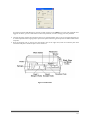
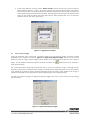
4. Select “Probe vs. Plate” from the menu. Insert a plate or strip tray into position when prompted. Click
the
button. The probe tip should be centered in well H01 and almost touching the bottom. Use
the arrows to move the probe into the correct position. Press “Test” to confirm. When finished, click
“Save” and then the “Close” button.
Figure 2.1-5 Adjust Probe Position for Plate
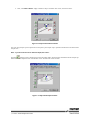
5. Select “Probe vs Wash Cup” from the menu. Press the
button. The probe will move to the center
wash position and lower into the cup. The probe tip should be centered in, and at the surface of, the
small, center wash cup. If it is not in position, use the arrow keys to move the probe into position.When
finished, click “Test” to check new alignment. If aligned, click “Save”, then “Close”.
Figure 2.1-6 Adjust Probe Position with Wash Cup
8/12