1
2.3
Run “Start of Day”
Check instrument fluid levels. Fill the Prime bottle with fresh deionized water.
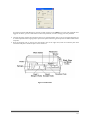
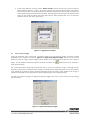
From the “Routines” menu, select “Start of Day (refer to Figure 2.3-1 Start of Day). This will completely prime the
sample handling system with the fresh deionized water. It also primes the washer (if applicable) with wash
solution and turns on the lamps. Observe the fluid handling system and ensure there are no leaks.
Figure 2.3-1 Start of Day
After running the “Start of Day” program, visually check the sample handling tubing and the syringes for the
presence of any bubbles. If bubbles are present, you should run the “Start of Day” program again, tapping the
tubing where the bubbles are present. If this does not eliminate the bubbles, run the “Weekly Alcohol Cleaning”
(see TroubleShooting Guide for details).
2.4
Channel Blanks
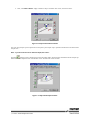
Select “Channel Blank” from the “Settings>Alignment” menu dialog.
This will allow you to blank the four photometer channels on a wetted optically-clear solution (example blanking
solution included, 0.5N NaOH with 100µL Triton X-100/L). The ELISYS UNO software will show you which wells it
will be using for channel blanks (preferably, use a new set of wells), and then prompt you to put ELISYS UNO
Blanking Solution in position 1 of Rack 1(never use plain water).
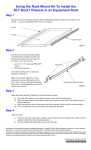
Figure 2.4-1 Load the wetted Blanking material into position
10/12