1
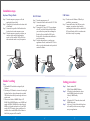
Installation steps
Keyboard Wedge Model:
RS-232 Model:
USB Model:
Step 1 Turn the computer system power off, and
unplug the keyboard cable.
Step 2 Connect the keyboard cable into the short-cable
of the Reader.
Step 3 Connect the long-cable of the Reader into the
keyboard socket on the computer system.
Step 4 Turn the computer system power on, then you
can hear a beep sound for confirming the
reader's self-test, and Red LED will be lit to
indicate that the reader is ready for operation.
Step 1 Turn the computer power off.
Step 2 Connect the Reader's cable to the RS-232 COM
port on the computer.
Step 3 Connect the DC-plug of 5V DC power adapter
to the DC jack on the cable-end of the Reader,
you can hear a beep sound for confirming the
Reader's self-test, and the Red LED on the
Reader will be lit to indicate that the Reader is
ready for operating.
Step 4 Turn the computer power on, and run your
application software, include one RS-232 drive
utility, to get the data from the serial port which
connects the Reader.
Step 1 To make sure the Windows USB utility is
available in your computer.
Step 2 Connect the Reader to the USB port on the
computer, you can hear a beep sound for
confirming the Reader's self-test, and the Red
LED on the Reader will be lit to indicate that
the Reader is ready for operating.
USB port
to PC Keyboard port
AC power
source
RS-232 port
Reader's setting
Setting procedure:
Note :
1. The bundled CD includes the setting utility for
Windows.
2. The setting of USB interface is same as the setting of
keyboard interface, please disconnect the extended
USB cable and use the keyboard wedge cable to set
up the reader.
3. There are two folders of MMSR Utility in CD
ROM:\Utility\MMSR\Windows, one is MMSR and
another is KBIDrv. MMSR folder is the utility and
KBIDrv is keyboard interface driver. If your MSR
reader is RS-232 interface, then you don't need to
install the driver inside KBIDrv folder. Otherwise
both Folder programs will be installed.
3
Step 1
Step 2
Step 2
Step 3
4
Run the attached CD
ROM:\Utilities\MMSR\Windows
If Reader is keyboard interface, please
install KBIDrv (Interface driver) and
follow by MMSR utility.
or
If Reader is RS-232 interface, then, install
MMSR utility only.
After step 2, please follow the dialog boxes
of the utility to do the necessary setting to
meet your applications.
5