1
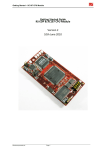
EDP-CM-LPCxxxx Getting Started V3.11 1. Introduction To get the most out of the EDP platform it’s important to understand the concept of the EDP system correctly. This is detailed in the user manual for the Base Boards which can be downloaded as a pdf file RS EDP-BB-SystemBaseBoard User Manual Vx, from the RS EDP website. The base boards come in both 2 position and 4 position formats and share a common user manual. Please read this manual to get an understanding of the system. Each of the Command Modules (CM) and Application Modules (AM) has its own user manual, so again these documents must be read to get an understanding on how to use the modules. Each of the boards comes with its own suite of software to fully exercise the EDP Application Modules and the peripherals available on the MCU device. An EDP system usually consists of one Command Module and one or more Applications Modules plugged into a Base Board. A minimum system just has a Command module and Base Board, for example a simple web server operating through an Ethernet connection. The Command Module dictates whether the whole system uses a supply voltage of +3.3V or +5.0V. This particular CM module use a +3.3V microcontroller (MCU) and so the board is configured as such. The user can check the Vcc_CM signal on the Base Board break-out header to confirm the system voltage. There are 100 pins on the MCU and these are connected via various link options to the Base Board. The Base Board then routes these signals to the Application Modules thereby allowing the CM Module to communicate with the Application Modules. As many of the MCU pins have more than one function it can make the mapping of the connections rather complex so there are additional support documents available to help you with this. The first is the Pin Allocation Spread Sheet. One spread sheet is available for each of the CM Modules. The one for the NXP family of ARM-based modules is called: Pin Allocation - 100 pin NXP Command Module Rev xx This spreadsheet also forms part of the User Manual for the LPCxxxx CM module. It details which pins are mapped to the Base Board backplane and the various link options which need to be configured to connect them accordingly. To get an appreciation of how the Application Modules are mapped to the backplane and how the CPU Module can connect to them, a Mapping Aid exists. The one for the LPC1768 module is called: Mapping Aid RS-EDP NXP LPC1768 Rev xx (Name may vary slightly for other NXP modules) This mapping aid also forms part of the User Manual for the LPC Module and at a glance you can see what resources are required to get the best out of each Application Module. Other useful documents you will need are the circuit diagrams for the modules you wish to use. These are contained in the back of each user manual. So before you start to use the RS EDP system make sure you have to hand the following documents: Base Board User Manual Appropriate CM module User Manual Application Module User Manuals (as required) Electrocomponents plc Page 3