1
matchIT v5 User Interface
While all of matchIT’s processes can be accessed from the menu bar,
the most common selections have been integrated into matchIT’s User
Interface. Following is a description of each icon.
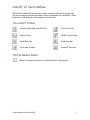
The matchIT Toolbar
Open an Existing matchIT File
View Text File
Import Data
ODBC Connection
Find Matches
Find Overlap
Generate Output
matchIT Options
The File Selector Button
There is frequent reference to this button in this guide.
Getting started with matchIT
3