1
D4.2.1 Information and Data Lifecycle Management: Software prototype (Initial)
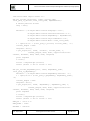
USER_NAME = 'swift'
PASSWORD = 'password'
os_options = {'tenant_name': ACCOUNT}
url, token = c.get_auth("http://" + AUTH_IP + ":" + AUTH_PORT +
"/v2.0", ACCOUNT +":"+USER_NAME, PASSWORD, os_options = os_options,
auth_version="2.0")
put_storlet_object(url, token,'storlettranscoder10.jar','/tmp' ,'com.ibm.storlet.transcoder.TranscoderStorlet',
'commons-logging-1.1.3.jar,fontbox-1.8.4.jar,jempbox-1.8.4.jar,pdfboxapp-1.8.4.jar')
put_storlet_dependency(url, token,'commons-logging-1.1.3.jar','/tmp')
put_storlet_dependency(url, token,'fontbox-1.8.4.jar','/tmp')
put_storlet_dependency(url, token,'jempbox-1.8.4.jar','/tmp')
put_storlet_dependency(url, token,'pdfbox-app-1.8.4.jar','/tmp')
How to Execute a Storlet
Once the storlet and its dependencies are deployed the storlet is ready for execution, and can
be invoked. Invocation via PUT and GET involves adding an extra header to the Swift original
PUT/GET requests. Below we invoke the TranscoderStorlet in both PUT and GET. Let us assume
that we have uploaded a pdf document called example.pdf to a container called my_container
as appearing in the following Swift URL (again, using the pre-configured account)
http://sde.softlayer.com/AUTH_2dc1440a41e94fc696bced36c6e3c249/my_container/example.
pdf
Here is how we can invoke the storlet using Curl, where auth_header is the X-Auth-Header
used with Swift.
curl -i -X GET
http://sde.softlayer.com/v1/AUTH_2dc1440a41e94fc696bced36c6e3c249/my_c
ontainer/example.pdf -H$auth_header
-H'X-Run-Storlet:storlettranscoder-10.jar'
Note the extra header 'X-Run-Storlet' specifying the name of the storelt to execute. When this
header is specified, the storlet engine wsgi middleware intercepts the request, activates the
storlet and returns the computation result as a repsonse.
To invoke a storlet whose logs will be available as an object, use the below. Note that a
container named 'storletlog' needs to be created under the account prior to this.
curl -i -X GET
http://sde.softlayer.com/v1/AUTH_2dc1440a41e94fc696bced36c6e3c249/my_c
ontainer/example.pdf -H$auth_header
-H'X-Run-Storlet:storlettranscoder-10.jar' -H'X-Storlet-GenerateLog:True'
Once executed with the generate log header set to true, one can download the resulting object
as follows. Note that object name is derived from the storlet name (truncating the version
number suffix and adding a .log suffix):
Date: 19/07/2014
Grant Agreement number: 609043
Page 27 of 31