1
Chapter
4 Restrictions
The following explains restrictions related to use of the PD-Adapter.
4.1
Setup Restrictions
• When a project name contains characters other than alphanumeric characters
and the underscore (_), PD-Adapter cannot select the project. The project name
is used as the registered node in Pro-Server, and characters are restricted by
Pro-Server. When characters other than those mentioned above have been used
in the project name, click on Pro-Designer editor's File menu, and select Name
Project and Save to change the project name. Next, do a build and create the
PD-Adapter communication setup file (*.pda).
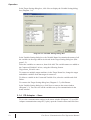
• When variables are registered in PD-Adapter’s Variable Setting dialog box
(Diagram 7–6), the number of characters in the target and variable names,
combined, cannot exceed 30 characters. Pro-Server symbols support up to 31
characters. Symbol names for Pro-Server are generated by PD-Adapter using the
following format:
TargetName_VariableName
If the combined target and variable name is too long, it may not be added. If
you cannot add the name, shorten either the target or variable name in ProDesigner and try again.
• When PD-Adapter communication is run, each target must be set up with DataSharing in Pro-Designer.
• PD-Adapter can connect only targets in the same project, and can connect a
maximum of 16 targets at the same time.
• The maximum number of variables that can be connected with PD-Adapter in
all targets is 400. However, the transferring of variable values is limited by the
number of variables that can be shared using the Data-Sharing protocol.
For details, refer to the Data-Sharing API User Manual.
• You cannot start up multiple instances of the PD-Adapter application.
4.2
Communication Restrictions
• When starting communication in PD-Adapter, connected Pro-Designer
Runtime applications must be running. Pro-Designer Runtime should be started
before PD-Adapter communication starts.
20
Pro-Server Communication Tool Operation Manual