1
The scanning plan to be used should be based on the users’
requirements.
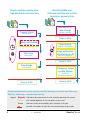
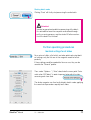
Operating process in two steps:
+
Use SilverFast Ai to generate 48 bit raw data scans
in batch mode, with no
image corrections.
Saved raw data scans.
In SilverFat HDR, download raw scans into the
JobManager, optimise
individually and then allow
the full job to be completed
automatically.
Saved, individually optimised scans.
SilverFast® Manual
For the optimal combination of minimum personnel time and
maximum image quality, the two-step process ( + ) is considered the “silver bullet”. The purpose and the main advantage of
this process are considerable savings in personnel time due to
separating the operating processes “scanning” and “image optimisation”. The reason: the scanning itself takes a long time due to the
hardware used, coupled with much “idle time” for the user in front
of the apparatus.
With the two-step process, the slides can be scanned as “raw”data, fully automatically, magazine after magazine. The user has
only occasionally to change the magazine or keep supplies coming.
The resulting 48 bit raw data are loaded on to a sufficiently large
hard disk, server, etc.
Optimisation of the images takes place during the second process. Here, a SilverFast HDR (or a SilverFast DC Pro) version comes
into action. Only now must the user spend more time in front of the
computer, but now with no “idle time”! With the SilverFast HDR, he
can access the raw data directly and optimise image after image.
And no waiting!
Even this process of image optimisation can be made to take less
time with the integrated JobManager in SilverFast HDR. However,
anyone working with large image files on an older and thus slower
computer could still be faced with waiting times when “rendering” applying optimisation parameters to individual image files. With the
JobManager, the finalised “right” and ready to use scans might be
delayed. The parameters for image optimisation are not calculated
straight away into the image files in the JobManager, but instead
are processed as a temporary “to-do list” as a sort of “package
insert”. Only when the required number of images has been optimised, can the computing process start. Depending on the computer, this could take a while and might for example run overnight.
The user can leave the computer and carry on with other things.
1 • Introduction
7