1
Understanding Digital Toning
The final image inherits only the 256 tones per color that are
displayed on the screen. Through autoranging and toning,
you can select and modify the range of tones.
Understanding autoranging
Autoranging is a mathematical process that selects a range of
256 tones from the 65,536 capture values. The 256 values are
the tones you see on the monitor. Autoranging works by:
1. determining the lightest and darkest capture values in an
area of the image
2. making the lightest value white and the darkest value
black
3. graduating all the values in-between white and black
When you capture a prescanned image, the autorange process
automatically occurs on the capture values. The lightest and
darkest points are automatically selected from within the
blue autorange box. The size and position of the box are
initially a default. If you do not like the tonal qualities that
result from the autorange, you can move the box or use other
methods to select a black and white point. (Please see
Chapter 6.)
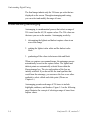
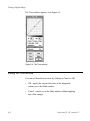
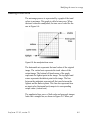
Autoranging permits each range of 256 tones to include
highlights, midtones, and shadows. Figure 5-1 on the following
page illustrates the concept of selecting a range of tones from
capture values.
5-4
Leaf scan 35 / 45, version 2.1