1
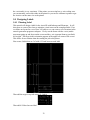
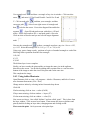
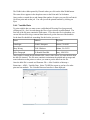
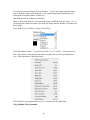
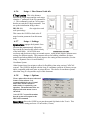
carriage. With the Jog/Slew box checked so that Jog/Slew = Jog, the arrow buttons will
jog the AXXIS that fixed distance each time the button is clicked.
The setting in the Jog Distance Window also sets the jog distance for the Front Panel
Joystick buttons.
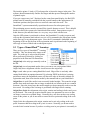
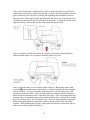
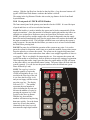
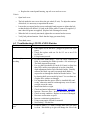
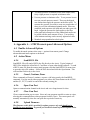
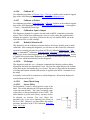
5.8.8 Front panel of i-TECH AXXIS Finisher
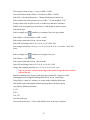
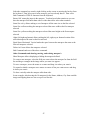
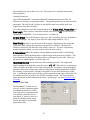
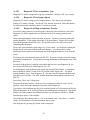
The front control panel is the primary user interface for the AXXIS. It is used for input
of speed and force as well as several other functions.
LOAD The load key is used to initialize the system and to load or automatically fill the
supply accumulator. Once the material is fed thru the media path and the nip rollers are
engaged (see section Error: Reference source not found Error: Reference source not
found), press the load key and the supply roller will start feeding media into the supply
dancer bar and will automatically stop once the supply dancer bar reaches the bottom and
the input accumulator is full. The load light will then come on to indicate the system is
ready to operate. Be sure that the label frame you want to cut is at least 2 inches behind
the llade before pressing load.
PAUSE The pause key will halt the operation of the system at any point. It is used to
pause the system for inspection, media jams or to pause the machine for any other reason.
Press the pause key to resume the system. The system can be jogged while paused and
will remember where it was and resume from where it was stopped regardless of where it
was jogged. This is very helpful for inspecting the cut. You can pause the system and
joystick the media or cut head away from its position to inspect the cutting or registration.
After inspecting the media, simply press the pause key again and the AXXIS will return
to the point where it was paused and resume cutting. The pause light will flash while the
system is paused. You can also use the pause button to enter the unload state (press
Pause followed by Load).
COPY The copy key is used to
input the quantity of copies the
AXXIS will digitally die cut. It is
used after the first copy of the job
is cut. Once the first copy is cut
and you are happy with the results,
press the copy key. The display
will read 0001. The number
represents the total number of
copies including the first one run.
Increase the number of copies by
pressing the up arrow key of the
joystick or the force up button.
Hold the key down and the
numbers will start moving slowing
then more quickly. Press the down
arrow key to lower the number.
Alternatively the force keys will
increment the single digits and the
L
P
LO A D
PAU S E
S
P
E
E
D
C
F
O
R
C
E
CO PY
TC
TEST
CU T
F1
SELECT
59
F3