1
MED ASSOCIATES INC.
S O F - 7 0 0 R A - 1 6 C O NT E X T U A L C O N D I T I O NI NG
Using the MED-PC IV Load Wizar d
MED-PC IV is designed to help the researcher run an experiment by guiding selection choices
through its Experiment Loading Wizard. This section will describe how to initiate the Bar Press
Shape.mpc application, however the following steps that will also apply to all other .mpc
procedures.
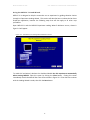
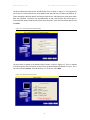
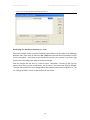
Open MED-PC IV and the MED-PC Experiment Loading Wizard’s Welcome screen, shown in
Figure 2.2 will appear.
Figure 2.2 - The MED-PC IV Loading Wizard Welcome Screen
To avoid this load wizard, deselect the checkbox labeled Run this experiment automatically
when starting MED-PC. Close this screen by clicking the Close button. Closing this screen
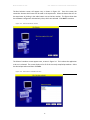
immediately reveals the MED-PC Run-Time Screen shown in Figure 2.9. If the choice to continue
with the Loading Wizard is made, then click the Next button.
-5-