1
Basic Operations
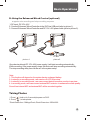
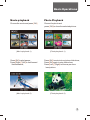
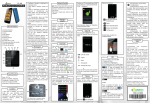
Movie playback
Photo Playback
Choose the movie and press [OK]
Choose the photo and
press [OK] to show the selected picture.
(Movie playback-1)
Press [OK] to play/pause;
Press [Right] / [Left] to fast forward
/ fast backward;
(Movie playback-2)
(Photo playback-1)
Press [ OK] to enter into a picture slide show;
Press [OK] again to stop slide show;
Press [Left] / [Right] to choose previous
/next picture.
(Photo playback-2)
7