1
Basic Operations
Basic Operations
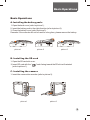
A. Installing the battery pack:
1: Open the back cover (refer to picture 1).
2: Insert the battery pack in the right direction (refer to picture 2).
3: Close the battery cover (refer to picture 3).
Remarks: If the recorder will not be used for a long time, please remove the battery.
!
M ic
M ic
M ic
picture 1
picture 2
picture 3
B. Installing the SD card
1: Open the SD card slot cover.
2: Insert SD card with the “
(refer to picture 1).
”mark facing toward the SD slot as illustrated
C. Installing the camera
1: Insert the camera into recorder (refer to picture 2).
CAM in
Mic in
AV OUT
DIGITAL
HDCAM in
HD
CAM
picture 1
picture 2
3