1
2.
The User Interface
There are several methods you can use to operate the system. Apart from the keypad on
the front panel, your system may include a number of peripheral devices such as
keypads and keyfobs.
This chapter provides a brief introduction to each of the devices you can use to operate
the system. It is important that you familiarize yourself with these devices before
reading the following chapters that shall describe system operation in further detail.
The front panel is the main user interface that provides you with all the functions you
Control System is available with the
need to control your security system. iConnect
LCD front panel configuration.
2.1.
Front Panel
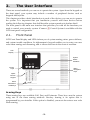
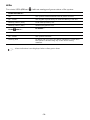
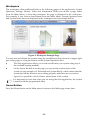
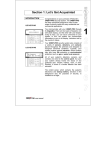
LCD Front Panel display and LEDs inform you of system arming status, power failures,
and system trouble conditions. Its alphanumeric keypad enables you to enter your user
code when arming and disarming, and to silence the siren in the event of an alarm.
LCD
Display
System
Status
indicators
Arming
Keys
Menu
Navigation
Keys
Alphanumeric
Keypad
Home
Automation/
PGM Keys
Arming Keys
Three arming keys are available: Full, Part, and Perimeter. These keys arm the system
using one of the three arming methods. One-key Arming is an option that is
programmed by your installer. If this option is disabled, you must also enter a user code
when arming.
-10-